EasyManua.ls Logo

JVC L-AX1 - Cartridge Mounting

JVC L-AX1
18 pages
Print Icon
To Next Page IconTo Next Page
To Previous Page IconTo Previous Page
Loading...
L-AX1/L-AX1B
|
5.
During
the
return
operation
the
engagement
and
lower
trip
which
have
moved
are
returned
to
their
original
posi-
tion
by
the
reject
button
coming
into
contact
with
the
bottom
of
the
lower
trip.
At
this
moment
the
switch
lever
operates
with
the
help
of
the
main
gear
cam,
swit-
ching
off
the
power
just
before
the
rotation
should
stop.
This
completes
the
automatic
cycle.
Return
Lever
2-(2)
Tonearm
Lift
and
Return
Mechanism
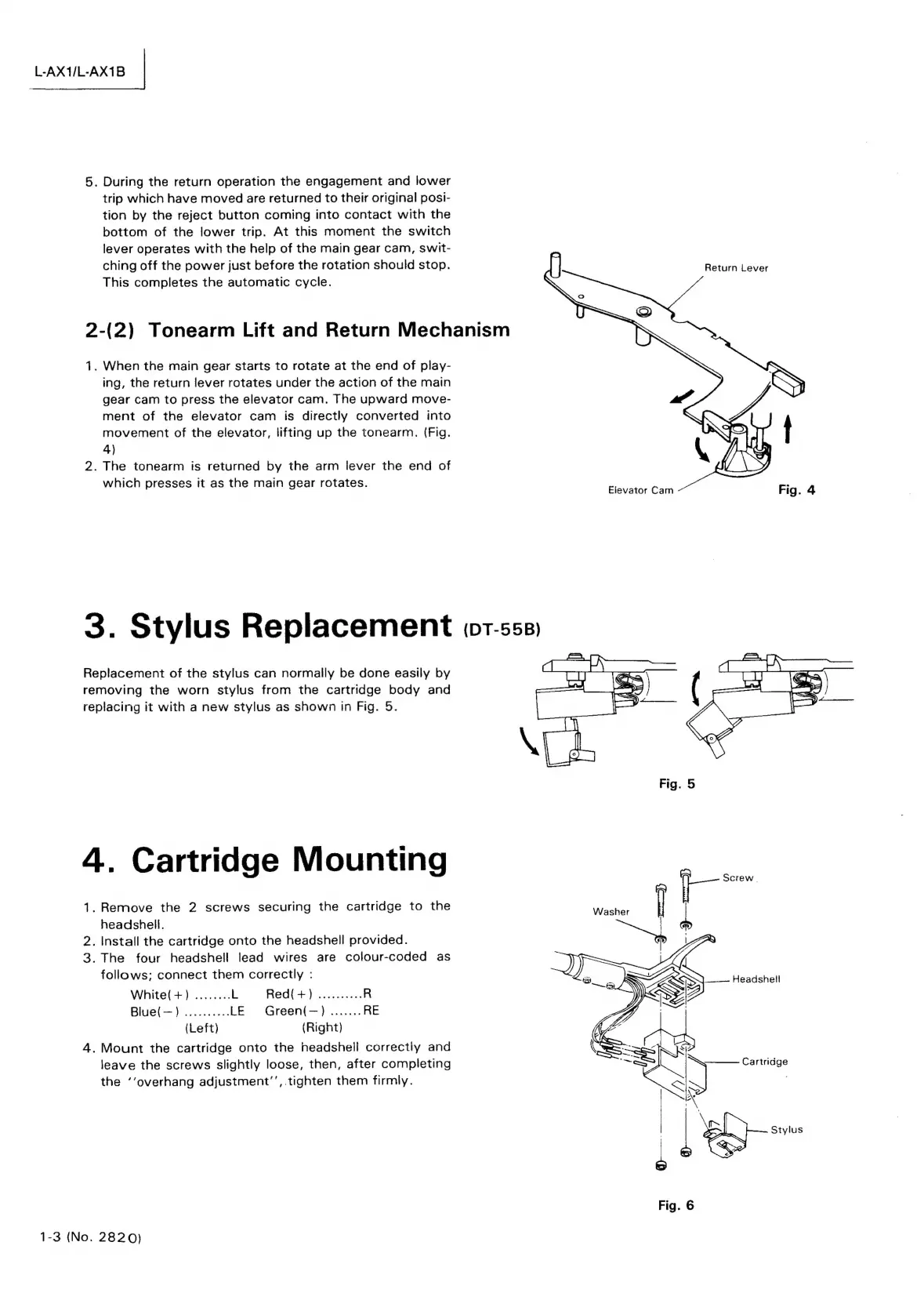
1.
When
the
main
gear
starts
to
rotate
at
the
end
of
play-
ing,
the
return
lever
rotates
under
the
action
of
the
main
gear
cam
to
press
the
elevator
cam.
The
upward
move-
ment
of
the
elevator
cam
is
directly
converted
into
movement
of
the
elevator,
lifting
up
the
tonearm.
(Fig.
4)
2.
The
tonearm
is
returned
by
the
arm
lever
the
end
of
which
presses
it
as
the
main
gear
rotates.
Eievator
Cam
3.
Stylus
Replacement
(0r-s55.)
Replacement
of
the
stylus
can
normally
be
done
easily
by
removing
the
worn
stylus
from
the
cartridge
body
and
replacing
it
with
a
new
stylus
as
shown
in
Fig.
5.
4.
Cartridge
Mounting
1.
Remove
the
2
screws
securing
the
cartridge
to
the
headshell.
2.
Install
the
cartridge
onto
the
headshell
provided.
3.
The
four
headshell
lead
wires
are
colour-coded
as
follows;
connect
them
correctly
:
White(+)
........
L
Red(+)
..........
R
Blue(—)
..........
LE
Green(—)
.......
RE
(Left)
(Right)
4.
Mount
the
cartridge
onto
the
headsheil
correctly
and
leave
the
screws
slightly
loose,
then,
after
completing
the
‘‘overhang
adjustment’’,.tighten
them
firmly.
___--
Headshell
Cartridge
ep
Stylus
Fig.
6
1-3
(No.
2820)

Related product manuals