ENGLISH
IMPORTANT! PREPARE USE SETTINGS TROUBLE?
6
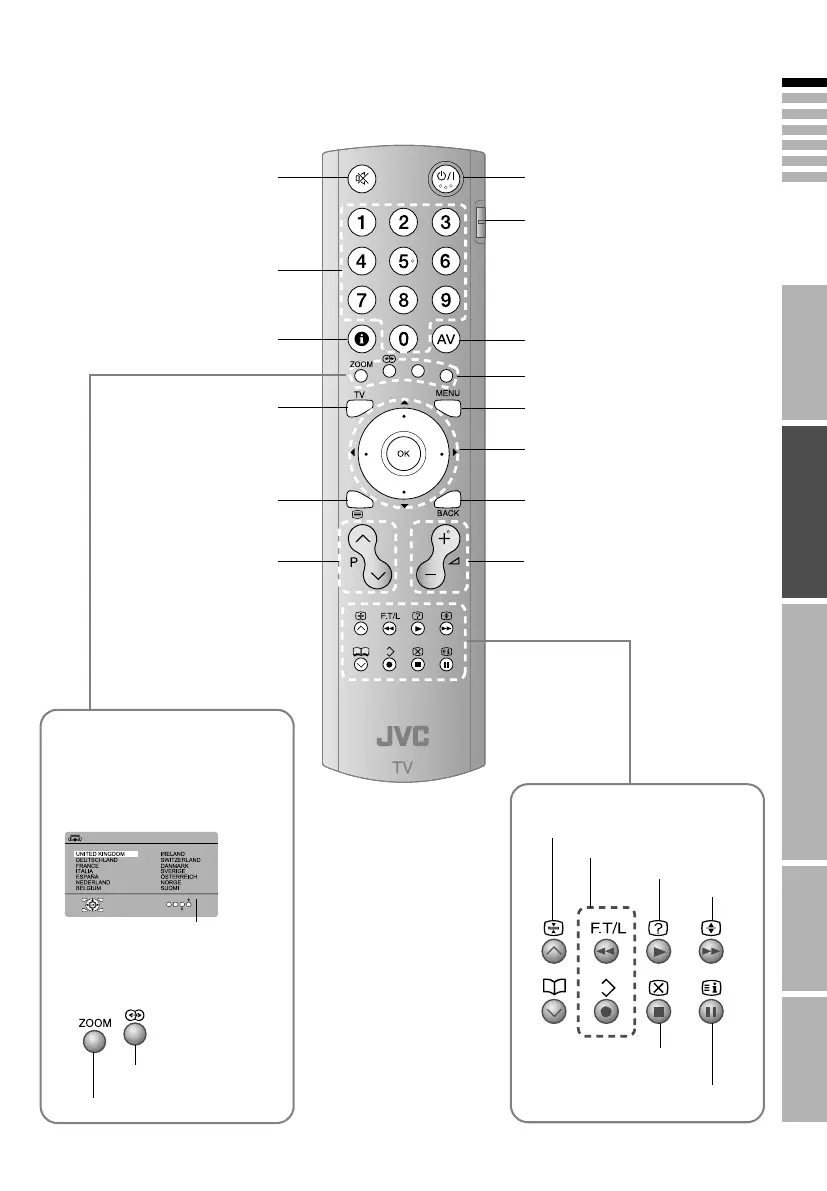
Power On / Off
Switch between AVCR / TV /
DVDB (P. 21)
Change channel / page
Watch video, etc. (P. 21)
Select and confirm settings in
menus
To the previous screen (P. 25)
Change channel / page
Mute
Channel information
(P. 17)
Return to TV
To teletext (P. 19)
Volume
When viewing teletext (P. 19)
Hold the current page
Bookmark pages
Reveal hidden pages
Enlarge the
text
Switch briefly between
teletext and TV
To index page
Colour buttons
The coloured buttons can perform
different functions according to the
situation.
When viewing teletext (P. 19)
Follow on-screen instructions.
Other uses
When watching TV / Video
>COUNTRY
START
MORE
Follow instructions in
on-screen guides.
Change the aspect ratio (P. 17)
Turn on A3D SOUNDB (P. 17)
Display on-screen menu (P. 25)
LT-A70.book Page 6 Thursday, November 16, 2006 11:44 AM



 To Next Page