EasyManua.ls Logo

JVC LT-32A70BU - Just the Way You Like It; Customising Your TV

JVC LT-32A70BU
40 pages
To Next Page IconTo Next Page
To Previous Page IconTo Previous Page
Loading...
25
.
A
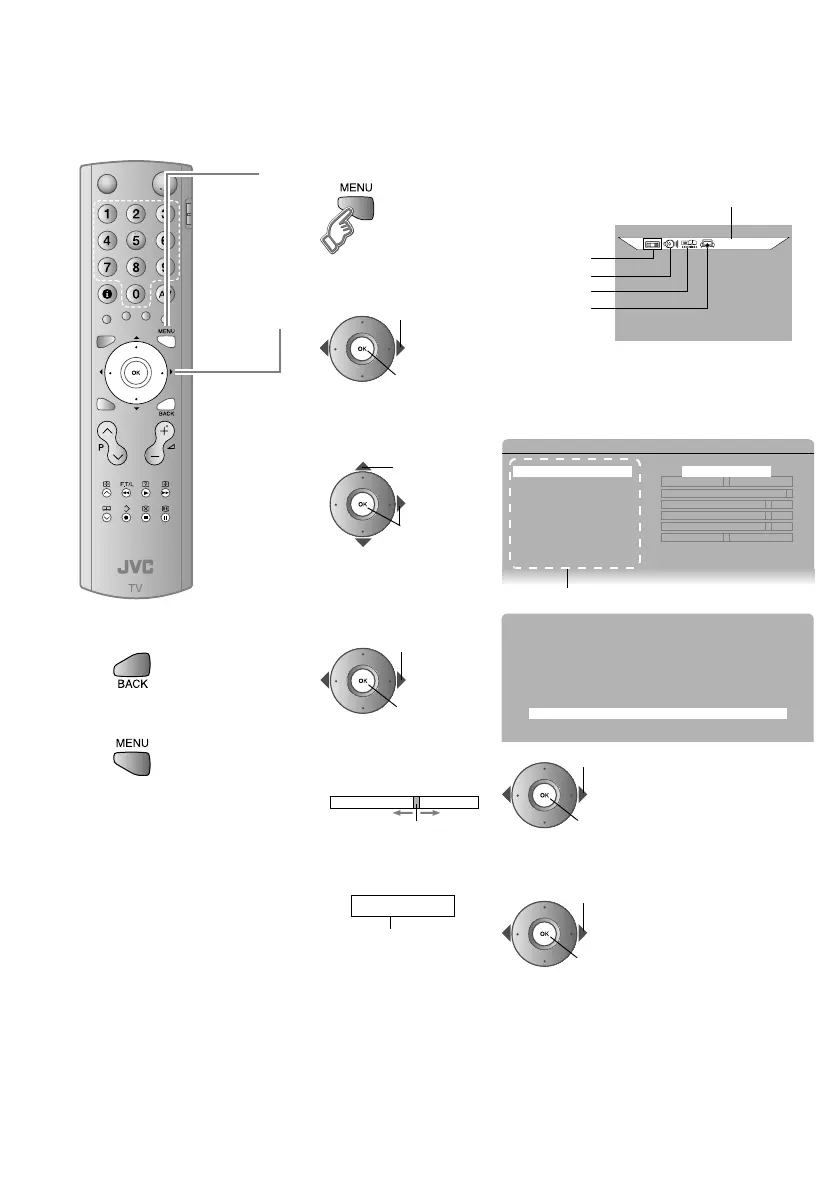
Display the menu bar
PICTURE
PICTURE
FEATURES
SET UP
SOUND
B
Select a menu
C
Select an item
B PICTURE
PICTURE MODE 2 STANDARD 3
BRIGHT-1
CONTRAST
BRIGHT-2
SHARP
COLOUR
HUE
COLOUR TEMP. COOL
FEATURES 3
Items
To the previous
screen
¨
Exit
¨
The menu
disappears after one
minute of inactivity.
D
Adjust / configure
PICTURE MODE STANDARD
When adjusting with
the sliding-bar
When selecting from
presets
2 STANDARD 3
The item will change.
Some items have a sub-
menu.
A select
B next
A select
B next
OK or 3
A adjust /
select
B set
Move
A adjust
B set
A select
B set
Just the way you like it
Customising your TV
Selected menu’s title
LT-A70.book Page 25 Thursday, November 16, 2006 11:44 AM

Other manuals for JVC LT-32A70BU

Related product manuals