17
.
A
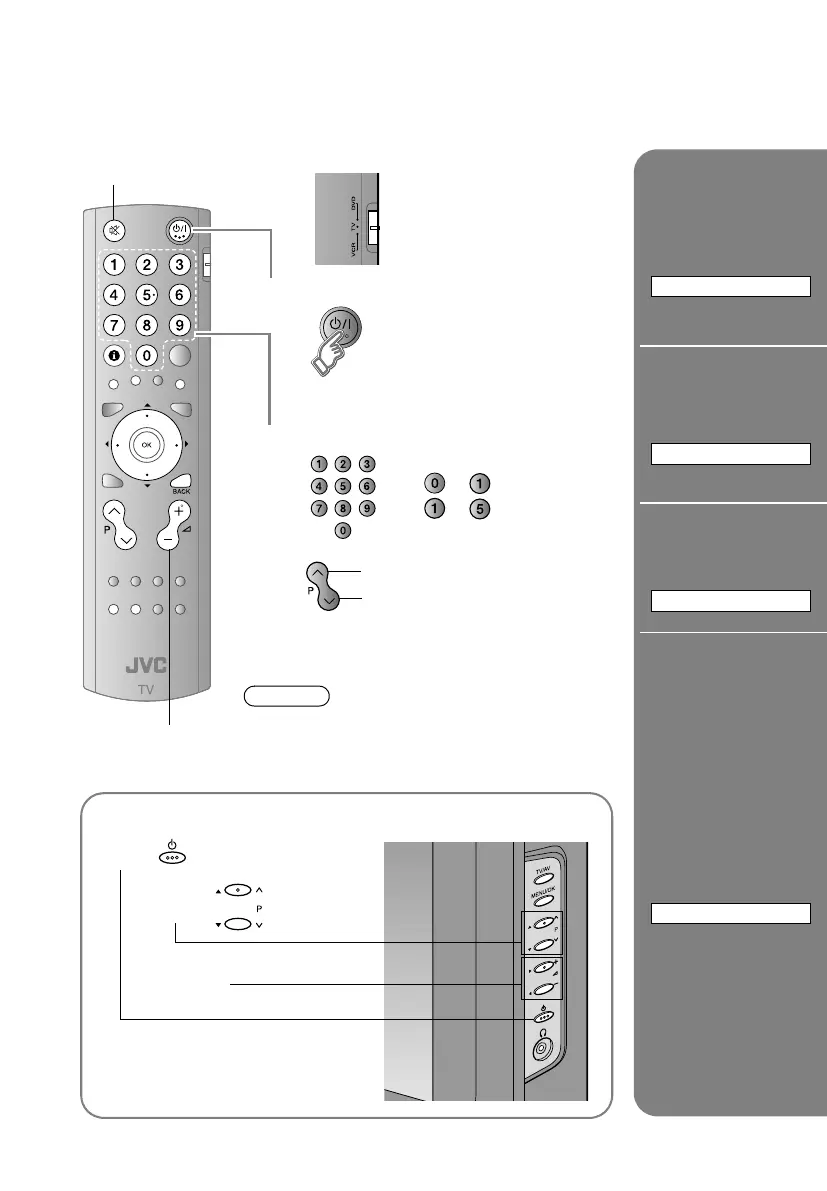
Set to ATVB
B
Power on
The blue power lamp on the TV lights
Press again to turn the screen off and put the
TV into standby mode.
C
Select a channel
E.g.
1: ¨
15 : ¨
Move up or down a channel
Switch between mono / stereo / bilingual
broadcasting
¨ ASTEREO/t · uB (P. 26)
Note
To completely turn off the TV, unplug the AC plug.
Mute
Volume
up
down
Basic operations using the side buttons
A
Power on
B
Volume
Change the
channel
Channel
information and
clock
INFORMATION
Change the
aspect ratio
ZOOM
Enjoy ambient
sound
3D SOUND
Register a
channel to a
button
FAVOURITE CHANNEL
Watching TV
LT-A70.book Page 17 Thursday, November 16, 2006 11:44 AM



 To Next Page