23
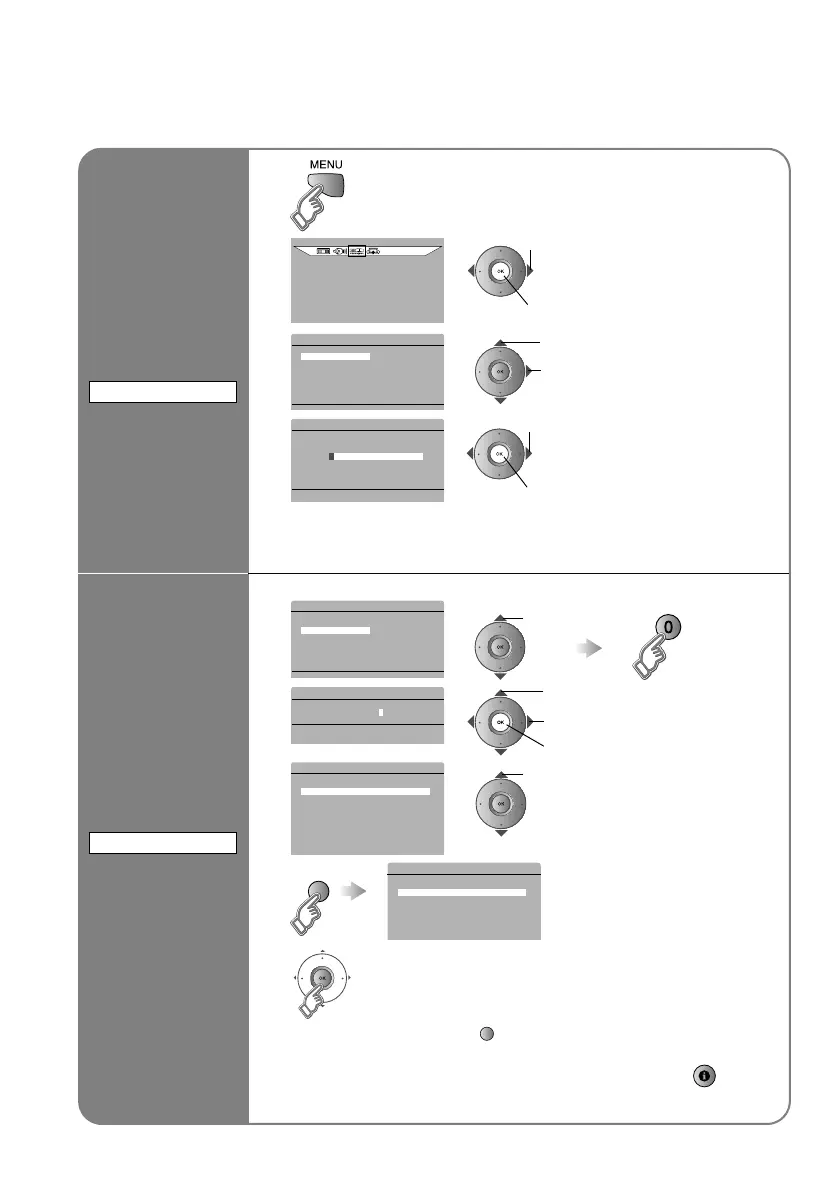
Set a time for
the TV to turn
itself off
1
2
FEATURES
3
C FEATURES
SLEEP TIMER 3
CHILD LOCK
APPEARANCE TYPE B
BLUE BACK ON
FAVOURITE SETTING 3
4
C >SLEEP TIMER
0 120
OFF
Cancel¨ Set the time to A0B in step 4
Remaining time ¨ You can confirm the remaining time at step 4, after
repeating this process.
Stop children
from watching
specific
channels
After steps 1 and 2 above
3
C FEATURES
SLEEP TIMER 3
CHILD LOCK
APPEARANCE TYPE B
BLUE BACK ON
FAVOURITE SETTING 3
4
C >SET ID NO.
p 0040
5
C >>CHILD LOCK
PR n ID CH/CC
AV _ _ _ _ _ _
01 BBC1 CH 21
02 CH 22
03 CH 23
04 CH 24
05 CH 25
06 CC 02
07 CC 03
08 CC 04
09 CC 05
6
C >>CHILD LOCK
PR n ID CH/CC
AV _ _ _ _ _ _
01 n BBC1 CH 21
02 CH 22
03 CH 23
04 CH 24
05 CH 25
06 CC 02
07 CC 03
Lock more channels
¨ Repeat steps 5 and 6
7
Release a channel ¨ Press AB (blue) again in step 6
View a locked channel ¨ Use the numerical buttons to enter the channel
number. When n appears, press AB and
enter your AID NO.B. (If you forget your
AID NO.B, check it in step 4.)
SLEEP TIMER
A select AFEATURESB
B next
A select ASLEEP TIMERB
B next
A select a time in minutes
B set
CHILD LOCK
select
ACHILD LOCKB
B to the next column
C set
A enter an AID NO.B
(a secret number of your choice)
select a channel to lock
(blue)
Try the advanced features
Useful functions
ASLEEP TIMERB / ACHILD LOCKB
LT-A70.book Page 23 Thursday, November 16, 2006 11:44 AM



 To Next Page