ENGLISH
IMPORTANT! PREPARE USE SETTINGS TROUBLE?
20
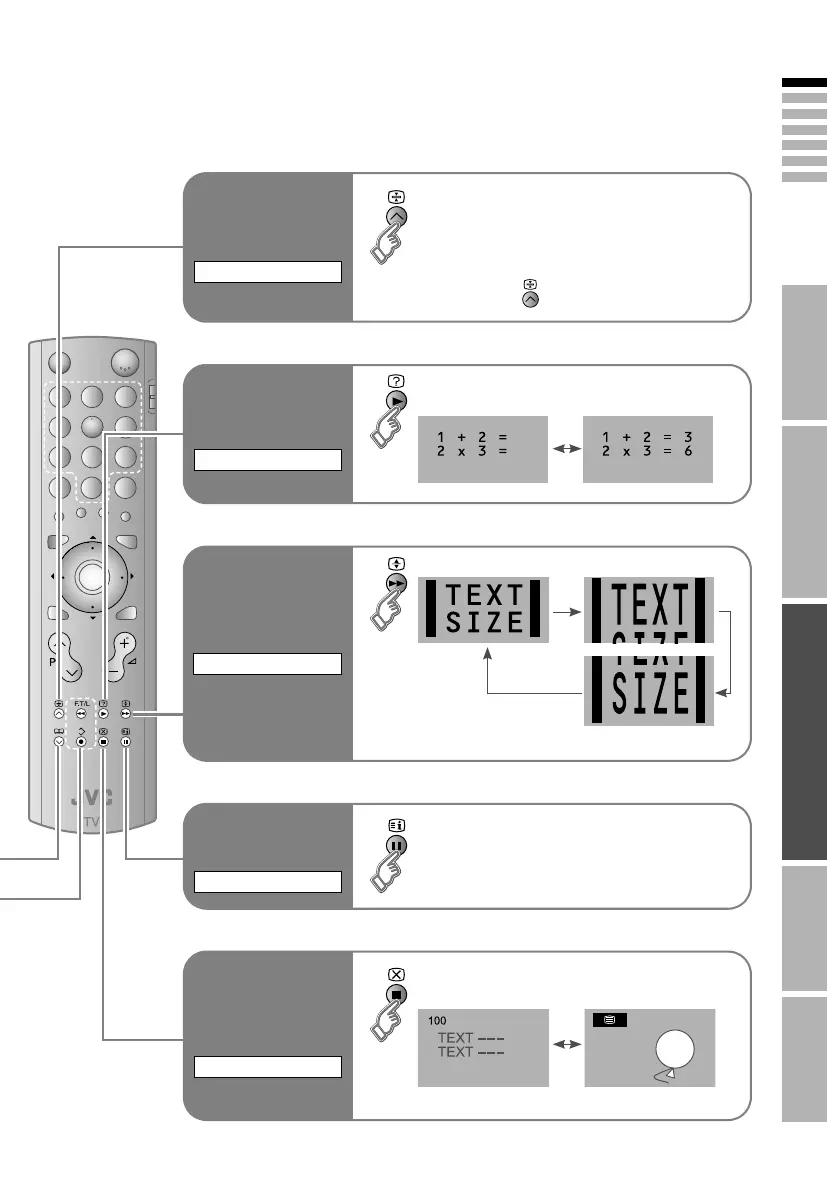
Enlarge the text
Double the size of the displayed text
SIZE
Hold the current
page
Hold the current page
Release ¨ Press AB again
HOLD
Switch briefly
from teletext to
TV
Leave the current page open, while you
switch to watch TV
Useful when running a page search.
CANCEL
Reveal hidden
pages
Display hidden information
(answers to quizzes, etc.)
REVEAL
To the index
page
Returns to page A100B or a previously
designated page
INDEX
LT-A70.book Page 20 Thursday, November 16, 2006 11:44 AM


 To Next Page
 Loading...