English
English
8
English
English
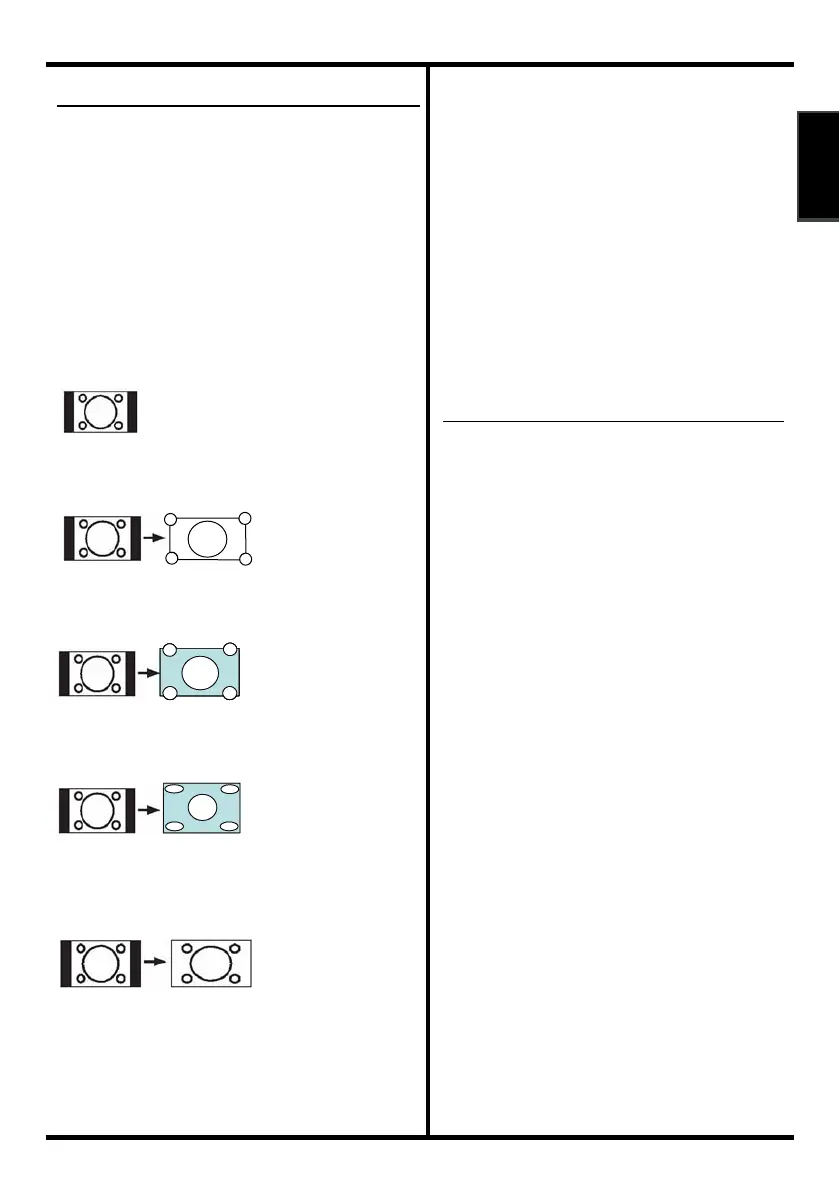
ZOOM function
You can change the screen size according
to the picture aspect ratio. Choose the
optimum one from the following ZOOM
modes.
Auto:
Select the screen size 4:3 or 16:9
automatically.
4:3:
Use to view a normal picture as this is its
original shape.
Zoom1:
Vertically and horizontally linearly expanded,
the side of the image is slightly cropped.
Zoom2:
Vertically linearly expanded, the top and the
bottom of the image is cropped.
Panoramic:
Horizontally nonlinearly stretched right and
left.
16:9:
This uniformly stretches the left and right
sides of a normal picture (4:3 aspect ratios)
to ll the wide TV screen.
•For 16:9 aspect ratio pictures that have been
squeezed into a normal picture (4:3 aspect ratio),
use the 16:9 mode to restore the picture to its
original shape.
Full Native
Full Native is 16:9 aspect & without
overscan.
Note: When user select “Full Native” in
1080i@HDMI mode and HDMI source
change format from 1080i to 480i, TV
select 16:9 aspect.
In DTV mode, not available for 1080i
(1125i) / 720p (750p) signals.
In PC or DVI mode, only 4:3 or 16:9 can
be selected.
Choose the ZOOM mode
Press the ZOOM button to choose the
ZOOM menu.
Adjusting the visible area of the picture: if
subtitles or the top (or bottom) of the
picture are cut off, you can adjust the
visible area of the picture manually.



 To Next Page
 Loading...







