Stand Installation
NOTE:
Before beginning this process, make sure that you have a clean, safe, and cushioned
space to work at to avoid any damage to the unit.
Do not touch or press the TV screen, the glass might break under pressure.
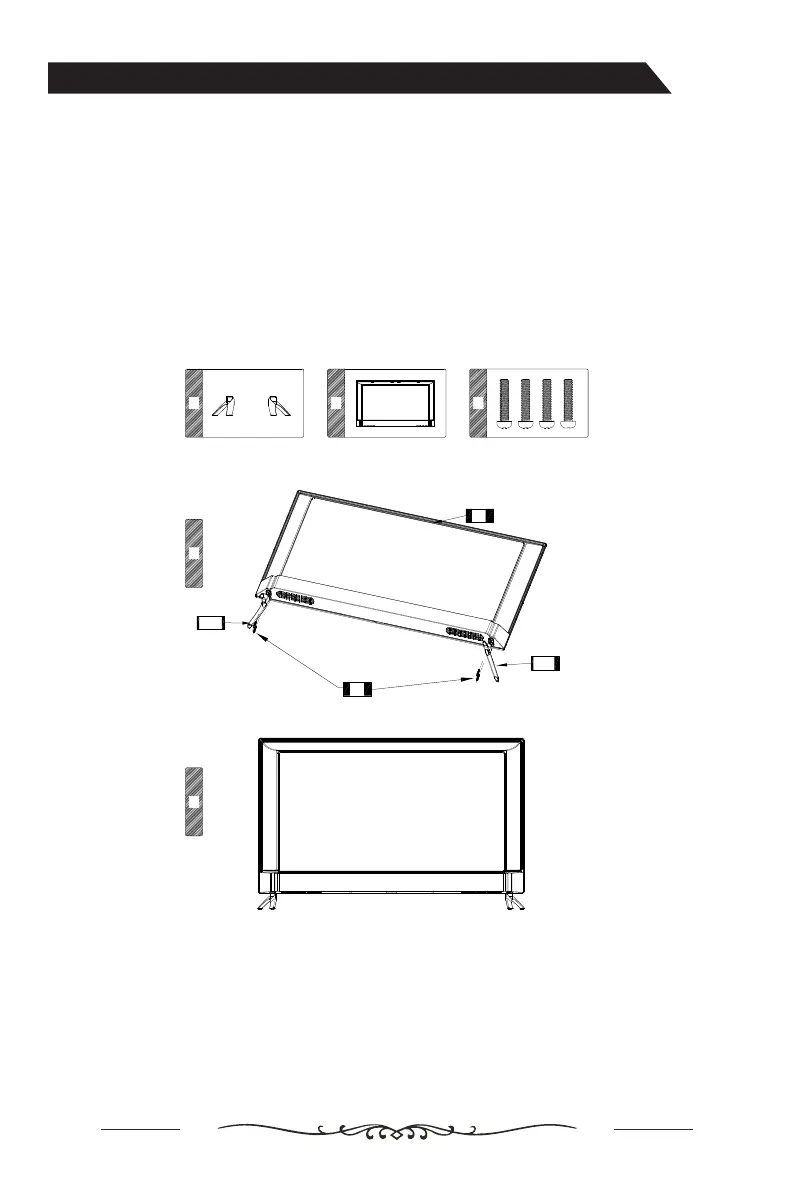
1. Carefully place the TV screen face-down on a clean, cushioned surface.
2. Insert and secure the stands (R and L) with 2 screws (supplied) each side as shown.
3. Insufficient tightening or incorrect installation
of the stand will not support your TV correctly, and could result in damage or injury from
tip-over.
A B C
1
2
R
L
A B C
1
2
R
L
A B C
1
2
R
L
A B C
1
2
R
L
A B C
1
2
R
L
B
A-R
C
A-L
Assembling the Stand
Make sure the AC cord is not connected to an AC outlet.
Important:
Screw size:M4 x 20 mm


 To Next Page
 Loading...