56 EN
Edit From A
Camcorder
You can use a camcorder as the player and your VCR as the recorder.
You can perform digital dubbing if you connect a device such
as a camcorder which has a DV output/input connector.
Because the signals are digital, there is no loss of video or audio
quality as a result of editing.
MAKE CONNECTIONS
1
A
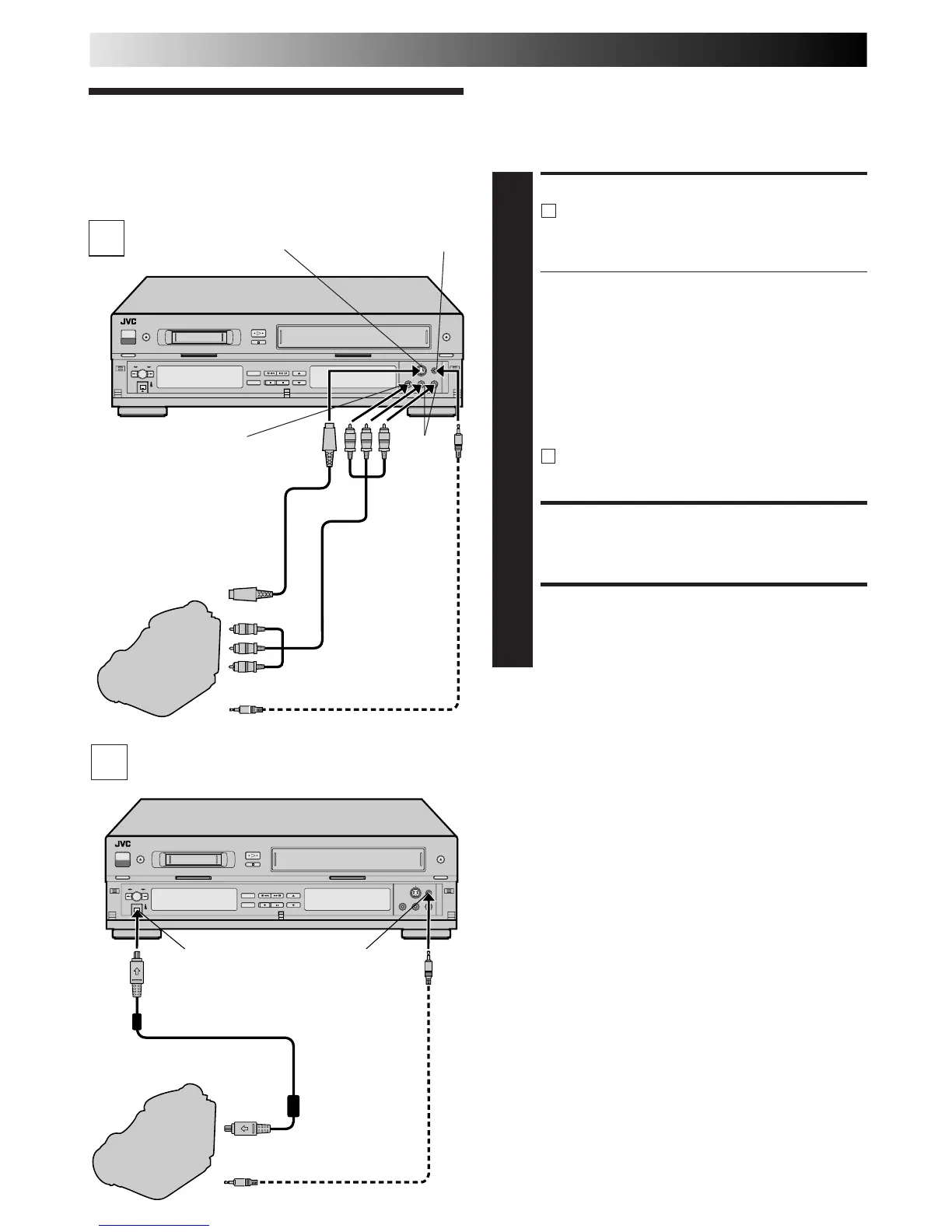
If the camcorder has no DV OUT/IN connector:
Connect an AV cable between the camcorder’s
VIDEO OUT and AUDIO OUT connectors and your
VCR’s VIDEO IN and AUDIO IN connectors.
● If connecting a camcorder with an S-VIDEO output
connector, it is recommended to use the S-VIDEO
connection to minimize picture degradation while
editing.
● When a Master Edit Control-equipped JVC camcorder is
used, the camcorder is capable of controlling your VCR.
The mini-plug cable is a mono 3.5 mm mini-plug to
mono 3.5 mm mini-plug connector.
● If connecting to a camcorder with a monaural output,
connect the audio output connector on the
camcorder to AUDIO IN L of the VCR.
B
If the camcorder has a DV OUT/IN connector:
Connect the camcorder’s DV OUT/IN connector to
the VCR’s DV IN/OUT connector.
LOAD A CASSETTE
2
Insert the cassette to be recorded on into the recorder.
SELECT RECORDING DECK
3
Press VHS or DV.
Recorder
Your VCR
PAUSE connector
Mini-plug cable
(not supplied)
(JVC camcorder only)
Audio/Video
cable
(supplied)
Camcorder
VIDEO OUT
AUDIO OUT
EDIT
VIDEO IN
AUDIO
IN
S-VIDEO IN
S-VIDEO
OUT
S-VIDEO
cable
(supplied)
Player
EDITING (cont.)
A
B
Mini-Plug Cable
(not provided)
(JVC camcorder only)
EDIT
DV Camcorder
Recorder
PAUSE connector
DV OUT/IN
DV Cable VC-VDV204U (not provided)
Player
DV IN/OUT
Your VCR
NOTES:
●
When connecting this recorder to a device equipped with a
DV input connector, be sure to use the optional DV cable
(VC-VDV204U).
●
The signals through the DV IN/OUT connector cannot be
recorded on the VHS deck, even though
→
of the DUB
button is pressed.
●
When you are editing through the DV IN/OUT connector, the
recorder will stop if the player begins playing a blank portion
of tape or the signal is interrupted.



 To Next Page