15
Using the USB
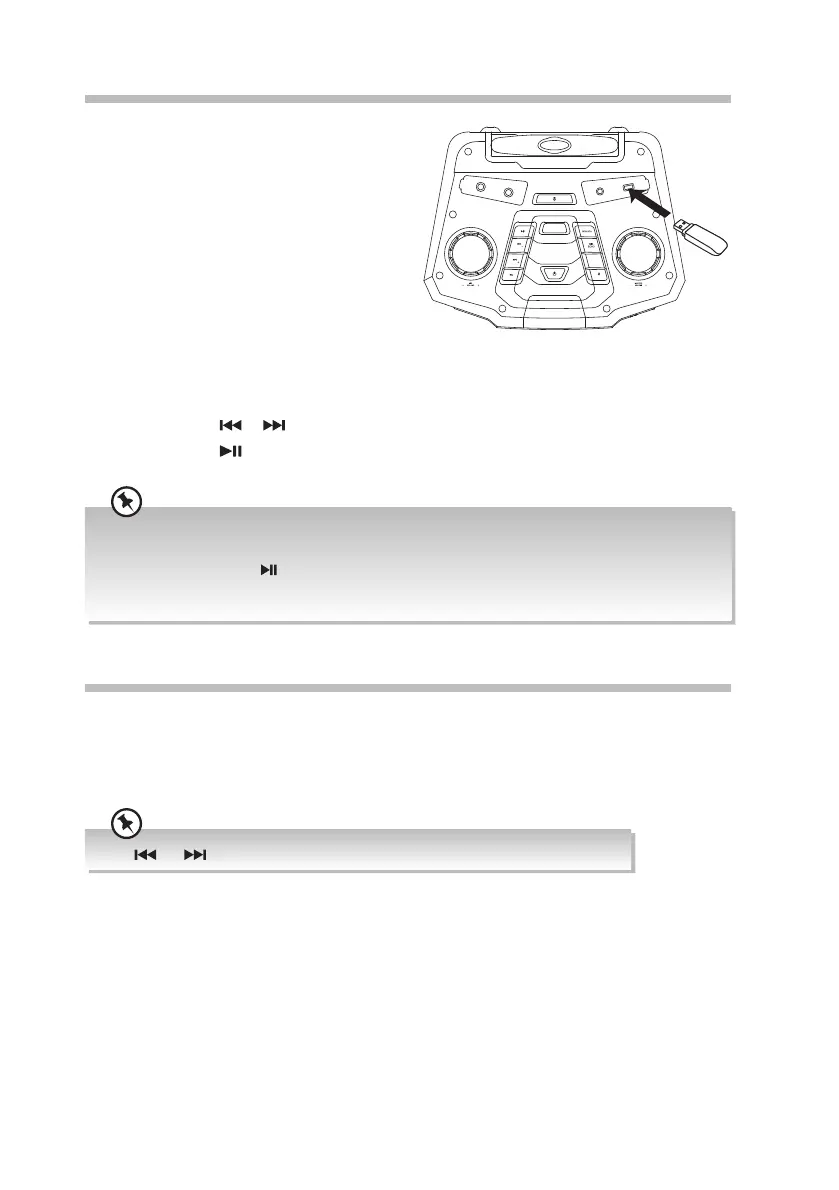
By connecting a USB mass storage device
(including USB ash memory or USB ash
players) to this unit, you can enjoy the device’s
stored music through the unit.
1. Press SOURCE button repeatedly to select
the USB source. The display will show
“USB”, and then “LOAD“.
• If there is no USB device connected,
the display will show “NO USB”.
• If there is no MP3 le in the USB
device, the display will show “NO MUSIC“.
2. The display will show the number of ALBUM and FILE stored in the USB device, and
then start playback.
3. Press and hold
or button to select next/previous album, and play the rst track.
4. Press and hold
button to select dierent REPEAT mode: REPEAT ONE / REPEAT
ALBUM / REPEAT ALL / REPEAT OFF.
• The player supports the USB music le format of MP3 only.
• The unit can support USB devices with up to 32 GB of memory.
• You may need to press
button to start playback after inserting the USB device.
• The unit may not be compatible with all USB devices, this is not an indication of a problem with the
unit.
LINE IN (AUX IN) Operation
1. While in ON mode, press the SOURCE button to select the LINE IN mode. The words
“LINE” will be shown on the display.
2. Operate your audio device directly for playback features.
3. Turn the MASTER –VOLUME+ dial to adjust the volume to your desired level.
The and buttons are invalid in LINE IN mode.
BOO STE R
STER EO
CHAI N
TUNE
TUNE
PAIR
MX-D719PB_IB_Final190704V2.indd 15 05/07/2019 09:48



 To Next Page