EasyManua.ls Logo

JVC PC-5 L - Amplifier Parts (PC-A5) Removal

JVC PC-5 L
65 pages
Print Icon
To Next Page IconTo Next Page
To Previous Page IconTo Previous Page
Loading...
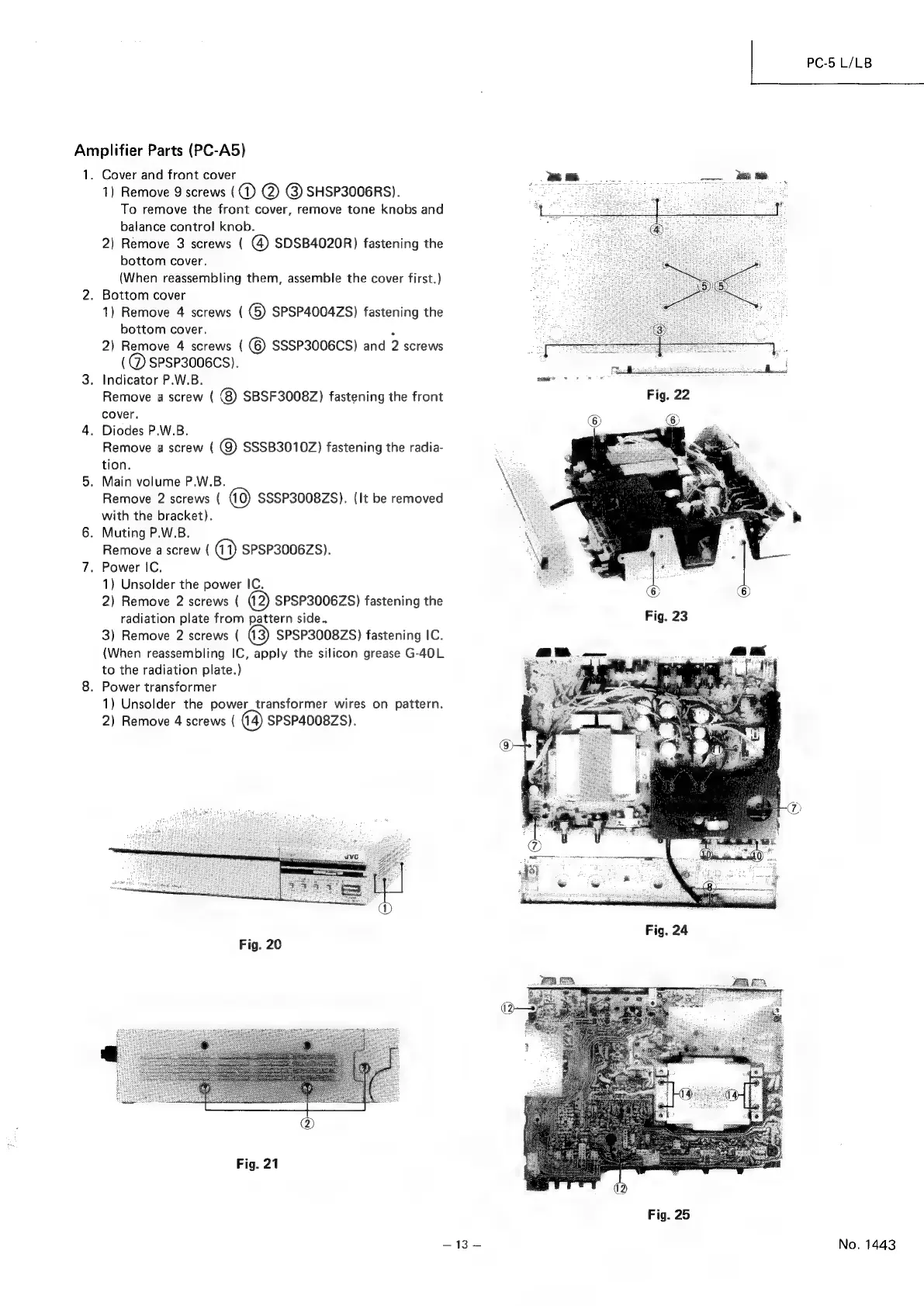
Amplifier
Parts
(PC-A5)
1.
wo
a
QD
Cover
and
front
cover
1)
Remove
9
screws
(
(1)
@)
@)
SHSP3006RS).
To
remove
the
front
cover,
remove
tone
knobs
and
balance
control
knob.
2)
Remove
3
screws
(
@)
SDSB4020R)
fastening
the
bottom
cover.
(When
reassembling
them,
assemble
the
cover
first.)
Bottom
cover
1)
Remove
4
screws
(
()
SPSP4004ZS)
fastening
the
bottom
cover.
a
2)
Remove
4
screws
(
(6)
SSSP3006CS)
and
2
screws
(@
SPSP3006CS).
.
Indicator
P.W.B.
Remove
a
screw
(
8
SBSF3008Z)
fastening
the
front
cover.
Diodes
P.W.B.
Remove
a
screw
(
@)
SSSB3010Z)
fastening
the
radia-
tion.
Main
volume
P.W.B.
Remove
2
screws
(
SSSP3008ZS).
(It
be
removed
with
the
bracket).
Muting
P.W.B.
Remove
a
screw
(
@)
SPSP3006ZS).
Power
IC,
1)
Unsolder
the
power
IC.
2)
Remove
2
screws
(
2)
SPSP3006ZS)
fastening
the
radiation
plate
from
pattern
side..
3)
Remove
2
screws
(
@3)
SPSP3008ZS)
fastening
IC.
(When
reassembling
IC,
apply
the
silicon
grease
G-40L
to
the
radiation
plate.)
Power
transformer
1)
Unsolder
the
power_transformer
wires
on
pattern.
2)
Remove
4
screws
(
SPSP4008ZS).
Fig.
20
Fig.
21
Fig.
24
Fig.
25
PC-5
L/LB
No.
1443

Related product manuals