EasyManua.ls Logo

JVC RC-S22 C - Page 5

JVC RC-S22 C
28 pages
Print Icon
To Next Page IconTo Next Page
To Previous Page IconTo Previous Page
Loading...
Removal
of
the
Main
Parts
f
3
4
;
oe
29
a5
ot
2
;
|
Fig.
9
api
{|
Telescopic
2
antenna
Fig.
11
|
RC-S22
C/W/JW/WH/L/LB/LD
.
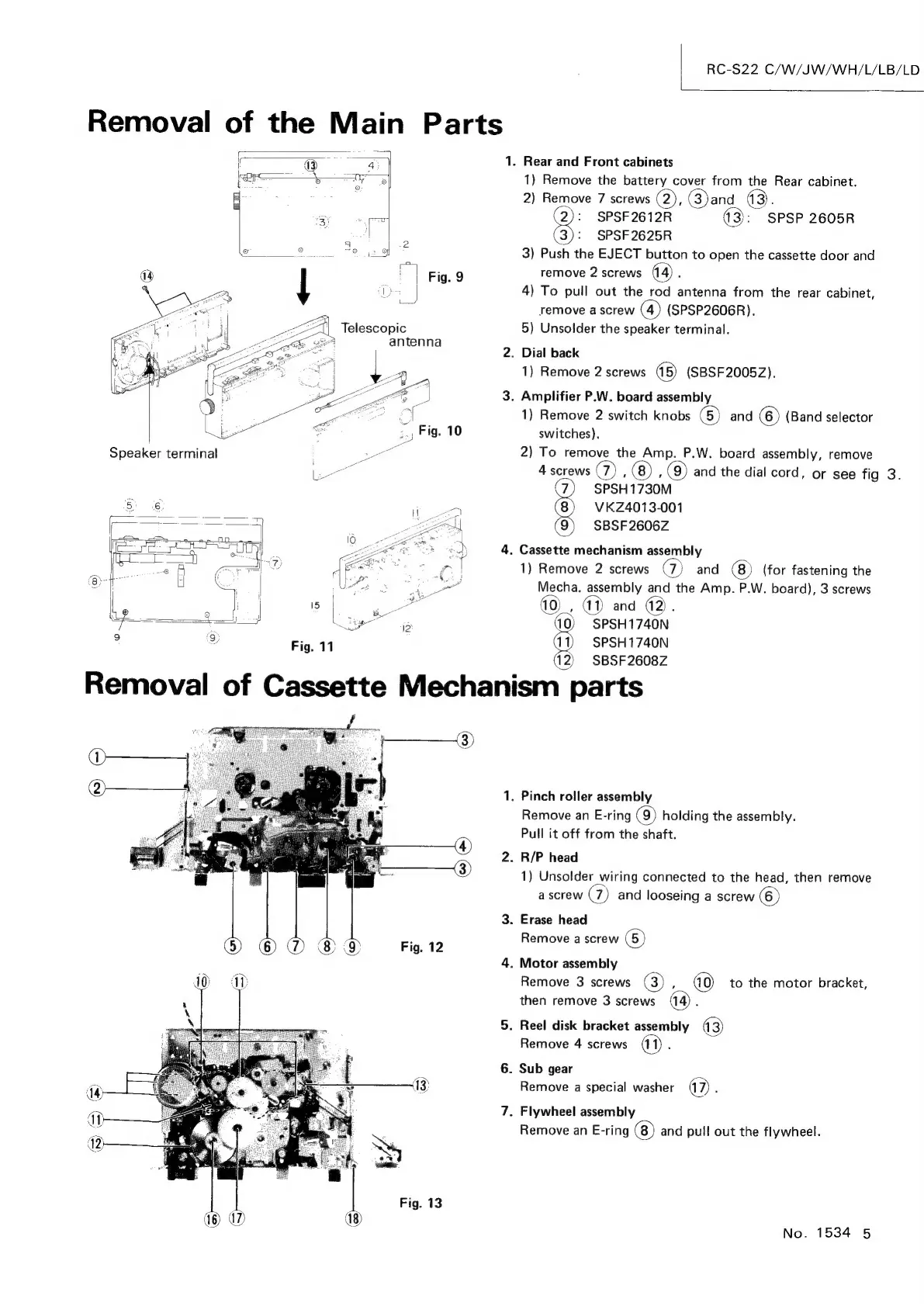
Rear
and
Front
cabinets
1)
Remove
the
battery
cover
from
the
Rear
cabinet.
2)
Remove
7
screws
(2),
(3)and
a3.
2):
SPSF2612R
13}:
SPSP
2605R
SPSF
2625R
3)
Push
the
EJECT
button
to
open
the
cassette
door
and
remove
2
screws
4)
To
pull
out
the
rod
antenna
from
the
rear
cabinet,
remove
a
screw
(4)
(SPSP2606R).
5)
Unsolder
the
speaker
terminal.
.
Dial
back
1)
Remove
2
screws
(5)
(SBSF2005Z).
.
Amplifier
P.W.
board
assembly
1)
Remove
2
switch
knobs
(5)
and
(6)
(Band
selector
switches).
2)
To
remove
the
Amp.
P.W.
board
assembly,
remove
4
screws
@)
:
,
(Q)
and
the
dial
cord,
or
see
fig
3.
7
SPSH1730M
(8)
VKZ4013-001
(9)
SBSF2606Z
.
Cassette
mechanism
assembly
1)
Remove
2
screws
@)
and
(8)
(for
fastening
the
Mecha.
assembly
and
the
Amp.
P.W.
board),
3
screws
40),
41)
and
42).
10)
SPSH1740N
SPSH1740N
12)
SBSF2608Z
Removal
of
Cassette
Mechanism
parts
.
Pinch
roller
assembly
Remove
an
E-ring
(9)
holding
the
assembly.
Pull
it
off
from
the
shaft.
.
R/P
head
1)
Unsolder
wiring
connected
to
the
head,
then
remove
a
screw
@)
and
looseing
a
screw
(6)
.
Erase
head
Remove
a
screw
(5)
.
Motor
assembly
Remove
3
screws
(3)
,
to
the
motor
bracket,
then
remove
3
screws
(14)
;
.
Reel
disk
bracket
assembly
43)
Remove
4
screws
.
Sub
gear
Remove
a
special
washer
a7)
:
.
Flywheel assembly
Remove
an
E-ring
and
pull
out
the
flywheel.
No.
1534
5

Related product manuals