Listening to auxi|iary equipment
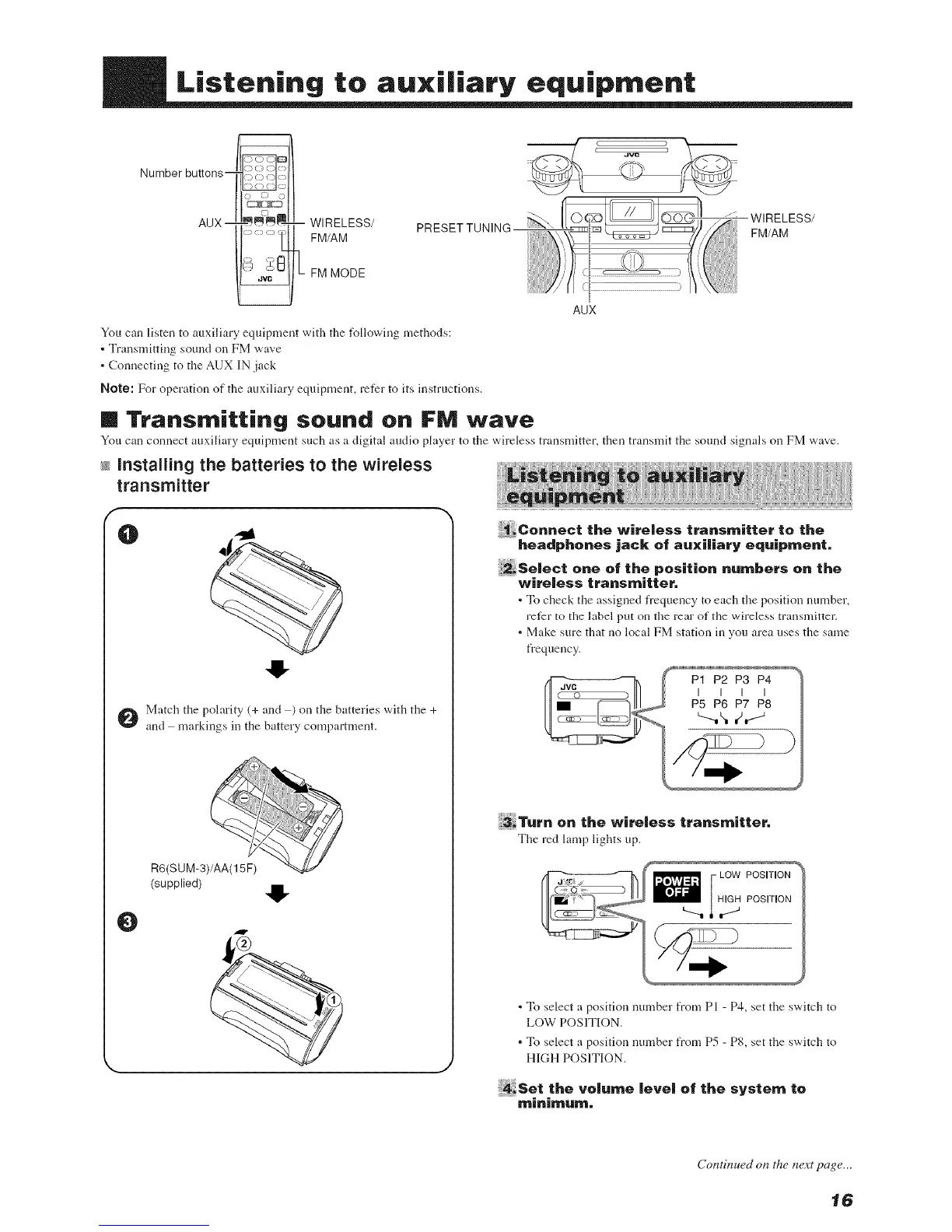
Number buttons_
WIRELESS/ PRESET TUNING--
FM/AM
FM MODE
You can listen to auxiliary equipment with the following methods:
• Transmitting sound on FM wave
. Connecting to the AUX IN jack
Note: For operation of the auxiliary equipment, refer to its instructions.
--WIRELESS/
FM/AM
AUX
m Transmitting sound on FM wave
You can connect auxiliary equipment such as a digital audio player to tile wireless mmsmitter, then transmit tile sound signals on FM wave.
_sinstalling the batteries to the wireless
transmitter
f
O
41-
Match tile polarity (+ and ) on the batteries with the +
and markings in the battery compartment.
4!-
_eo.._t th_wi,olosst,a,,s,.,i._,to tho
headpho,es jack: of auxiliary °quipme,t.
_solooto.oofth_positio...mbo,so. tho
wireless transmitter.
• To check the assigned frequency to each the position number,
refer to the label put on the rear of the wireless transmitter.
. Make sure that no local FM station in you area uses the same
frequency.
3_T.,. o. th° wi,°l°s_t,,,,,s,_i.°,.
The red lamp lights up.
LOW POSITION
• To select a position number from PI - P4, set the switch to
LOW POSITION.
. To select a position nmnber from P5 - P8, set the switch to
HIGH POSITION.
4sot tho,ol.moIo,oloftho_y_t°mto
O
(supplied)
m
Contilzued on the lwxt page...
16


 To Next Page
 Loading...