EasyManua.ls Logo

JVC TD-W777A - Page 12

JVC TD-W777A
27 pages
Print Icon
To Next Page IconTo Next Page
To Previous Page IconTo Previous Page
Loading...
TD-W777
sacecuu
|
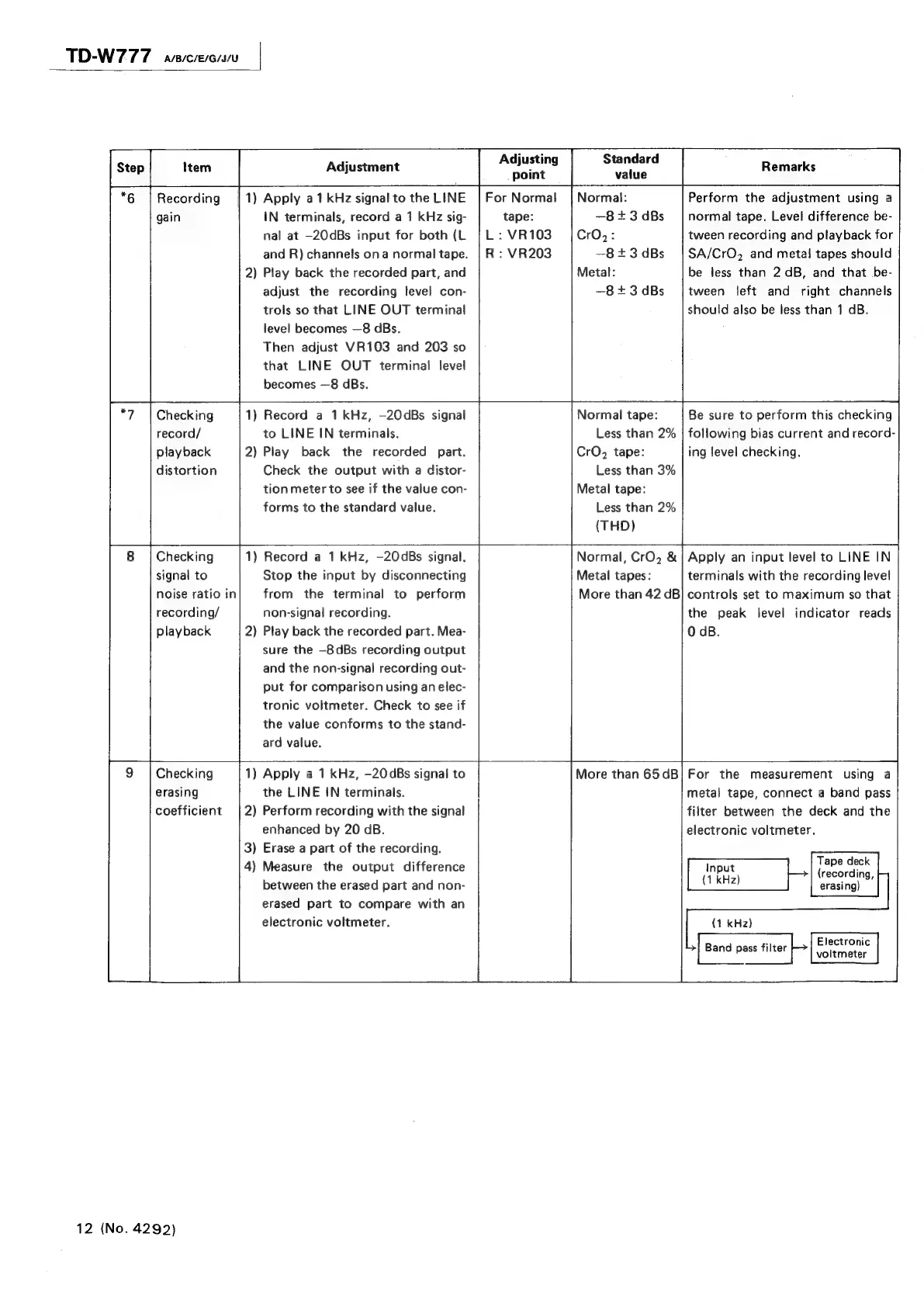
Adjustment
Apply
a1
kHz
signal
to
the
LINE
IN
terminals,
record
a
1
kHz
sig-
nal
at
—20dBs
input
for
both
(L
and
R)
channels
ona
normal
tape.
Play
back
the
recorded
part,
and
adjust
the
recording
level
con-
trols
so
that
LINE
OUT
terminal
level
becomes
—8
dBs.
Then
adjust
VR103
and
203
so
that
LINE
OUT
terminal
level
becomes
—8
dBs.
Adjusting
point
For
Normal
tape:
L
:
VR103
R
:
VR203
Standard
value
Normal:
—8+3dBs
CrO,:
—8+3dBs
Metal:
—8+3dBs
Remarks
Perform
the
adjustment
using
a
normal
tape.
Level
difference
be-
tween
recording
and
playback
for
SA/CrO,
and
metal
tapes
should
be
less
than
2
dB,
and
that
be-
tween
left
and
right
channels
should
also
be
less
than
1
dB.
*6
|
Recording
|
1)
gain
2)
*7
|
Checking
1)
record/
playback
2)
distortion
8
|
Checking
1
signal
to
noise
ratio
in
recording/
playback
2
~—
Record
a
1kHz,
—20dBs
signal
to
LINE
IN
terminals.
Play
back
the
recorded
part.
Check
the
output
with
a
distor-
tion
meter
to
see
if
the
value
con-
forms
to
the
standard
value.
Record
a
1
kHz,
-20dBs
signal.
Stop
the
input
by
disconnecting
from
the
terminal
to
perform
non-signal
recording.
Play
back
the
recorded
part.
Mea-
sure
the
—8dBs
recording
output
and
the
non-signal
recording
out-
put
for
comparison
using
an
elec-
tronic
voltmeter.
Check
to
see
if
the
value
conforms
to
the
stand-
ard
value.
9
|
Checking
1)
erasing
coefficient
|
2)
3)
4)
Apply
a
1
kHz,
-20dBs
signal
to
the
LINE
IN
terminals.
Perform
recording
with
the
signal
enhanced
by
20
dB.
Erase
a
part
of
the
recording.
Measure
the
output
difference
between
the
erased
part
and
non-
erased
part
to
compare
with
an
electronic
voltmeter.
Normal
tape:
Less
than
2%
CrO,
tape:
Less
than
3%
Metal
tape:
Less
than
2%
(THD)
Normal,
CrO,
&
Metal
tapes:
More
than
42
dB
Be
sure
to
perform
this
checking
following
bias
current
and
record-
ing
level
checking.
Apply
an
input
level
to
LINE
IN
terminals
with
the
recording
level
controls
set
to
maximum
so
that
the
peak
level
indicator
reads
O
dB.
More
than
65dB
For
the
measurement
using
a
metal
tape,
connect
a
band
pass
filter
between
the
deck
and
the
electronic
voltmeter.
ie
sing
(recording,
(1
kHz)
erasing)
(4
kHz)
|
:
Electronic
Band
pass
filter
12
(No.
4292)

Related product manuals