EasyManua.ls Logo

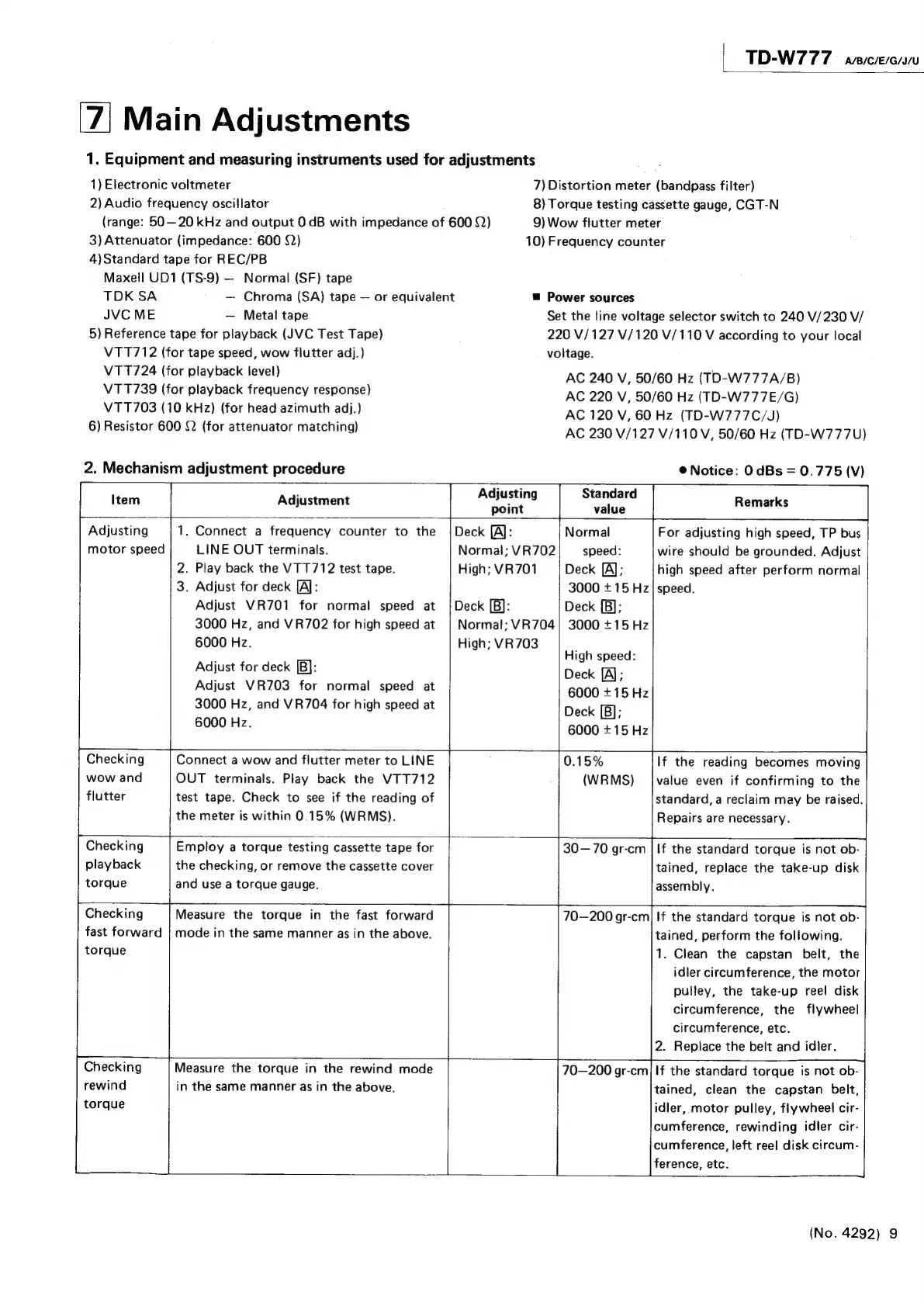
JVC TD-W777A - Main Adjustments; Equipment and Measuring Instruments; Mechanism Adjustment Procedures

JVC TD-W777A
27 pages
Print Icon
To Next Page IconTo Next Page
To Previous Page IconTo Previous Page
Loading...
TD-W77
7
A/B/C/E/G/J/U
Main
Adjustments
1.
Equipment
and
measuring
instruments
used
for
adjustments
1)
Electronic
voltmeter
7)
Distortion
meter
(bandpass
filter)
2)
Audio
frequency
oscillator
8)
Torque
testing
cassette
gauge,
CGT-N
(range:
50—20
kHz
and
output
0
dB
with
impedance
of
600
2)
9)
Wow
flutter
meter
3)
Attenuator
(impedance:
600
22)
10)
Frequency
counter
4)Standard
tape
for
REC/PB
Maxell
UD1
(TS-9)
Normal
(SF)
tape
TDK
SA
Chroma
(SA)
tape
or
equivalent
=
Power
sources
JVC
ME
Metal
tape
Set
the
line
voltage
selector
switch
to
240
V/230
V/
5)
Reference
tape
for
playback
(JVC
Test
Tape)
220
V/127
V/120
V/110
V
according
to
your
local
VTT712
(for
tape
speed,
wow
flutter
adj.)
voltage.
V11724
(for
playback
level)
AC
240
V,
50/60
Hz
(TD-W777A/B)
VTT739
(for
playback
frequency
response)
AC
220
V,
50/60
Hz
(TD-W777E/G)
6)
Resistor
600
Q
(for
attenuator
matching)
AC
230
V/127
V/110
V,
50/60
Hz
(TD-W777U)
2.
Mechanism
adjustment
procedure
®
Notice:
0
dBs
=
0.775
(V)
Item
|
Adjustment
Adjus
ring
Standard
Remarks
point
value
Adjusting
1.
Connect
a
frequency
counter
to
the
|
Deck
{A):
Normal
For
adjusting
high
speed,
TP
bus
motor
speed
LINE
OUT
terminals.
Normal;
VR702
speed:
wire
should
be
grounded.
Adjust
2.
Play
back
the
VTT712
test
tape.
High;
VR701
Deck
[A];
high
speed
after
perform
normal
3.
Adjust
for
deck
[A]:
3000
+
15
Hz!
speed.
Adjust
VR701
for
normal
speed
at
{Deck
[B):
Deck
[B];
3000
Hz,
and
VR702
for
high
speed
at
|
Normal;
VR704|
3000
+15
Hz
6000
Hz.
High;
VR703
High
speed:
Adjust
for
deck
[B]:
Deck
(Al:
Adjust
VR703
for
normal
speed
at
6000
+15Hz
3000
Hz,
and
VR704
for
high
speed
at
Deck
[B];
6000
Hz.
6000
+15
Hz
Checking
Connect
a
wow
and
flutter
meter
to
LINE
0.15%
If
the
reading
becomes
moving
wow
and
OUT
terminals.
Play
back
the
VTT712
(WRMS)
jvalue
even
if
confirming
to
the
flutter
test
tape.
Check
to
see
if
the
reading
of
standard,
a
reclaim
may
be
raised.
the
meter
is
within
0.15%
(WRMS).
Repairs
are
necessary.
Checking
Employ
a
torque
testing
cassette
tape
for
30—70
gr-cm
|
If
the
standard
torque
is
not
ob-
playback
the
checking,
or
remove
the
cassette
cover
tained,
replace
the
take-up
disk
torque
and
use
a
torque
gauge.
|
assembly.
Checking
Measure
the
torque
in
the
fast
forward
70—200
gr-cm|
If
the
standard
torque
is
not
ob-
fast
forward
|
mode
in
the
same
manner
as
in
the
above.
tained,
perform
the
following.
torque
1.
Clean
the
capstan
belt,
the
idler
circumference,
the
motor
pulley,
the
take-up
reel
disk
circumference,
the
flywheel
circumference,
etc.
2.
Replace
the
belt
and
idler.
Checking
Measure
the
torque
in
the
rewind
mode
ies
gr-cm|
If
the
standard
torque
is
not
ob-
rewind
in
the
same
manner
as
in
the
above.
tained,
clean
the
capstan
belt,
torque
idler,
motor
pulley,
flywheel
cir-
cumference,
rewinding
idler
cir-
cumference,
left
reel
disk
circum-
ference,
etc.
(No.
4292)
9

Related product manuals