32
English
AUDIOTV
SLEEPDIMMER
DVD FM/AM
TV CH
AUX
TV/VIDEO
MUTING
CONTROL
TEST TONE
TOP
MENU
MENU
CHOICE/TIME
AUDIO
SLOW RETURN PL
SUBTITLE ANGLE ZOOM
ON SCREEN
TV VOL
AUDIO VOL
1234
5678
9
TV
0
MEMORY
CANCEL
ENTER
SOUND
/
REPEAT
FM MODE
STEP
DOWN - TUNING - UP
PROGRESSIVE
RM-STHA25U
DVD CINEMA SYSTEM
NTSC/PAL
MP3/JPEG Playback
3/2/5/∞
ENTER
Number
buttons
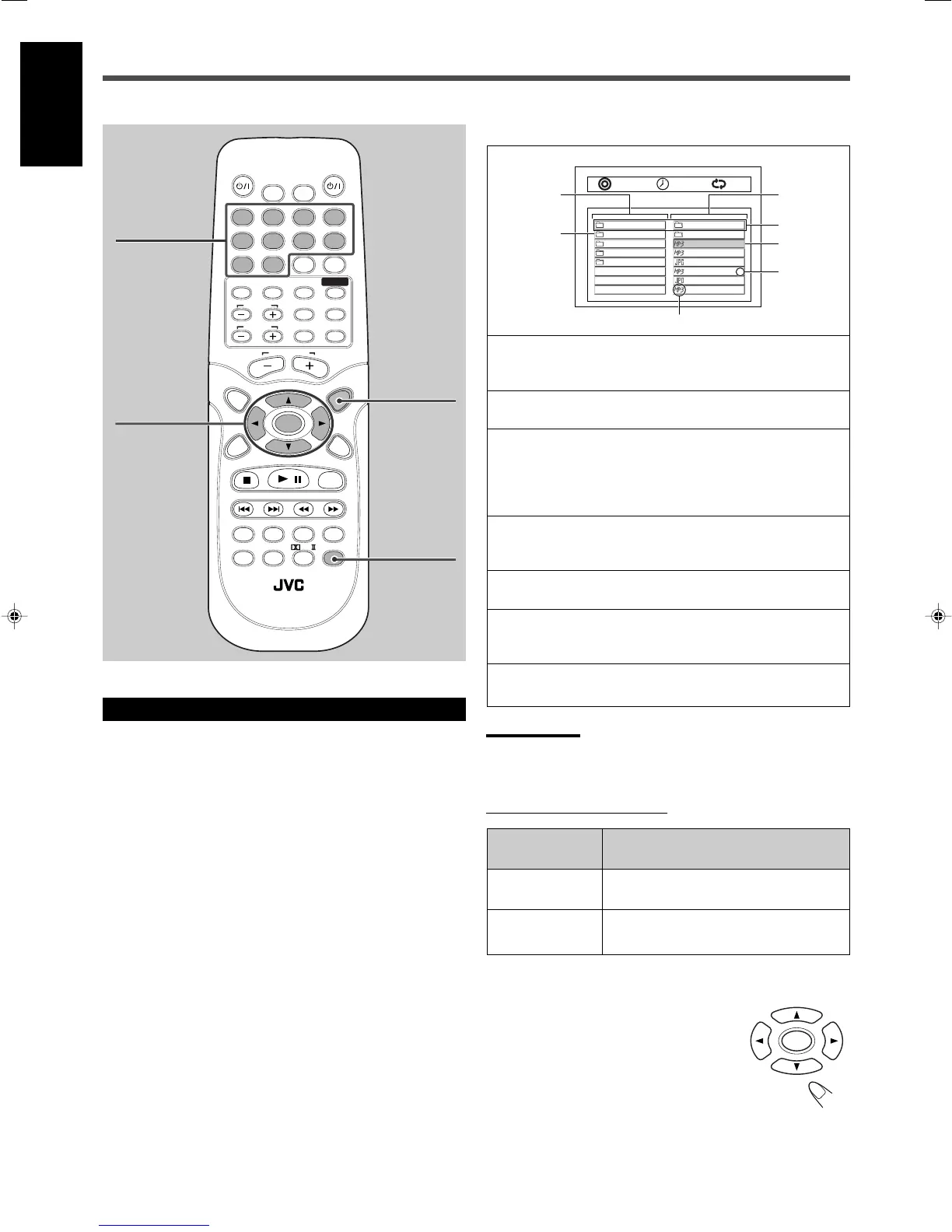
1 : Folder column
• Ex.: 4 folders exist in the current level: ALPHA, BETA,
GAMMA, and DELTA.
2 : Current folder
The name of the current folder is highlighted.
3 : Content column
The contents of the current folder are shown on this column.
• Ex.: 1 folder and 6 or more* files in the current folder.
* Only 7 file/folder names can be shown on the column at
once. You can scroll the column with ∞/5 buttons.
4 : Top cells
You can move back to the folder that contains the current
folder by selecting the top cell of either column.
5 : Current file (Ex.: MP3 file)
The name of the current file is highlighted.
6 : Item number
Use this number when you select a particular file or folder
with the number buttons.
7 : Item type indicator
The item type (folder, MP3 file, or JPEG file) is shown.
Operations Using the On-Screen Display
You can select the file to play back on the on-screen display while
playback is stopped.
.. ..
ALPHA
BETA
GAMMA
DELTA
AAA
0
1
2
3
ANT01
BULL02
COOT03
DOG04
ELEPHANT05
FOX06
4
5
6
7
0001/0003 OFF0:00:28
1
2
3
4
5
6
7
Notes:
• Only the first 11 letters of the file or folder name appear on the TV
screen.
• The file extensions—“.mp3” and “.jpg” —are not displayed.
From the remote control ONLY:
To start playback of the selected file
Press 3/2/5/∞ to select the file, then press
ENTER.
The system starts playback from the selected file.
REPEAT
Button
ENTER
To do
Start playback or go into a folder.
Select a file or folder.
3/2/5/∞
MENU
The on-screen display
30_33_TH_A25[UW].p65 03.10.7, 10:35 PM32


 To Next Page
 Loading...