25
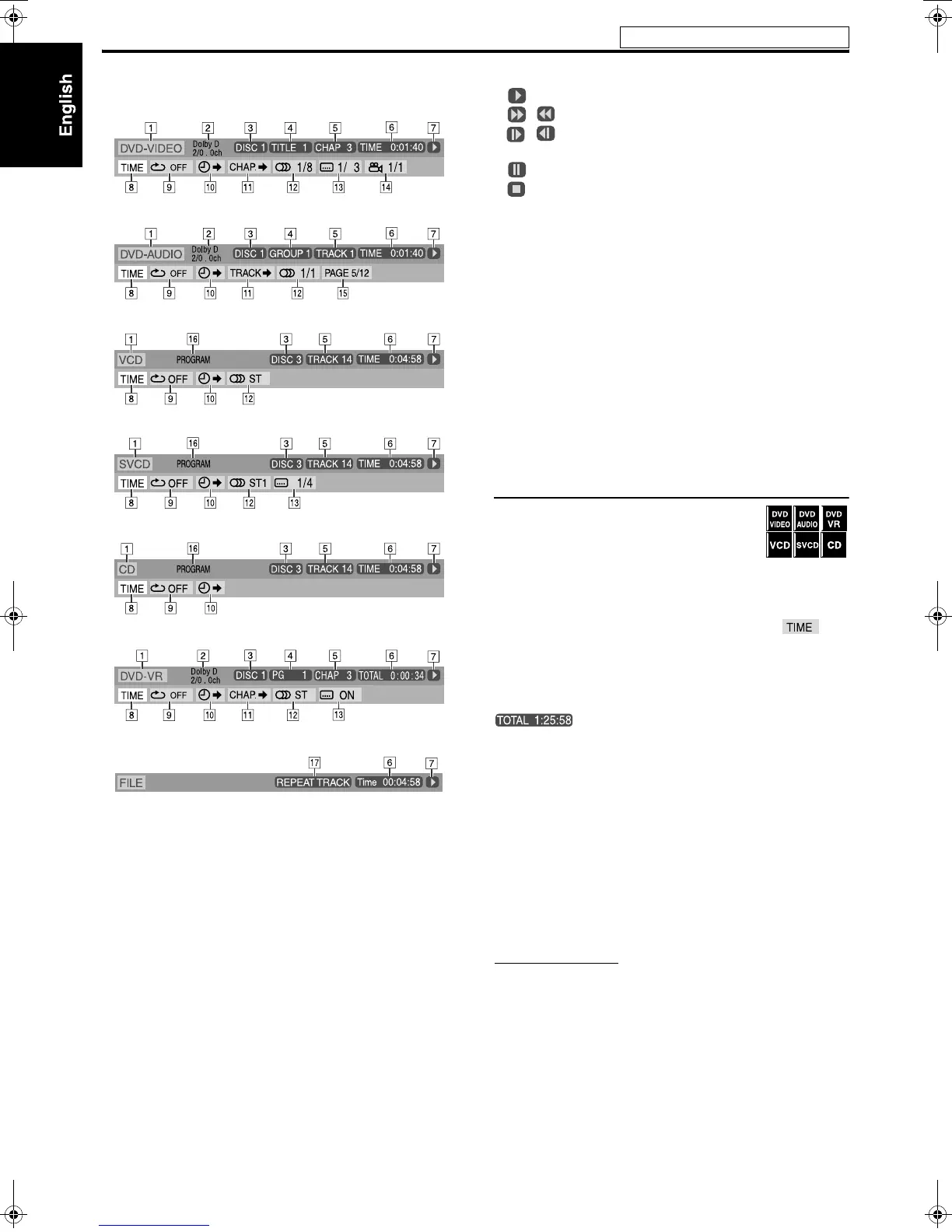
7 Contents of the on-screen bar during playback
DVD VIDEO
DVD AUDIO
VCD
SVCD
CD
DVD VR disc
ASF/MPEG-2/MPEG-1/DivX
1 Shows disc type.
2 Shows audio information.
3 Shows disc number.
4 For DVD VIDEO: Shows current title number.
For DVD AUDIO: Shows current group number.
For DVD VR: Shows current play mode (PG: for Original
program, PL: for Playlist) and title number.
5 For DVD VIDEO and DVD VR: Shows current chapter number.
For other type of discs: Shows current track number.
6 Shows time information. See “Changing the time information”
on the right column.
7 Shows playback status.
: appears during playback.
/ : appears during fast forward/reverse.
/ : appears during playback in forward slow-motion/
reverse slow-motion.
: appears when paused.
: appears when stopped.
8 Select this to change time information (F). See “Changing the
time information” below.
9 Select this for Repeat Playback. (See page 32.)
0 Select this for time search function. (See page 27.)
K For DVD VIDEO and DVD VR: Select this for chapter search
function. (See page 26.)
For DVD AUDIO: Select this for track search function. (See page
26.)
L Select this to change audio language or channel. (See page 29.)
M Select this to change subtitle language and subpicture. (See page
28.)
N Select this to change view angle. (See page 28.)
O Select this to change the page. (See page 30.)
P Shows Playback mode status.
PROGRAM: appears during Program Playback. (See page 31.)
RANDOM: appears during Random Playback. (See page 32.)
Q Shows Repeat mode status. (See page 32.)
Changing the time information
You can change the time information in the on-
screen bar on the TV screen and the display
window of the center unit.
7 During playback
1 Press ON SCREEN twice.
The on-screen bar appears on the TV screen.
2 Press Cursor 3/2 to highlight .
3 Press ENTER repeatedly to select the
desired information.
Example: When elapsed playing time of disc is selected.
7 DVD VIDEO/DVD AUDIO/DVD VR
• TIME: Elapsed playing time of current chapter/track
• REM: Remaining time of current chapter/track
• TOTAL: Elapsed time of Title/Group/Program
• T. REM: Remaining time of Title/Group/Program
7 VCD/SVCD/CD
• TIME: Elapsed playing time of current track
• REM: Remaining time of current track
• TOTAL: Elapsed time of disc
• T. REM: Remaining time of disc
4 Press ON SCREEN.
The on-screen bar disappears.
NOTE
• When playing back DVD VR, “TIME” and “REM” cannot be shown.
Advanced operations
See page 23 for button locations.
TH-C6030[UW].book Page 25 Tuesday, August 1, 2006 3:49 PM


 To Next Page