EasyManua.ls Logo

JVC TM-41 EG - General Description; Introduction; Features

JVC TM-41 EG
36 pages
Print Icon
To Next Page IconTo Next Page
To Previous Page IconTo Previous Page
Loading...
SECTION
1
GENERAL
DESCRIPTION
1.1.
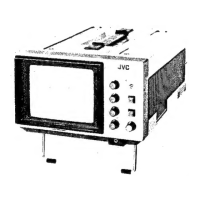
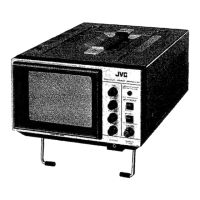
INTRODUCTION
This
manual
provides
service
information
for
the
JVC
TM-41EG/EK
Color
Video
Monitor.
The
manual
de-
scribes
the
instruction
and
adjustment
of
electrical
operation.
Service
procedures
given
herein
cover
only
field
maintenance
services.
Adjustments
which
require
high-level
instruments,
jigs
and
techniques
are
excluded,
since
they
should
be
per-
formed
at
the
factory.
Due
to
design
modifications,
the
service
procedures
and
data
given
in
this
manual
are
subject
to
posssible
change
without
prior
notice.
WARNING:
TO
PREVENT
FIRE
OR
SHOCK
HAZARD,
DO
NOT
EXPOSE
THIS
UNIT
TO
RAIN
OR
MOISTURE.
POWER
SYSTEM
The
operating
voltage
of
this
set
is
preset
to
220
V
~(EK-version:
240
V~\}
at
the
factory.
Before
connectiong
to
mains,
check
that
the
vol-
tage
selector
on
the
rear
panel
is
set
to
the
same
voltages
as
your
local
mains
supply.
Adapting
to
local
power
line
This
set
operates
on
either
110,
127,
220
or
240
Vv.
The
voltage
selector
can
be
reset
as
follows.
Turn
the
voltage
selector
using
a
screw-
driver
until
the
proper
voltage
appears
at
the
cutout.
r
IMPORTANT
{In
the
United
Kingdom)
Mains
Supply
(AC
240
Vv,
50
Hz
only)
IMPORTANT
Do
not
make
any
connection
to
the
Larger
Ter-
minal
coded
E
or
Green,
The
wires
in
the
mains
lead
are
coloured
in
accordance
with
following
code:
[ees
Blue
to
N
{Neutral}
oF
Black
_
=
Brown
to
L
(Live)
or
Red
If
these
colours
do
not
correspond
with
the
terminal
identifications
of
your
plug,
connect
as
follows:
Blue
wire
to
terminal
coded
N
(Neutral)
or
coloured
Black.
Brown
wire
to
terminal
coded
L
(Live)
or
coloured
Red.
Connection
to
the
mains
suppiy
|
MAINS
POWER
SWITCH
The
mains
power
switch
is
located
on
the
rear
connector
panel,
Setting
this
switch
to
OFF
removes
all
applied
power
from
the
unit.
1.2
FEATURES
®
PAL/SECAM
switchable
colour
system
with
a
three-
position
switch
for
PAL,
AUTO
and
SECAM.
@
Compact,
lightweight
and
handy
to
use.
®@
A
G-inch
(13-cm
viewing
area)
in-line
black
stripe
picture
tube
capable.
of
accurate,
well-defined
colour
reproduction.
@
Flexible
AC/DC
power
supply
—
household
AC
or
built-in
exclusive
rechargeable
battery
pack
—
enabling
both
indoor
or
outdoor
use.
@
Built-in
speaker
enabling
simultaneous
audio
and
video
monitoring.
@
Dual
circuits
provided
for
audio
and
video
signals.
®
An
LED
indicator
to
warn
of
jow
battery
power.
®
Recharging
of
the
exclusive
battery
pack
PBP-1
(optional)
is
possible
with
the
AA-PATEG/EK/S
AC
Power
Adapter
(optional).