EasyManua.ls Logo

JVC TM-41 EG - Power Supply

JVC TM-41 EG
36 pages
Print Icon
To Next Page IconTo Next Page
To Previous Page IconTo Previous Page
Loading...
15.
16.
17,
18,
19,
20.
24.
22,
23.
24.
25.
26,
27,
DC
IN
12
V/CHARGE
socket
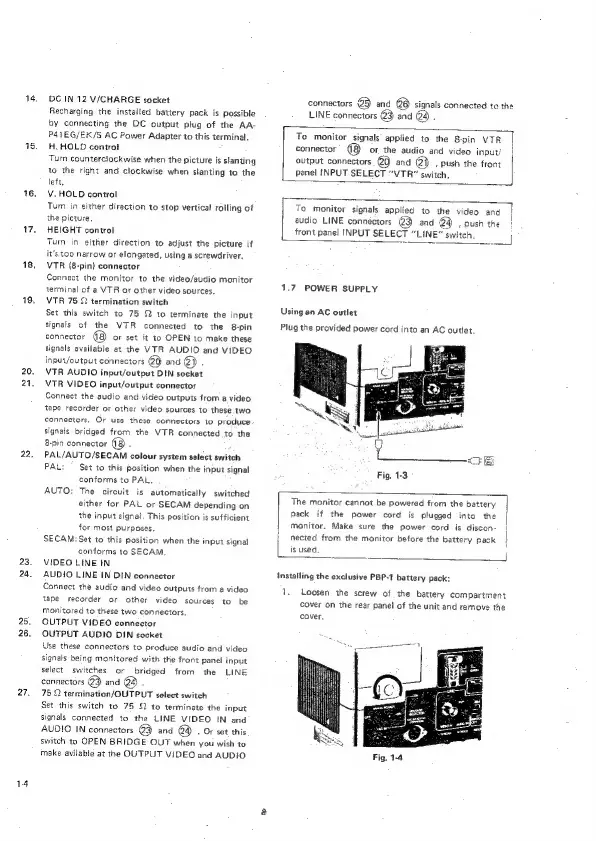
Recharging
the
installed
battery
pack
is
possible
by
connecting
the
DC
output
plug
of
the
AA-
P41EG/EK/S
AC
Power
Adapter
to
this
terminal.
H.
HOLD
control
Turn
counterclockwise
when
the
picture
is
slanting
to
the
right
and
clockwise
when
slanting
to
the
left.
V.HOLD
control
Turn
in
either
direction
to
stop
vertical
rolling
of
the
picture.
HEIGHT
control
Turn
in
either
direction
to
adjust
the
picture
if
it's
too
narrow
or
elongated,
using
a
screwdriver,
VTR
(8-pin)
connector
Connect
the
monitor
to
the
video/audio
monitor
terminal
of
a
VTR
or
other video
sources.
VTR
75
22
termination
switch
Set
this
switch
to
75
Q
to
terminate
the
input
signals
of
the
VTR
connected
to
the
8-pin
connector
(8)
or
set
it
to
OPEN
to
make
these
signals
available
at
the
VTR
AUDIO
and
VIDEO
inpuvVoutput
connectors
@Q
and
QD
.
VTR
AUDIO
input/output
DIN
socket
VTR
VIDEO
input/output
connector
Connect
the
audio
and
video
outputs
from
a
video
tape
recorder
or
other
video
sources
to
these
two
connectors.
Or
use
these
connectors
to
produce
signals
bridged
from
the
VTR
connected
to
the
8-pin
connector
B
PAL/AUTO/SECAM
colour
system
select
switch
PAL:
—
Set
to
this
position
when
the
input
signal
conforms
to
PAL.
AUTO:
The
circuit
is
automatically
switched
either
for
PAL
or
SECAM
depending
on
the
input
signal.
This
position
is
sufficient
for
most
purposes.
SECAM:
Set
to
this
position
when
the
input
signal
conforms
to
SECAM,
VIDEO
LINE
IN
AUDIO
LINE
IN
DIN
connector
Connect
the
audio
and
video
outputs
from
a
video
tape
recorder
or
other
video
sources
to
be
monitored
to
these
two
connectors.
OUTPUT
VIDEO
connector
OUTPUT
AUDIO
DIN
socket
Use
these
connectors
to
produce
audio
and
video
signals
being
monitored
with
the
front
panel
input
select
switches
or
bridged
from
the
LINE
connectors
@3
and
@3)
.
75
Q
termination/OUTPUT
select
switch
Set
this
switch
to
75
82
to
terminate
the
input
signals
connected
to
the
LINE
VIDEO
IN
and
AUDIO
IN
connectors
@3
and
@4)
.
Or
set
this
switch
to
OPEN
BRIDGE
OUT
when
you
wish
to
make
avilabie
at
the
OUTPUT
VIDEO
and
AUDIO.
connectors
@5
and
@6)
signals
connected
to
the
LINE
connectors
@3
and
@4)
.
(“Fe
smionitor
etgnals
applied
to
the
&-pin
VTR
connector’
(8
or
the
audio
and
video
inpury
|
output
connectors
@Q
and
@})
,
push
the
front
penel
INPUT
SELECT
“VTR”
switch,
|
To
monitor
signals
applied
to
the
video
and
|
audio
LINE
connectors
@3
and
@4
,
push
the
!
front
panel
INPUT
SELECT
“LINE”
switch.
1.7
POWER
SUPPLY
Using
an
AC
outlet
Plug
the
provided
power
cord
into
an
AC
outlet.
Fig.
1-3
The
monitor
cannot
be
powered
from
the
battery
]
pack
if
the
power
cord
is
plugged
into
the
|
Monitor.
Make
sure
the
power
cord
is
discon-
|
nected
from
the
monitor
before
the
battery
pack
|
is
used.
i
7
J
Installing
the
exclusive
PBP-1
battery
pack:
1.
Loosen
the
screw
of
the
battery
compartment
cover
on
the
rear
panel
of
the
unit
and
remove
the
cover.