EasyManua.ls Logo

JVC TM-41 EG - Recharging the Pbp-1 Battery Pack

JVC TM-41 EG
36 pages
Print Icon
To Next Page IconTo Next Page
To Previous Page IconTo Previous Page
Loading...
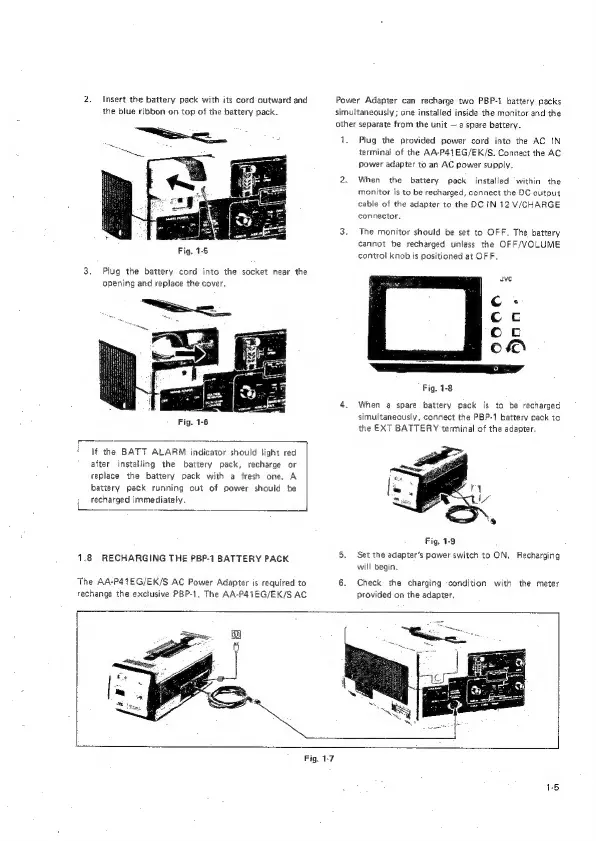
2.
Insert
the
battery
pack
with
its
cord
outward
and
Power
Adapter
can
recharge
two
PBP-1.
battery
packs
the
blue
ribbon
on
top
of
the
battery
pack.
simultaneously;
one
installed
inside
the
monitor
and
the
other
separate
from
the
unit
—
a
spare
battery.
ee
:
1.
Plug
the
provided
power
cord
into
the
AC
IN
terminal
of
the
AA-P41EG/EK/S.
Connect
the
AC
Power
adapter
to
an
AC
power
supply.
2.
When
the
battery
pack
installed
within
the
monitor
is
to
be
recharged,
connect
the
DC
output
cable
of
the
adapter
to
the
DC
IN
12
V/CHARGE
connector,
3.
The
monitor
should
be
set
to
OFF.
The
battery
cannot
be
recharged
unless
the
OFF/VOLUME
Fig,
1-5
control
knob
is
positioned
at
OF
F.
3.
Plug
the
battery
cord
into
the
socket
near
the
opening
and
replace
the
cover,
Fig.
1-8
4,
When
a
spare
battery
pack
is
to
be
recharged
simultaneously,
connect
the
PBP-1
battery
pack
to
the
EXT
BATTERY
terminal
of
the
adapter,
—
ca
If
the
BATT
ALARM
indicator
should
tight
red
after
installing
the
battery
pack,
recharge
or
replace
the
battery
pack
with
a
fresh
one,
A
battery
pack
running
out
of
power
should
be
recharged
immediately.
Fig.
1-9
1.8
RECHARGING
THE
PBP-1
BATTERY
PACK
5.
Set
the
adapter’s
power
switch
to
ON.
Recharging
will
begin.
The
AA-P4TEG/EK/S
AC
Power
Adapter
is
required
to
6.
Check
the
charging
condition
with
the
meter
rechange
the
exclusive
PBP-1.
The
AA-P41EG/EK/S
AC
provided
on
the
adapter.
Fig.
1-7