EasyManua.ls Logo

JVC TM-41 EG - Page 7

JVC TM-41 EG
36 pages
Print Icon
To Next Page IconTo Next Page
To Previous Page IconTo Previous Page
Loading...
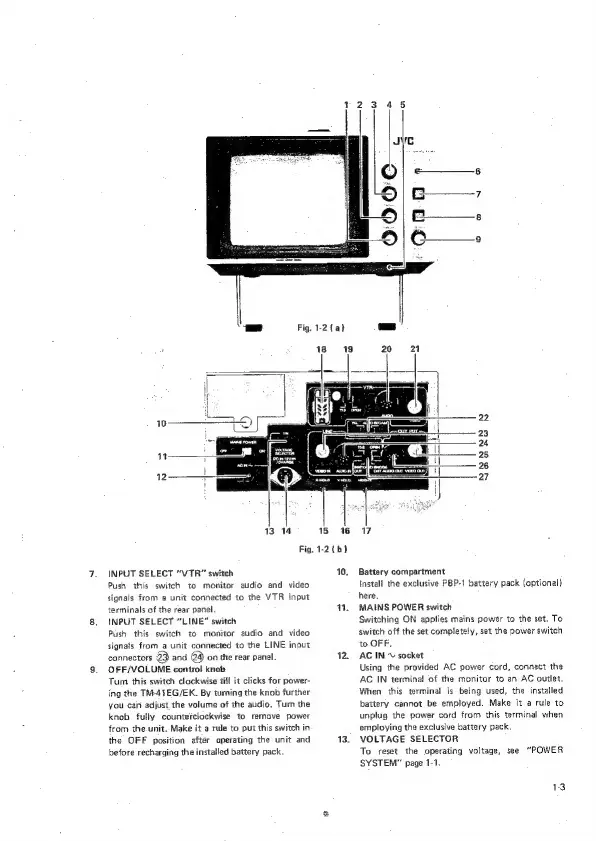
Fig.
1-2
{a}
13°14
15
16
Fig.
1-2
(b)
INPUT
SELECT
“VTR™
switch
Push
this
switch
to
monitor
audio
and
video
signals
from
a
unit
connected
to
the
VTR
input
terminals
of
the
rear
panel.
INPUT
SELECT
“LINE”
switch
Push
this
switch
to
monitor
audio
and
video
signals
from
a
unit
connected
to
the
LINE
input
connectors
B
and
@4)
on
the
rear
panel.
OFF/VOLUME
control
knob
Turn
this
switch
clockwise
dill
it
clicks
for
power-
ing
the
TM-44EG/EK.
By
turing
the
knob
further
you
can
adjust
the
volume
of
the
audio.
Turn
the
knob
fuliy
counterclockwise
to
remove
power
from
the.unit.
Make
it
a
rude
to
put
this
switch
in
the
OFF
position
after
operating
the
unit
and
before
recharging
the
installed
battery
pack.
10.
Ww.
12,
13.
7
Battery
compartment
Install
the
exclusive
PBP-1
battery
pack
(optional)
here.
MAINS
POWER
switch
Switching
ON
applies
mains
power
to
the
set.
To
switch
off
the
set
completely,
set
the
power
switch
to
OFF,
AC
IN
©
socket
Using
the
provided
AC
power
cord,
connect
the
AC
IN
terminal
of
the
monitor
to
an
AC
outlet.
When
this
terminal
is
being
used,
the
installed
battery
cannot
be
employed.
Make
it
a
rule
to
unplug
the
power
cord
from
this
terminal
when
employing
the
exclusive
battery
pack.
VOLTAGE
SELECTOR
To
reset
the
operating
voltage,
see
“POWER
SYSTEM”
page
1-1.