No. 51921
TM-A101G
17
[ WHITE BALANCE Adjustment : METHOD 1 ]
Accordance with the screen display, select the each W HITE BALANCE mode
following below.
CUTOFF adjustment mode (Low light adjustment)
Ο
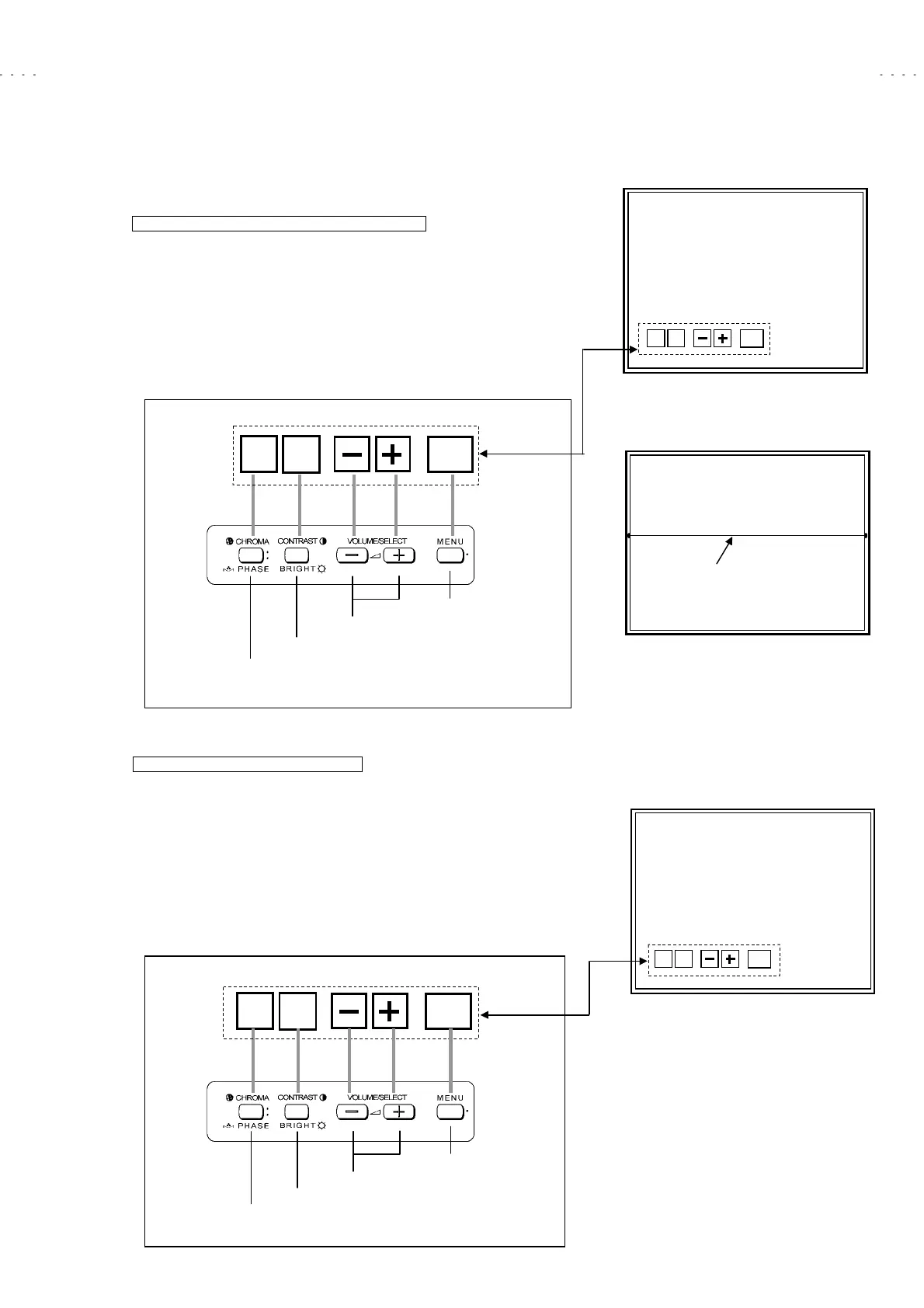
In the WHITE BALANCE menu screen, press the
CHROMA/PHASE
key to
enter to the CUTOFF adjustment mode (Fig. 9). In this case, key function is
replaced as shown below.
Π
Whenever press the
CHROMA/PHASE
key, change the adjustment colour
of R, G and B.
Ρ
The single horizontal line service screen appears if press the
CONTRAST/BRIGHT
key (Fig. 10).
z
Refer to the “Low-Light adjustment” corresponding page about detailed
adjustment steps.
DRIVE adjustment mode (HIGH LIGHT)
Ο
In the WHITE BALANCE menu screen, press the
CONTRAST/BRIGHT
key to enter to the DRIVE adjustment mode (Fig. 11). In this case, key
function is replaced as shown below.
Π
Whenever press the
CHROMA/PHASE
key, change the “R DRIVE” or “
B DRIVE” adjustment mode.
Ρ
CONTRAST/ BRIGHT
key is the switch of the screen display. If necessary,
you can shut off the display. Carefully, values of adjustment items are
changed while shut off the screen display.
z
Refer to the “High-Light adjustment” corresponding page about detailed
adjustment steps.
CUTOFF ADJUSTMENT SCREEN
R CUTOFF
ŅŅЅ***
RGB SERV
EXIT
Fig. 9
SINGLE HORIZONTAL LINE
Fig. 10
single horizontal line
RGB
SERV
EXIT
< Function Display >
< Front Panel Key Arrangement >
DRIVE ADJUSTMENT SCREEN
R DRIVE
Ѕ***
R-B
DISP
EXIT
Fig. 11
R-B
DISP
EXIT
< Function Display >
< Front Panel Key Arrangement >
Select the R, G or B mode
Display 1H line switch
Data operate (inc/dec) key
djustment mode exit key
Select the R or B mode
Display on/off switch
Data operate (inc/dec) key
djustment mode exit key







 To Next Page