No. 51921
TM-A101G
18
[ WHITE BALANCE Adjustment : METHOD 2 ]
SERVICE MENU has the other method for adjusting the WHITE BALANCE
about above-mentioned method.
Ο
In the W HITE BALANCE menu screen, press the
VOLUME/SELECT
+(UP)
key or
–(DOWN)
key, then enter to the “W 01” or “W05” adjustment
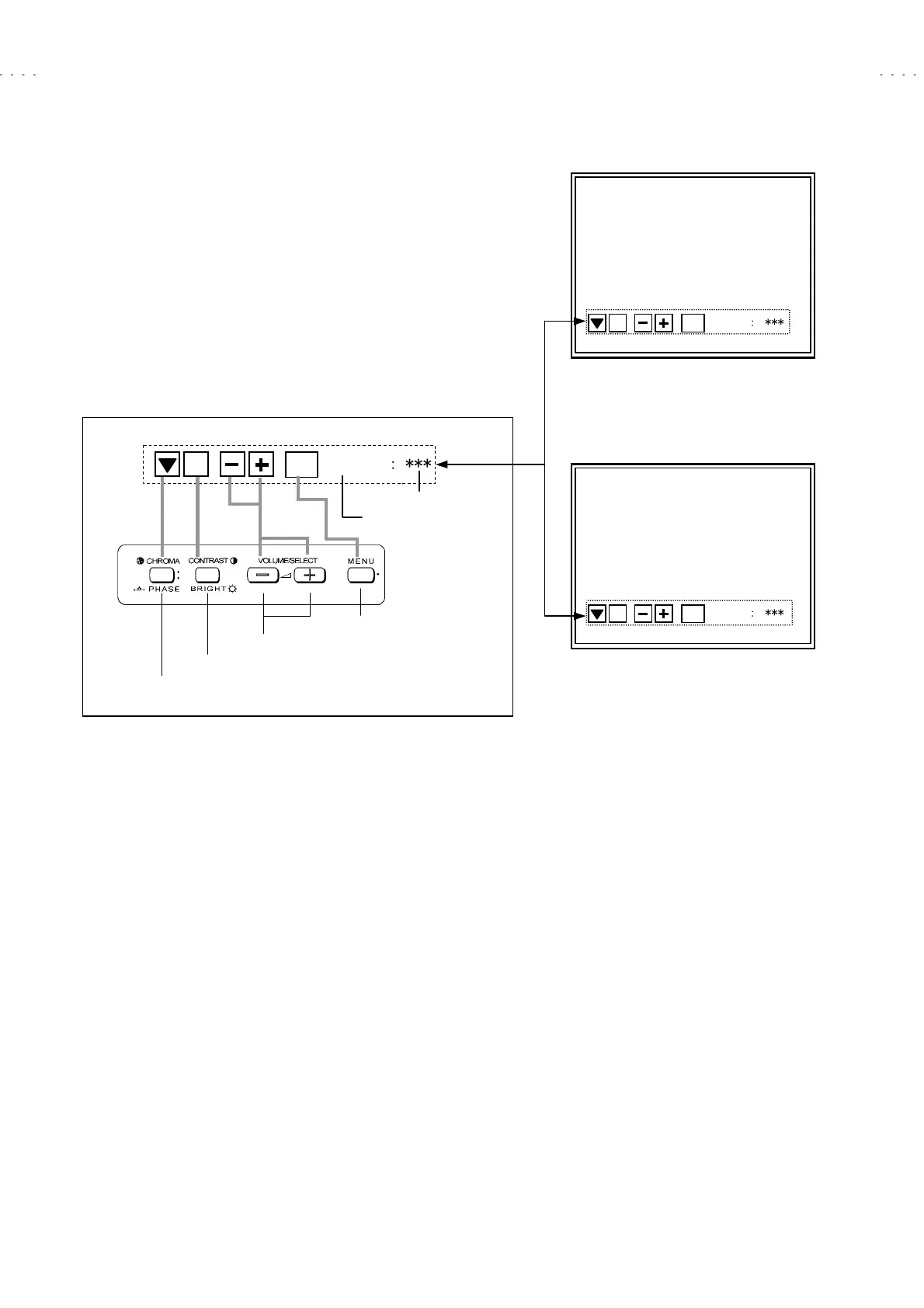
mode (Fig. 12, 13). In this case, key operation is changed as shown below.
The operation of this mode is as same as SIGNAL BLOCK adjustment
operation.
Π
In the case of select the “W01” mode, able to adjust the “R CUTOFF”. But
in order to adjust in correct condition must be adjust the other colour (G or
B). Therefore, necessary to change the service numbers and adjusts each
value.
Ρ
Press the
CHROMA/PHASE
key to select the service number.
This mode is WHITE BALANCE BLOCK full adjustment mode (both Low
light and High light are able to adjust).
WHITE BALANCE W01 mode
DISP
EXIT
ʷ
ʝ
ʝ
ʝ
ʧ
ʧ
ʧ
< W01 >
Fig. 12
DISP
EXIT
ʷ
ʝ
ʝ
ʧ
ʧ
ʧ
< W0
ң
>
< Function Display >
< Front Panel Key Arrangement >
Select the service number
Display on/off switch
Data operate (inc/dec) key
djustment mode exit key
Service number indicated
Setting value indicated
WHITE BALANCE W05 mode
DISP
EXIT
ʷ
ʝ
ʝ
ʝ
ʧ
ʧ
ʧ
< W05 >
Fig. 13







 To Next Page