No. 51921
TM-A101G
19
ӕ
DEFLECTION BLOCK
Ο
In the <BLOCK SELECT> screen, press the
VOLUME/SELECT
–(DOWN)
key.
Π
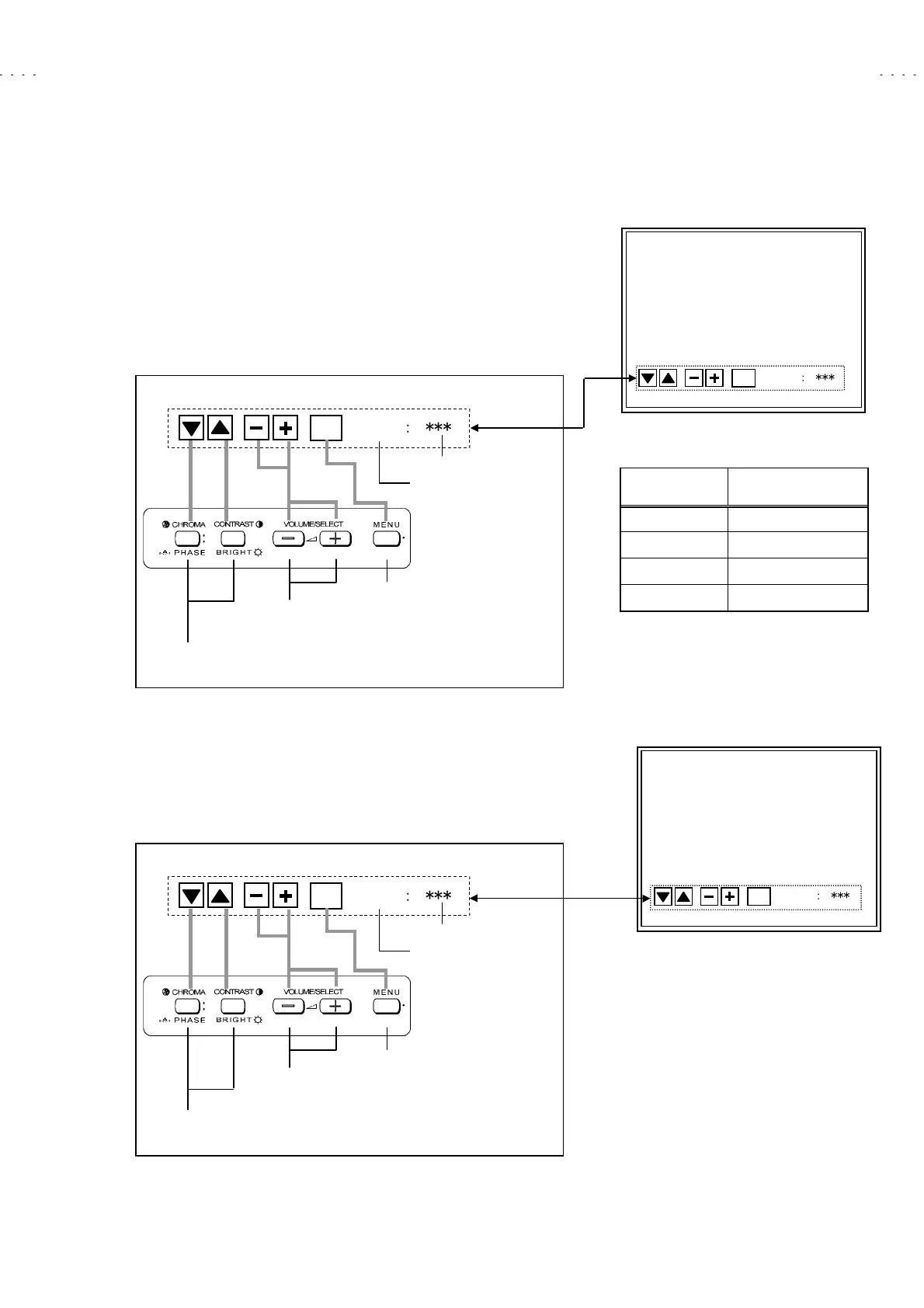
Then the DEFLECTION BLOCK adjustment screen is displayed (Fig. 14).
Ρ
The original front key function replaced with the other function displayed
at the lower side of the screen as shown below.
CONTRAST/BRIGHT
key is the switch of the screen display. If necessary,
you can shut off the display. Carefully, values of adjustment items are
changed while shut off the screen display.
Σ
The indication of service numbers are changed by the signal that uses for
adjustment (Vertical frequency and screen aspect ratio Fig. 15).
ӕ
CONTROL BLOCK (This is a fixed value. Don’t adjust it).
Ο
In the <BLOCK SELECT> screen, press the
VOLUME/SELECT
+(UP)
key.
Π
Then the CONTROL BLOCK adjustment screen is displayed (Fig. 16).
Ρ
The original front key function replaced with the other function displayed
at the lower side of the screen as shown below.
SIGNAL SCREEN DISPLAY
50Hz
Ӹ
4:3 D01
ϡ
D05
60Hz
Ӹ
4:3 DA1
ϡ
DA5
50Hz
Ӹ
16:9 DB1
ϡ
DB5
60Hz
Ӹ
16:9 DC1
ϡ
DC5
Fig. 15
DEFLECTION BLOCK
EXIT
EXITEXIT
EXIT
ʷ
ʝ
ʝ
ʝ
ʧ
ʧ
ʧ
< D01 >
Fig. 14
CONTROL BLOCK
EXIT
EXITEXIT
EXIT
ʷ
ʝ
ʝ
ʝ
ʧ
ʧ
ʧ
< C01 >
Fig. 16
EXIT
ʷ
ʝ
ʝ
ʝ
ʧ
ʧ
ʧ
< D01 >
< Function Display >
Select the Service Number
Data operate (inc/dec) key
djustment mode exit key
Service number indicated
Setting value indicated
< Front Panel Key Arrangement >
EXIT
ʷ
ʝ
ʝ
ʝ
ʧ
ʧ
ʧ
< C01 >
< Function Display >
e
ect t
e
erv
ce
um
er
Data operate (inc/dec) key
djustment mode exit key
Service number indicated
Setting value indicated
< Front Panel Key Arrangement >







 To Next Page