10
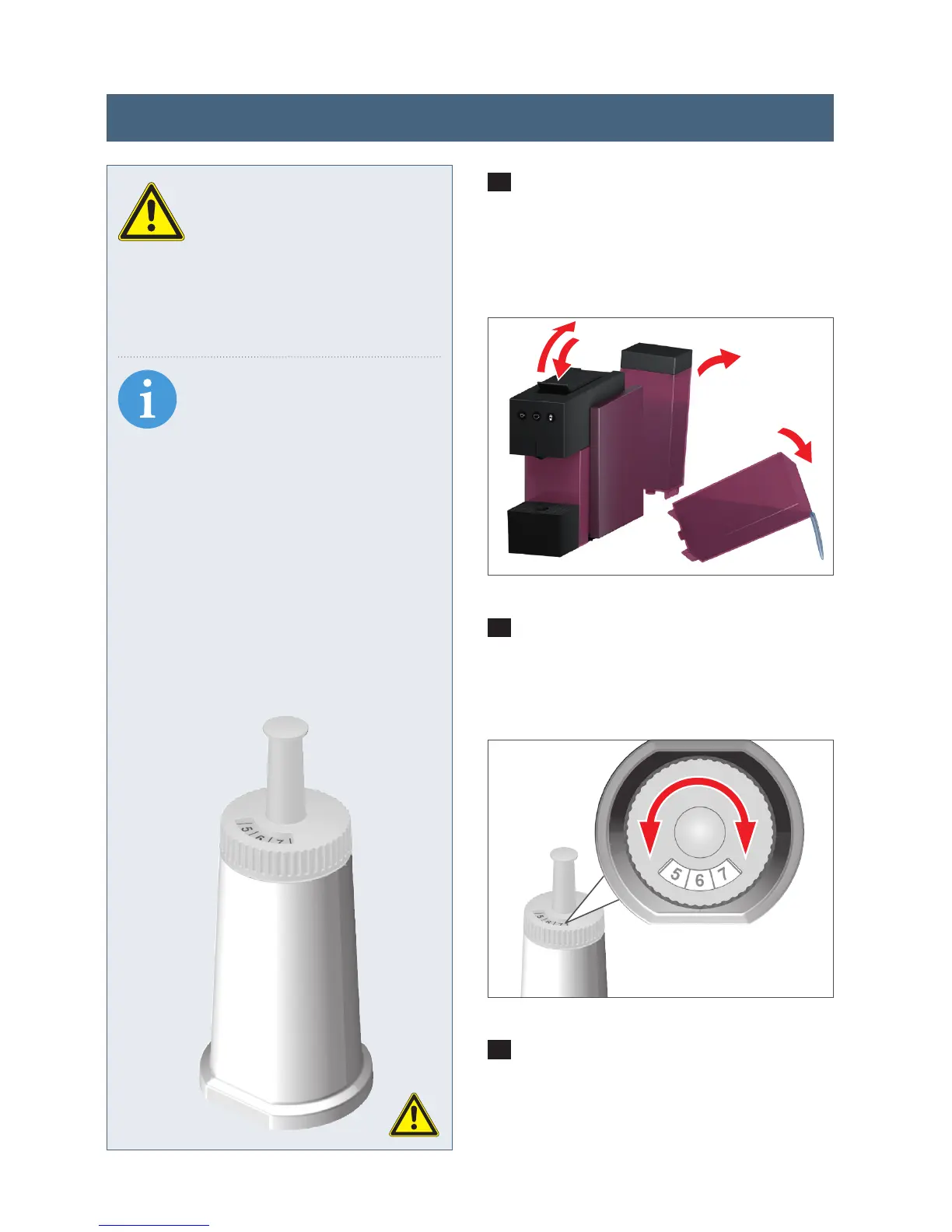
1
Open and close the lever so that you
eject any capsule which might not have
been released into the spent capsule
container. Now remove and empty the
water tank.
2
Set the insertion date (month) using
the rotating scale on the water filter. The
expiry date is automatically displayed.
3
Insert the filter into the empty water
tank. Now fill the water tank with fresh
drinking water. Put it back into the ap-
pliance and place a collecting container
under the spout.
SAFETY INFORMATION
Read the user and safety
information about the water
filter through carefully. We recommend
that you replace the water filter every
3 months at the latest for hygienic rea-
sons.
INFO
This water filter protects your
appliance against calcificati-
on and reduces the number of times
you have to descale it. It also remo-
ves undesirable odours and flavourings
such as chlorine etc. and therefore im-
proves the quality of your drinks. Plea-
se only use water filters which are sui-
table for EXPRESSI capsule machines.
For further information please visit
www.expressishop.com.au
2
1
Inserting the water filter (sold separately)




 To Next Page