15
1
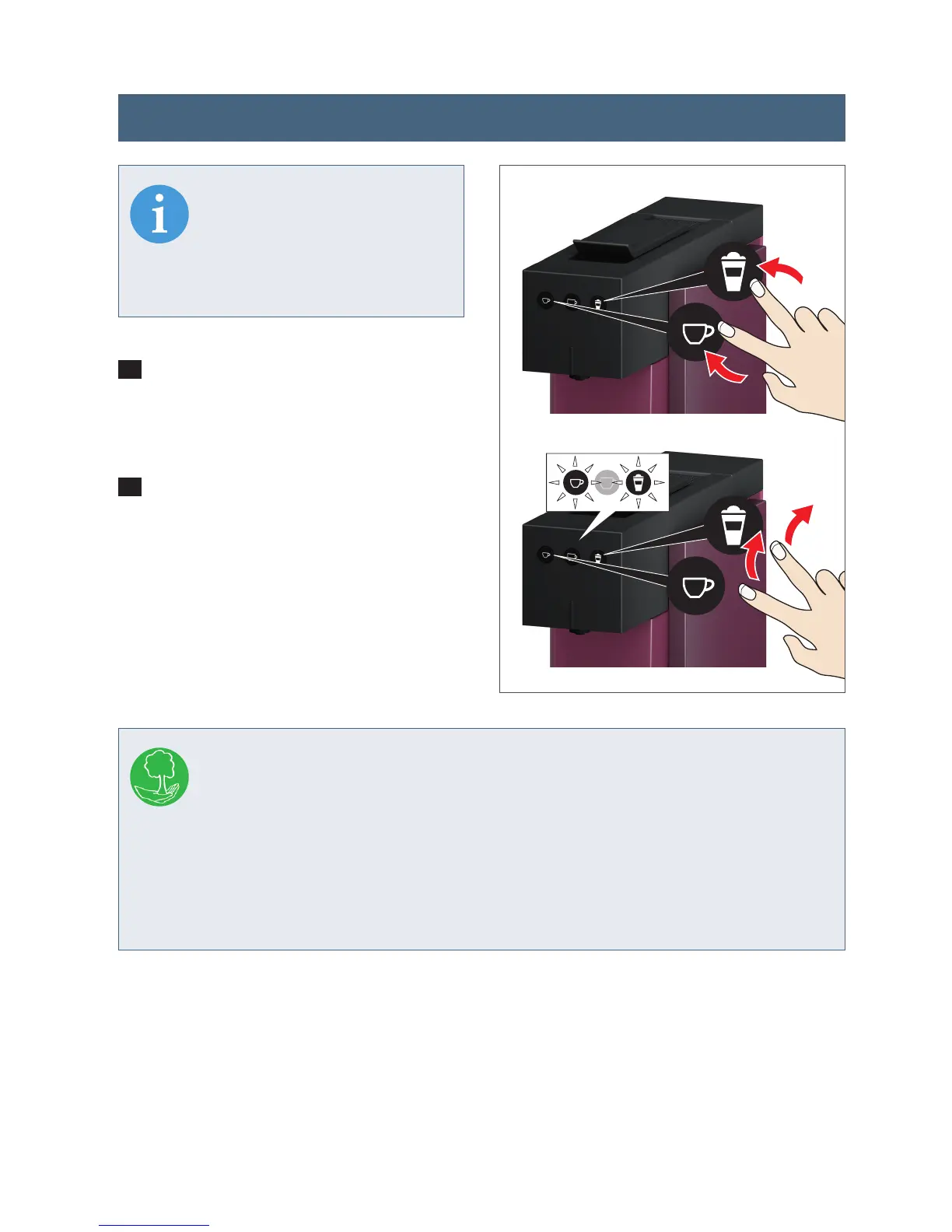
Allow the appliance to go into the
automatic off/standby mode (automatic
switch-off 5 minutes after last use).
2
Now press the "Small cup" button and
the rinse/milk button simultaneously,
and keep the buttons pressed for at
least 3 seconds. Release the buttons.
Both buttons will blink briefly once to
confirm resetting to factory settings.
INFO
Resetting the appliance to
the factory settings deletes
your individual settings for
cup capacity.
INFO
The factory setting is 5 minutes in order to avoid unnecessary energy
consumption and to protect the environment. This means that the applian-
ce automatically switches itself off after 5 minutes of non-use. This means that your
EXPRESSI capsule machine uses considerably less energy: the appliance consumes
considerably less power (less than 0.5 W) than it does in operating mode.
During periods of absence and at the end of the brewing day, switch the appliance
off at power supply (240V plug).
min.
3 sec.
2
Resetting to factory settings




 To Next Page