20
3
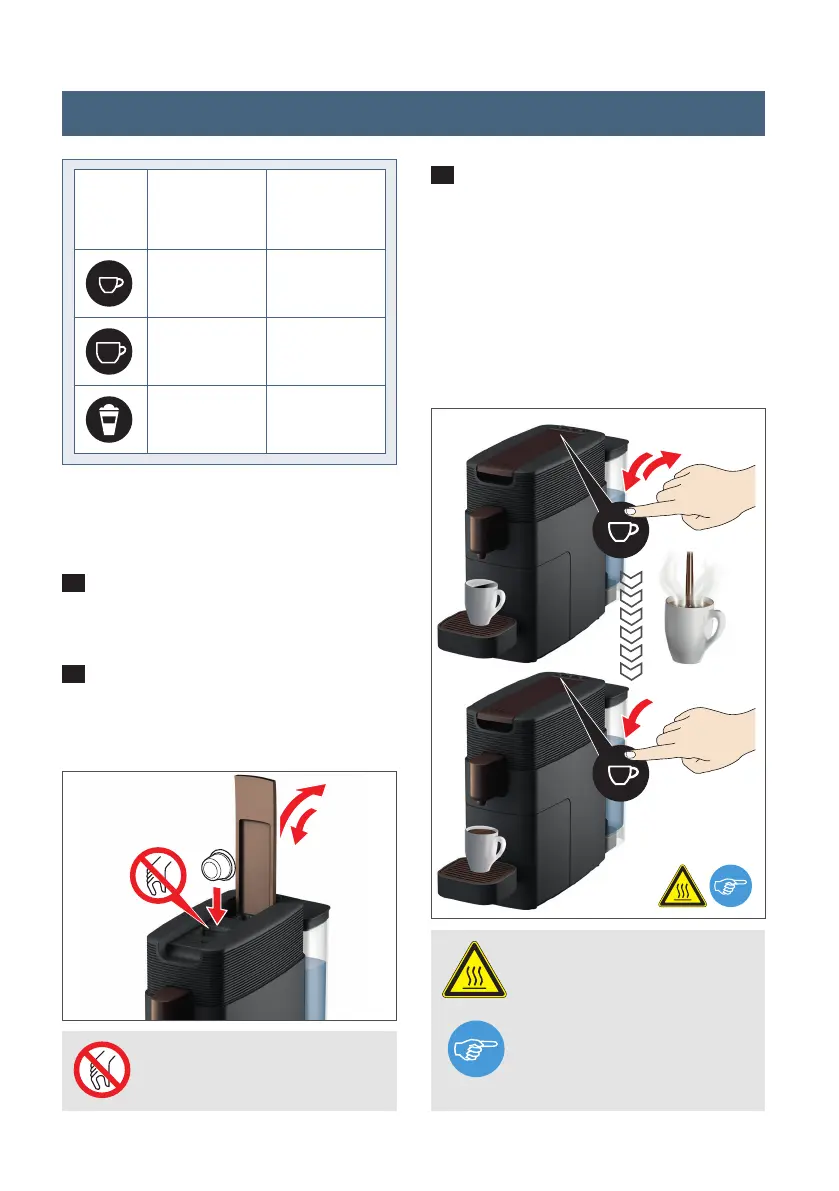
Now press and hold the desired beve-
rage button for at least 3 seconds to acti-
vate programming. Release the button.
The cup will now be filled up with liquid.
Once the desired level has been reached,
press the button again to automatically
save this new setting.
1
Switch the appliance on and place the
required cup under the spout.
2
Lift the handle and insert the required
pod. Reclose the handle.
Buttons
1.0 - 3.4 /
30 - 100
2.7 - 6.7 /
80 - 200
/
1.5 / 45
3.5 / 105
2.2 / 65
setting range
(fl oz / ml)
manufacturer
setting
(fl oz / ml)
PROHIBITED: Do not reach
inside – injury hazard.
WARNING: Very hot water –
scalding hazard.
NOTE: It is possible to reset
the appliance to the factory
settings (see p. 21).
2
min. 3 sec.
Stop
3
Programming pour size setting
K-FEE_359_BDA_US_KV_RZ_20210111.indd 20K-FEE_359_BDA_US_KV_RZ_20210111.indd 20 11.01.2021 15:59:0111.01.2021 15:59:01




 To Next Page