16
1
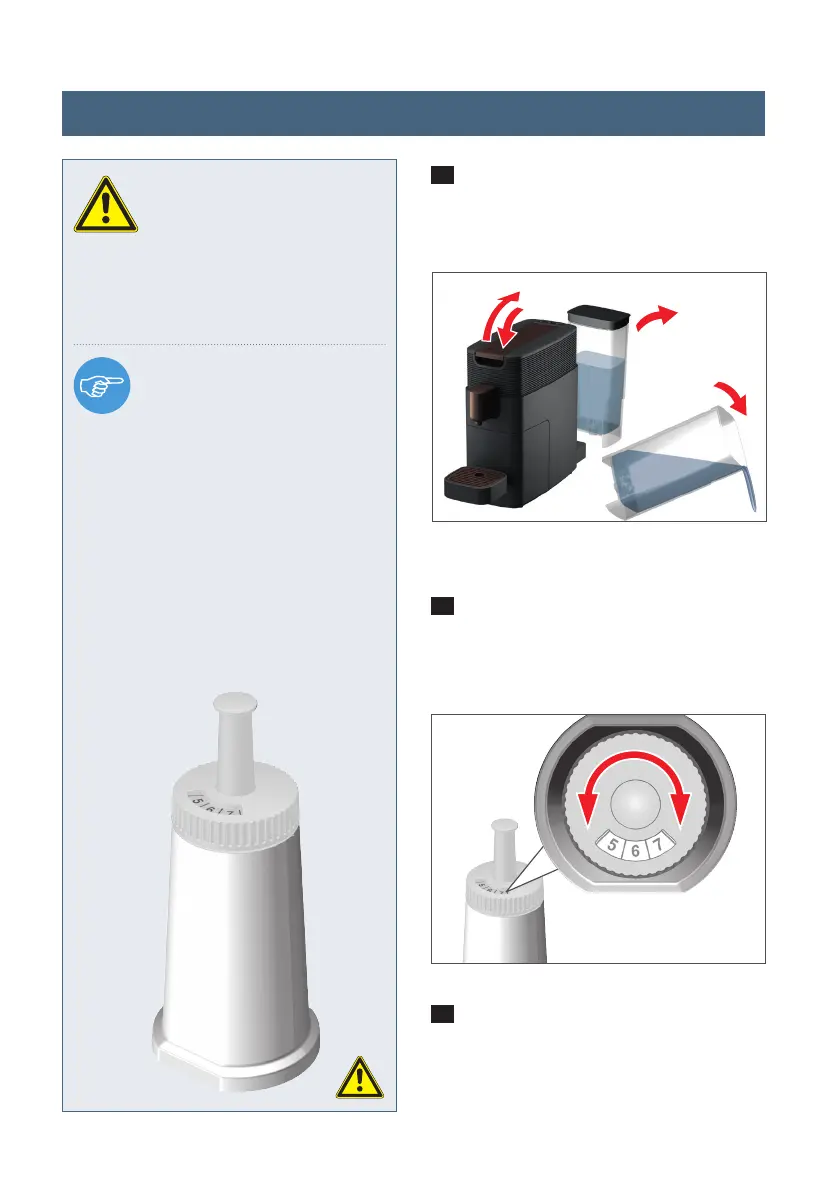
Open and close the lever to eject any
pod which might have been inserted. Now
remove and empty the water tank.
2
Set the insertion date (month) using
the rotating scale on the water fi lter. The
expiry date is automatically displayed.
3
Insert the fi lter into the empty wa-
ter tank. Now fi ll the water tank with
fresh drinking water. Put it back into
the appliance and place a heat-safe cup
under the spout.
WARNING:
Read the user and safety
information about the water
fi lter through carefully. We recommend
that you replace the water fi lter every
3 months at the latest for hygienic rea-
sons.
NOTE:
This water fi lter protects your
appliance against calcifi ca-
tion and reduces the number of times
you have to descale it. It also removes
undesirable odours and fl avourings
such as chlorine etc. and therefore
improves the quality of your drinks.
Please only use water fi lters which
are suitable for K-fee® – your system
brewer. For further information please
visit www.k-fee.us
2
1
Inserting the water fi lter (optional)
K-FEE_359_BDA_US_KV_RZ_20210111.indd 16K-FEE_359_BDA_US_KV_RZ_20210111.indd 16 11.01.2021 15:58:5711.01.2021 15:58:57




 To Next Page