14
3
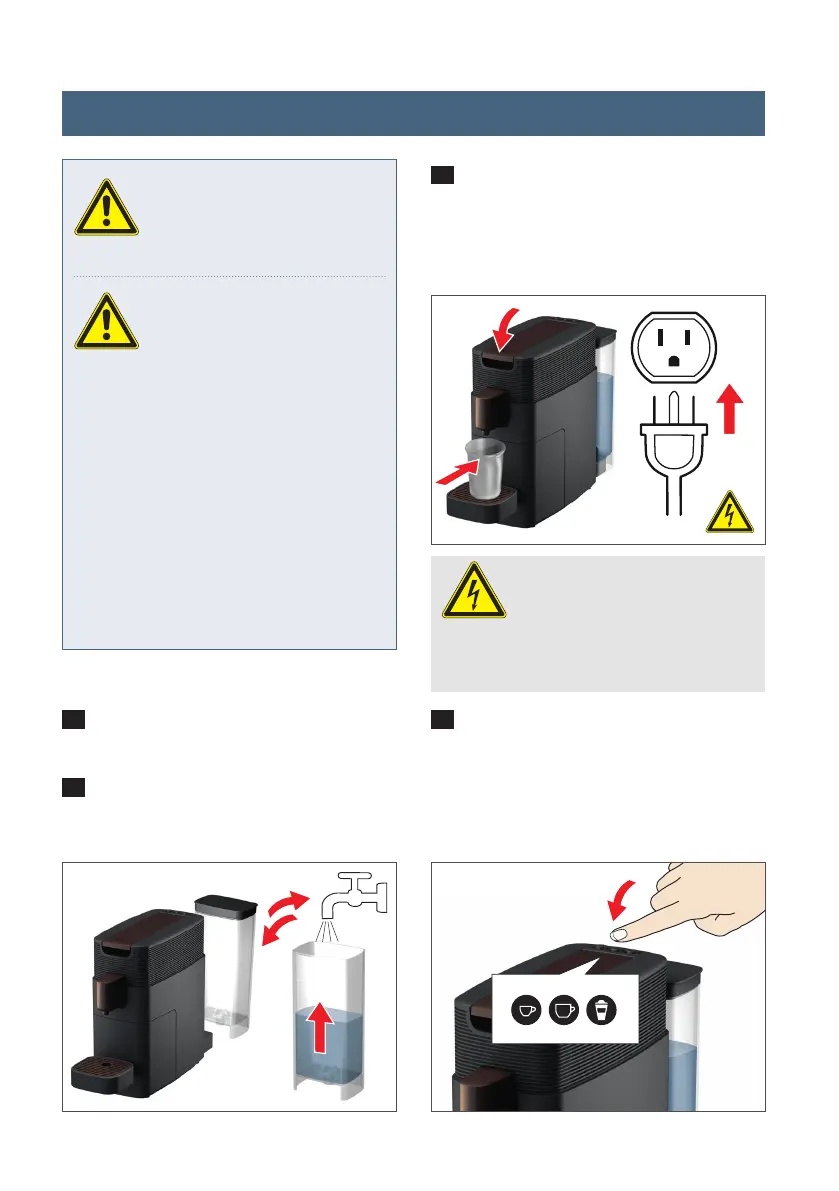
Connect the appliance to the power
supply, press the lever right down to the
bottom and place a heat-safe cup un-
der the spout. The device automatically
switches over to o /standby mode.
4
If you press any of the buttons the
appliance will switch on and heat up (see
fi gure 4a). All button symbols blink (see
fi gure 4b). After heating up, only the milk
button which has been used for rinsing is
illuminated.
1
Remove the water tank and clean it
with water, dish soap and a mild cloth.
2
Fill it up with fresh drinking water and
replace it in the appliance.
CAUTION:
Before setting up the appli-
ance read all safety instruc-
tions on pages 4 - 11.
WARNING:
1. Each time the appliance has
been subjected to cold tem-
peratures or frost, wait at least three
hours before switching on. Let the ap-
pliance warm up to room temperature
fi r s t - malfunction hazard.
2. We recommend the use of a water
fi lter for long and optimum co ee en-
joyment. Please insert this only after
the initial start-up. Please read the
instructions on pages 16 - 17 for this
purpose.
WARNING:
Before plugging in the appli-
ance ensure that the power
source voltage matches to the speci-
fi cations on the rating place (under-
neath the brewer / 120 V )
2 4a
On
3
Setting up / priming the brewer
K-FEE_359_BDA_US_KV_RZ_20210111.indd 14K-FEE_359_BDA_US_KV_RZ_20210111.indd 14 11.01.2021 15:58:5511.01.2021 15:58:55




 To Next Page