The device is a blueplanet XP10U-H4/H6 and XP10U-H4/H6 PSD inverter, designed to convert clean renewable DC energy into AC energy for export into the utility grid. This operator's manual provides instructions for its configuration, operation, and maintenance.
Function Description:
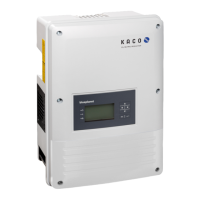
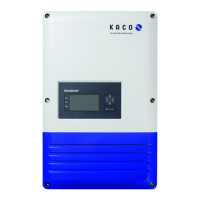
The blueplanet XP10U-H4/H6 inverter is a crucial component in a photovoltaic (PV) power supply system. Its primary function is to convert direct current (DC) generated by solar panels into alternating current (AC) suitable for feeding into the public power grid. The inverter is equipped with a backlit LCD and three status LEDs, along with six control keys, for user interaction and monitoring. It features an integrated web server, allowing for remote monitoring and recording of operating states and yield data via an Internet browser or by exporting data to a USB storage device. The inverter also supports software updates via its integrated USB interface, ensuring it can be kept up-to-date with the latest functionalities and improvements.
Important Technical Specifications:
The XP10U-H4 model is designed in accordance with UL 1741, CSA-C22.2 No. 107.1.01, and NFPA 70, while the XP10U-H6 model complies with CSA-C22.2 No. 107.1.01 and NFPA 70. Both models adhere to IEEE Std. 1547-2003 and 1547.1-2005, FCC Part 15 Class B, and the Directive concerning Electromagnetic Compatibility with Class B (Council Directive 2004/108/EC) and Low Voltage Directive (Council Directive 2006/95/EC).
For safety, the inverter integrates several monitoring and protective functions:
- Overvoltage conductors/varistors: Protect power semiconductors from high-energy transients on both the grid and PV array sides.
- Temperature monitoring: Monitors the heat sink to prevent overheating.
- EMC filters: Protect the inverter from high-frequency grid interference.
- Grid-side grounded varistors: Protect against surge pulses.
- Islanding detection: Complies with VDE 0126-1-1 and IEEE 1547 standards to ensure safe disconnection from the grid during outages.
- On-board overcurrent and over-temperature protection.
The USB interface is specifically approved for USB flash memories ("USB sticks") with a maximum available current of 100 mA. Devices requiring higher power will cause the USB interface power supply to shut down to protect the inverter.
Usage Features:
The inverter's operation is managed through a user-friendly interface comprising a 4-way key, an OK key, and an ESC key.
- LED Indicators: Three status LEDs (Operating, Feed-in, Fault) provide immediate visual feedback on the inverter's operating state.
- Green "Operating" LED: Illuminates when AC voltage is present.
- Green "Feed-in" LED: Illuminates after the country-specific waiting period, indicating the inverter is ready to feed into the grid.
- Red "Fault" LED: Illuminates to indicate a fault message on the display.
- Graphical Display (LCD): The backlit LCD shows measured values, data, and allows configuration through a graphical menu. It displays current date, current power, daily yield, annual yield, status bar, current time, and a feed-in indicator. The backlighting can be activated by pressing any control key and switches off after an adjustable period, or it can be permanently activated/deactivated. In sleep mode, the display is deactivated regardless of the setting.
- Menu Structure: The menu is organized into levels (0, 1, 2, 3) and includes items such as "Measurements" (Generator, Grid, Unit temperature, Yield counter, Yield today, Total yield, CO2 savings), "Settings" (Language, Define total yield, Interface, S0 pulse rate, Logging interval, Log data backup, Display, Date & time, Ethernet, Webserver, Parameters, Country, Grid type/guideline, DC starting volt., Const. volt. ctrl, Information, Inverter type, SW version, Serial number, Display country, Vendor), and "Log data view" (Monthly view, Yearly view, Daily view, Save to USB).
- Initial Start-up: A configuration assistant guides the user through necessary settings for the first-time start-up.
- Monitoring: The integrated web server allows for comprehensive monitoring of the PV system's operating state and yield. Users can view recorded data on the LCD, through the web server via an Internet-capable device connected to the Ethernet interface, or by exporting data to a USB stick. The web server dynamically adapts its language based on browser preferences.
Maintenance Features:
- Software Updates: The inverter's software can be updated via the integrated USB interface using a FAT32-formatted USB stick. It is crucial to ensure active power supply from both AC and DC sides during the update process to prevent damage. The update process involves downloading the update file from the KACO website, extracting it to a USB stick, connecting the stick to the inverter, and confirming the update. The "Operating" LED flashes during the update, and the inverter may restart several times. The success of the update can be verified in the "Information/SW version" menu.
- Data Backup: The inverter supports backing up all recorded yield data to a connected USB storage device. This feature can be activated or deactivated in the "Log data backup" menu.
- Resetting Counters: The "Yield counter" and "Oper. hours counter" can be reset using the "Reset" key, allowing for tracking of specific periods.
- Troubleshooting: The "Fault" LED and corresponding fault messages on the display aid in identifying and addressing issues.
- Authorized Electrician Requirement: All installation and maintenance tasks, especially those involving opening the inverter or touching terminals and leads, must be performed by authorized electricians approved by the supply grid operator, due to the presence of lethal voltages. This ensures operational safety and adherence to safety regulations.

 Need help?


 To Next Page
 General