1.8.3 Modifying Test Tone Frequency and Power Level
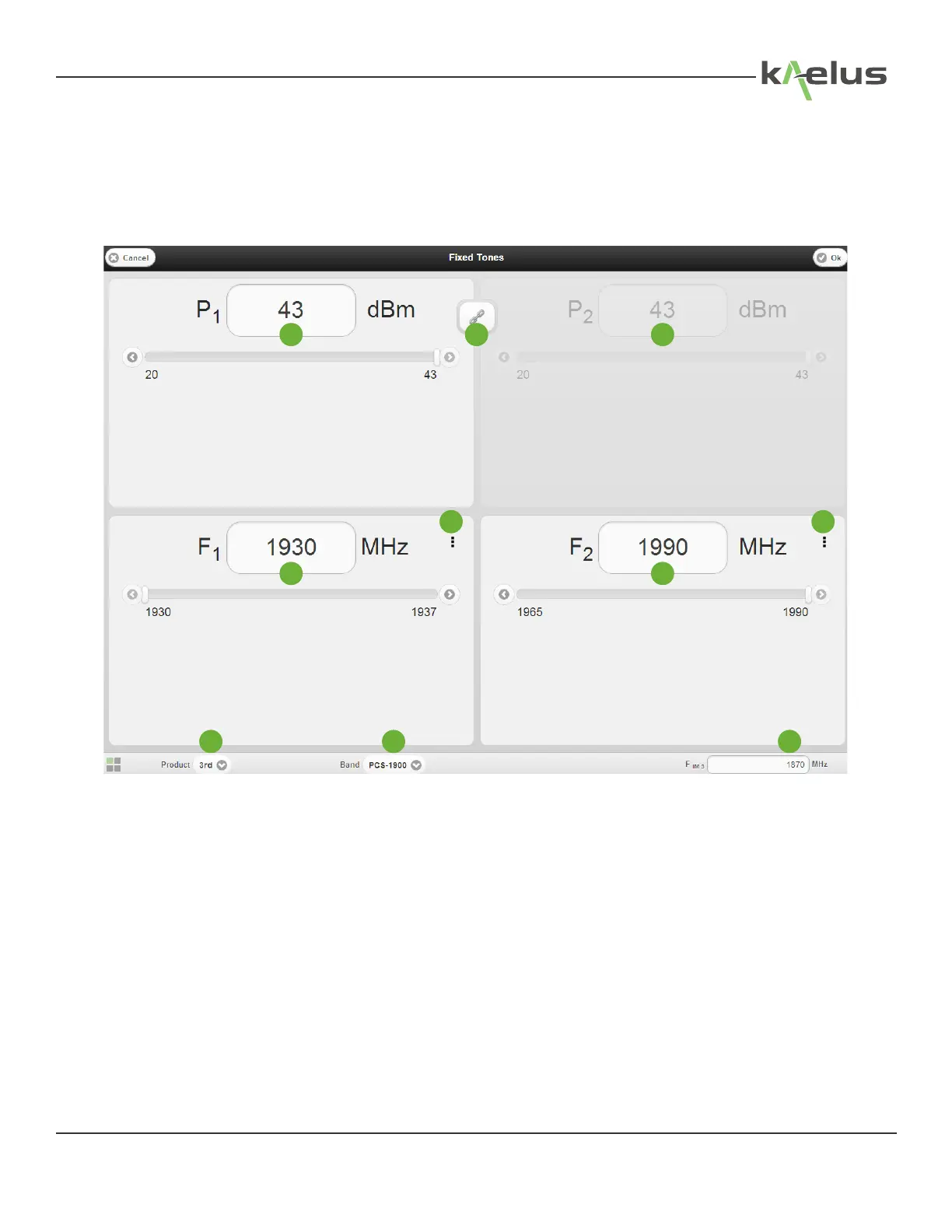
• Press the TX Power icon on the Main Display Window and the TX Tone Powers and frequencies will be displayed.
• Press a test tone power eld (P1 or P2). A numeric keypad is displayed.
• Input the new test tone power in dBm, and press Return.
• The TX Tone frequencies and powers may also be modied using the slide bars shown below the numeric displays.
• Tone 2 power may be locked or unlocked to Tone 1 power by the Power Lock button shown as “3” in gure below:
Figure 17 TX Tones Power and frequency Settings Menu (Tablet PC)
1. TX1 Power Level
2. TX2 Power Level
3. TX1, TX2 Power Locking Toggle (P2 shown locked to P1 power level)
4. TX1 Frequency
5. TX2 Frequency
6. IM Product (3rd, 5th) and 7th order on the iPA-0901
7. TX, RX Cellular Band
8. IM Receiver Frequency
9. Brings up the Tone enable/disable menu (Allows a test tone to be turned o individually Tone 1 or 2)
1 23
4 5
6 7 8
99
33
© 2017 Innite Electronics, Inc., All Rights Reserved.


 To Next Page