2.5.3 Outside connection via wireless router
Depending on your external wireless access points capabilities there may be several ways to connect to your iPA . To
connect to a single iPA most routers provide either a virtual server function or NAT (Network Address Translation) table.
Consult with your Network administrator for the preferred method to use.
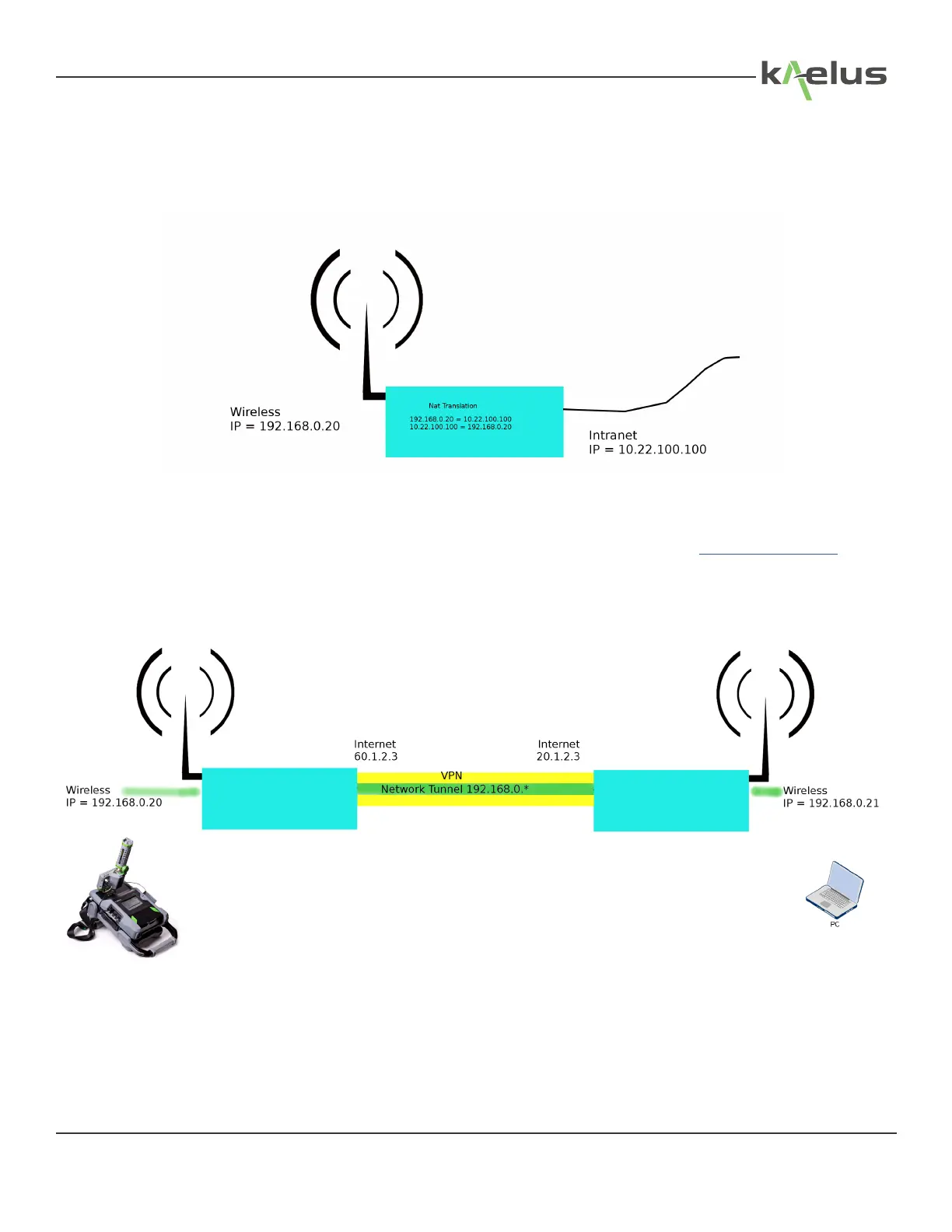
Figure 67 Typical NAT configuration from an intranet
Most wireless routers are congured to share a Pool of wireless side addresses with a single Intranet side address. Some
routers provide functions that allow incomming requests on the intranet side to be redirected to single IP address on the
wireless side. This would then allow you to point your Chrome browser on the intranet side to http://10.22.100.100 and
control the iPA on the wireless side at 192.168.0.20. Consult your wireless router provider information to establish what
functions are available. Port forwarding functions may also be an option in this situation.
Some routers have provision for a VPN (Virtual Private Network) this can provide a network tunnel across the internet.
Figure 68 Internet connection via VPN
85
© 2017 Innite Electronics, Inc., All Rights Reserved.


 To Next Page