List of Figures
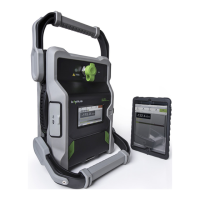
Figure 1 iPA and Tablet PC Front View 13
Figure 2 Monitor Port, External Wi-Fi Port and DC input socket 15
Figure 3 SD Card, USB and Mini USB Port 16
Figure 4 iPA Start up Window 17
Figure 5 iPA Fixed Frequency Window (Default Measurement Mode) 18
Figure 6 Zoom select region Local control 19
Figure 7 Zoom Adjustment Horizontal (Local Control) 20
Figure 8 Zoom Adjustment Vertical (Local Control) 21
Figure 9 Pan Window Adjustment (Local Control) 21
Figure 10 Settings Window Table PC 22
Figure 11 iPad Start up Window 23
Figure 12 iPad Initial Front Panel Display (Fixed Frequency Window) 24
Figure 13 Browser.iPA Fixed Frequency Window (RF “on”) 27
Figure 14 Test State Settings Window 30
Figure 15 Shutdown Window 31
Figure 16 iPA RF “on” Timer Window 32
Figure 17 TX Tones Power and frequency Settings Menu (Tablet PC) 33
Figure 18 Calculated IM Products 34
Figure 19 iPA IM Treshold Level Window 35
Figure 20 iPA Battery Window 36
Figure 21 iPA Settings About Window 37
Figure 22 iPA Settings Capabilities Window 38
Figure 23 iPA Settings Region Window 39
Figure 24 iPA Network Settings Window 40
Figure 25 iPad settings menu selection 41
Figure 26 iPad Selecting your Wi-Fi Hotspot (Serial Number) 42
Figure 27 iPad Network information Windows 43
Figure 28 Instrument State Window 44
Figure 29 Miscellaneous settings window 46
Figure 30 Miscellaneous settings window (Local control) 47
Operating Manual | The Battery Operated Intermodulation Test System
8


 To Next Page