26
WIFI DRONE OPERATION
The Gamma Drone has a feature that lets you control the Drone exclusively via the APP.
We recommend beginner pilots learn to use the remote transmitter before attempting to
control the Drone through the App.
To pilot the Drone without the Remote Transmitter:
1. Turn on the Drone. Do not bind the Drone to the Remote Transmitter (Keep it o).
2. Connect to the Drone with your device via WiFi. The password is “1234567890”
3. Using the App navigate to the “My Drone” screen.
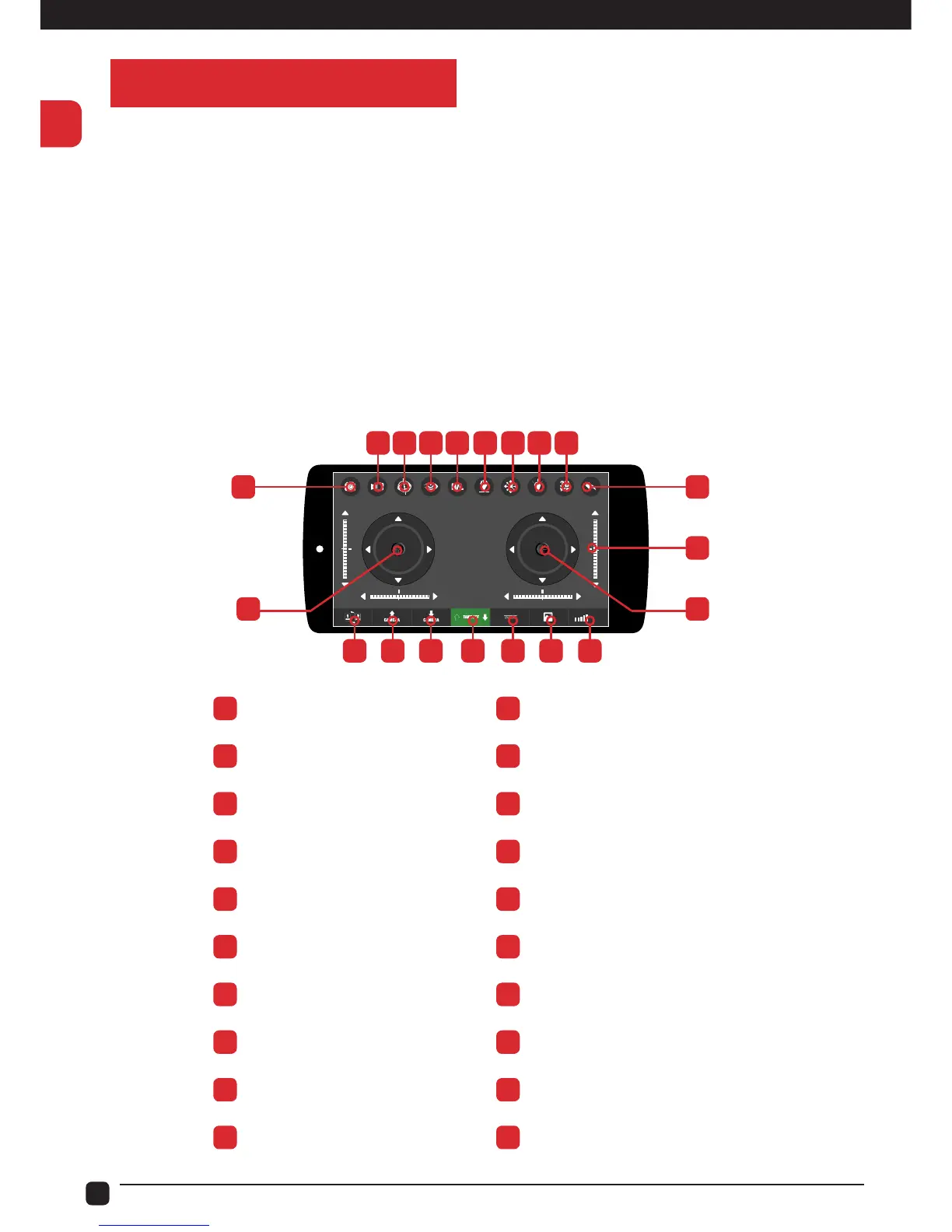
Use the in-app controls to operate. The App mimics the controls of the Remote Transmitter.
Please see the following guide or use the Help menu to list the controls.
WIFI
A J
L T
K
B C D E F G H I
M N O P Q R S
A
Photo
K
Trimmer
B
Record
L
Pitch/Roll Right Stick
C
Gravity Sensor
M
WiFi Signal
D
Hide/Show control
N
Media
E
Speed Control
O
Horizontal Alignment
F
Return Button
P
Auto Take O / Landing
G
CF Mode
Q
Camera Lens Down
H
Light
R
Camera Lens Up
I
3D View / VR Viewer
S
Left/Right Hand Switch
J
Back to previous Screen
T
Throttle/Yaw Left Stick


 To Next Page