2.3.4 Status page
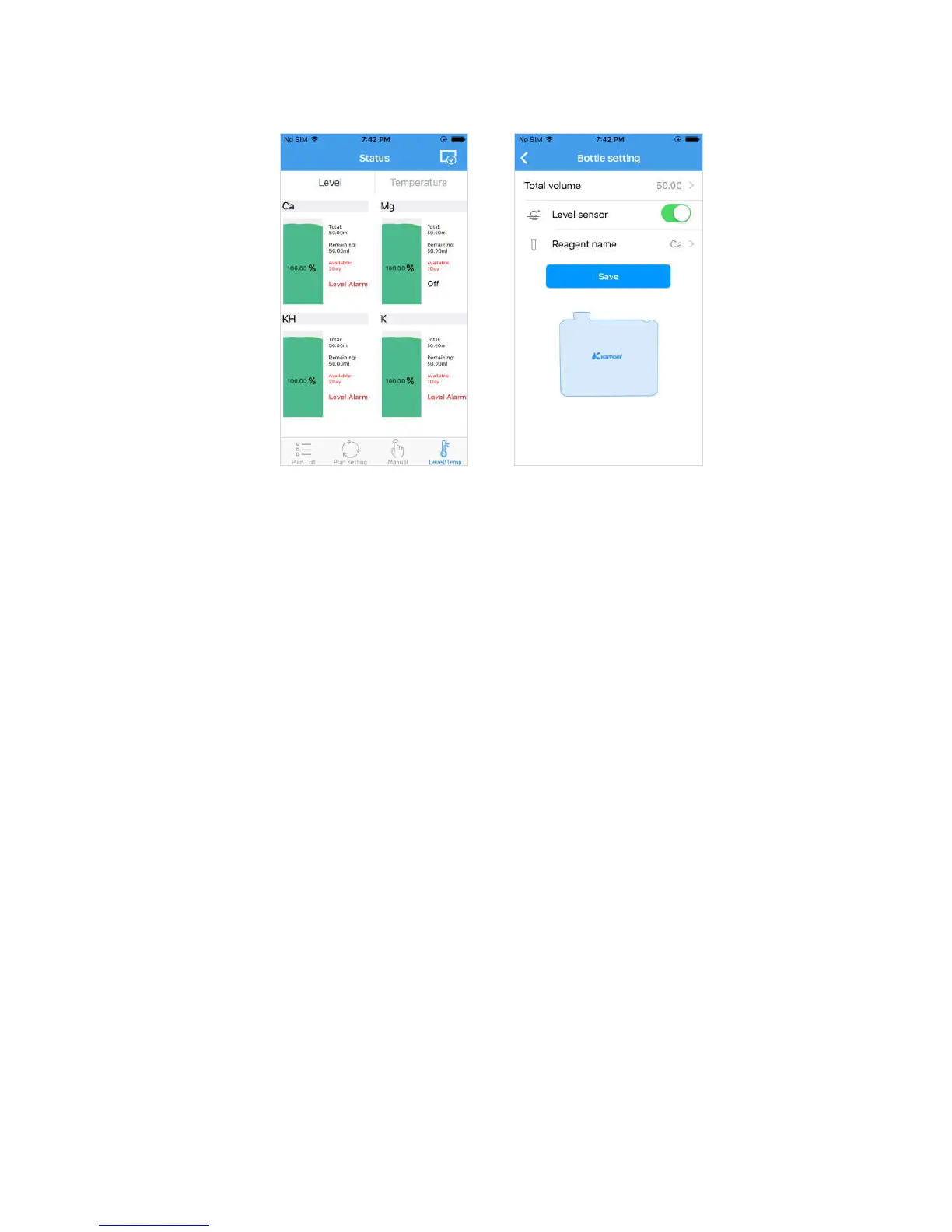
Liquid level status Bottle setting
a. Liquid level status display description:
Ca/Mg/KH/K:The name of pump head
Total: Capacity of the dosing container
Remaining: Current remaining amount of dosing liquid;
Available: The remaining liquid is divided by the amount of the day, when the
available days are less than 2 days, the text is warning red;
Alarm: When the dosing pump detects that the liquid level sensor is alert, the alarm is
displayed (part of the dosing pump model has no liquid level sensor function);
Pump 2, pump 3, pump 4 ditto.
b. Bottle setting interface (Click the reagent bottle icon to enter):
Total volume: Total volume of reagent bottle;
Level sensor: Detect liquid level sensor when opening, do not detect liquid level
sensor when close, liquid level sensor status is displayed in liquid level status page;
Reagent name: Set the name of the reagent corresponding to the pump head;
Save: Save the above settings, the remaining volume reverts to the same size as the
total volume after saving.


 To Next Page