EasyManua.ls Logo

Kanomax 3887 - Viewing Stored Data on LPC Screen

Kanomax 3887
44 pages
Print Icon
To Next Page IconTo Next Page
To Previous Page IconTo Previous Page
Loading...
22
5-1 Viewing Stored Data on LPC Screen
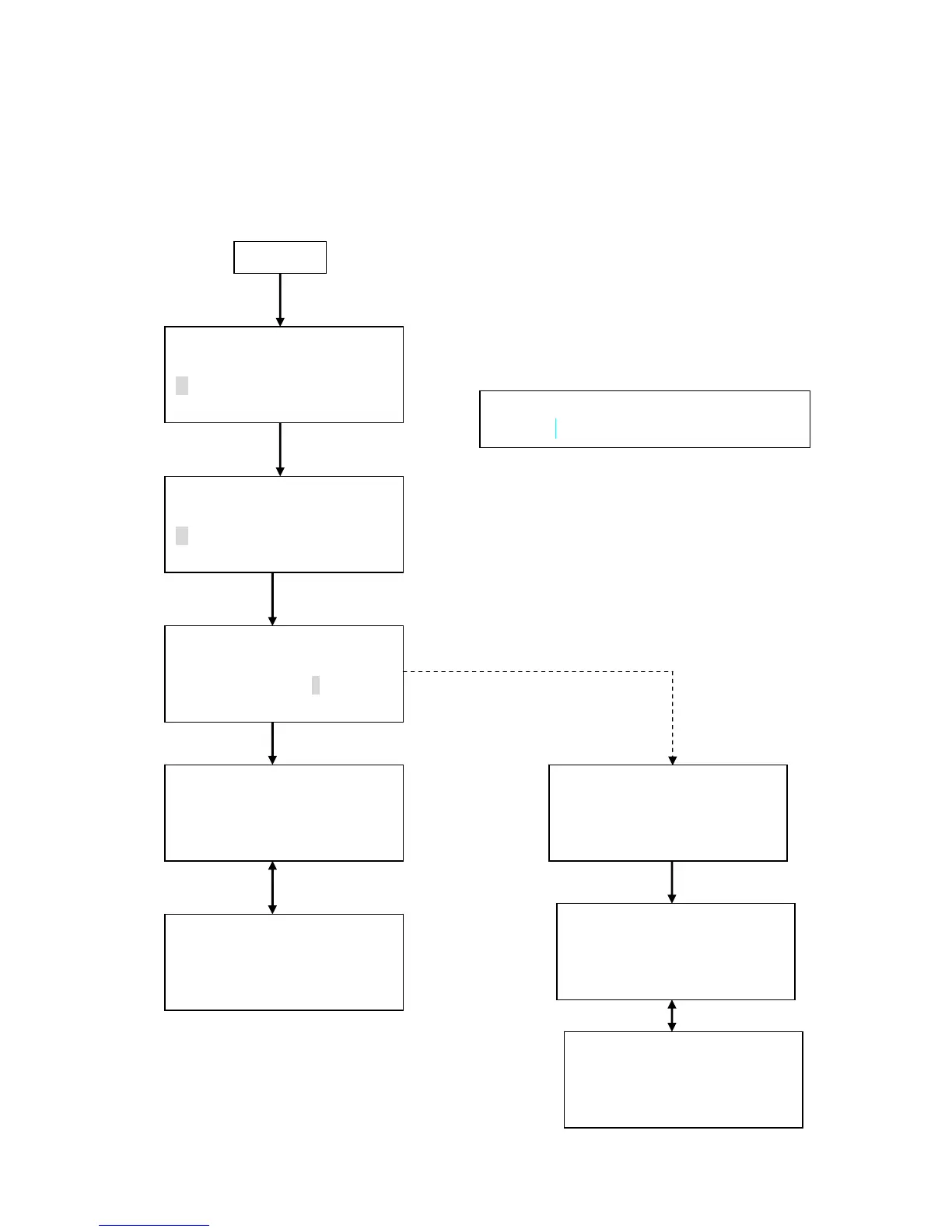
The data stored in the LPC can be viewed on its screen by the following procedure.
Power Up
<MENU>
1.MEASURE MODE
2.DATA PROCESSING
3.OPTIONS
< DATA PROCESSING >
RECORDS 99999
1.DISPLAY 3.PRINT
2.UPLINK 4.CLEAR
Press ENTER key
<DISPLAY>
RECORDS 9999
START 9000
RECORD.: Number of stored data records.
START: Data number of data to be displayed.
9000 05/08 11:58
0.3um 1.25E+4 /m3
0.5um 5.68E+3 /m3
5.0um 5.67E+1 /m3
Press START/STOP key
REPEAT MODE LOC.021
2005-05-08 11:58
SAMPLE TIME: 00:10:00
ENTER->BACK
ISO>4 MODE
2005-06-08 14:28
SAMPLE TIME: 00:10:00
ENTER->NEXT
9000 05/08 14:28
0.5um 5.68E+3 /m3
5.0um 5.67E+1 /m3
ISO>4 1POINT
ISO>4 2POINT
AVG 3.55E+2/m3
0.5um SD 0.00E+0/m3
UCL 0.00E+0/m3
Press ENTER key
Press ENTER key
www.GlobalTestSupply.com
Find Quality Products Online at: sales@GlobalTestSupply.com

Related product manuals