DN1315-1007
18
KT-300 Door Controller Installation Manual
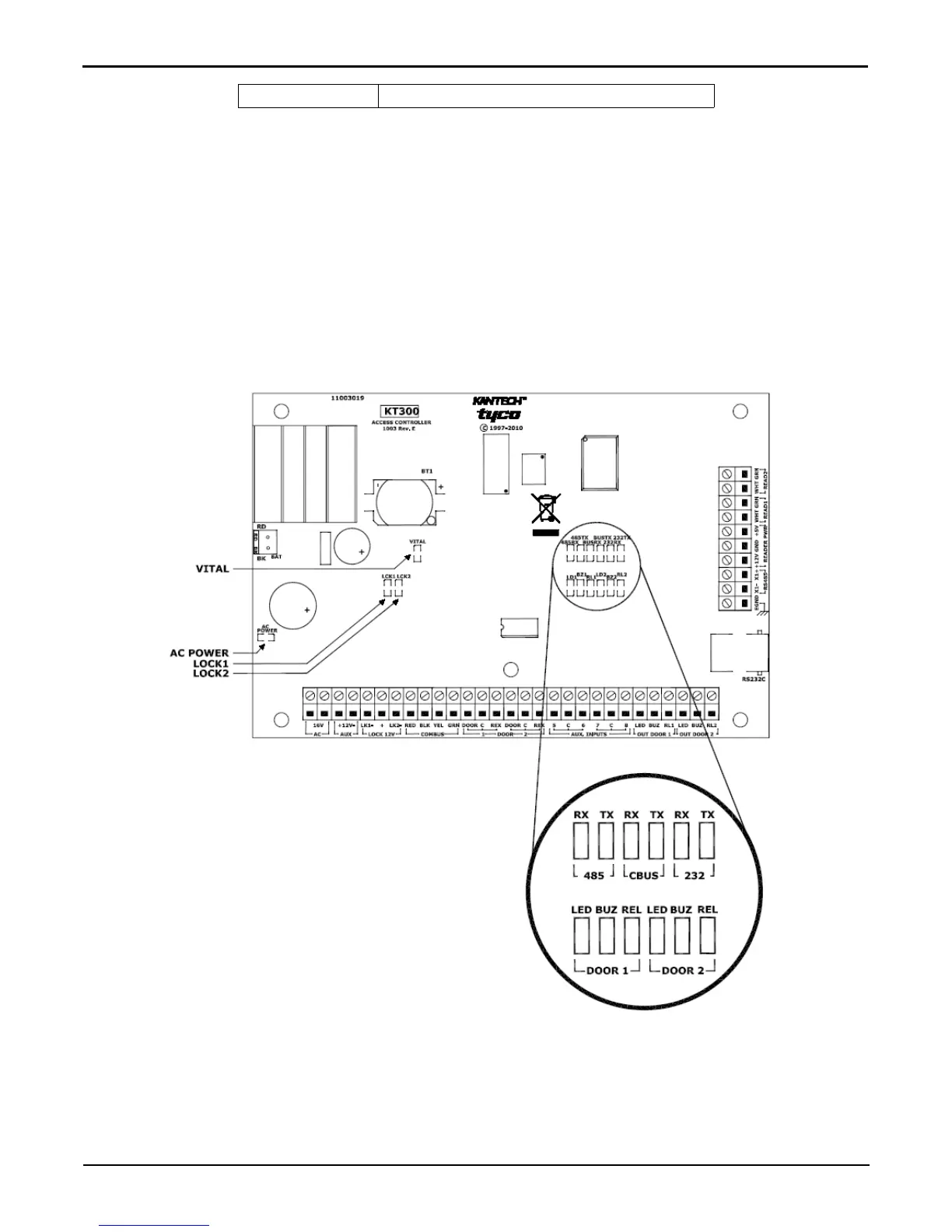
Visual Status Indicators (LEDs)
The KT-300 controller has multiple status indicators such as for troubleshooting, network activity, power status and outputs
activity. Please refer to the graphic below for a detailed view of their location.
• HEARTBEAT (BLUE): This LED indicates the working status of KT-300.
• RS-485 (YELLOW): The RS-485 port LEDs are transmit/receive activity indicators.
• RS-232 (YELLOW): The RS-232 LEDs are ON when communicating to the EntraPass gateway or to the
dial-up modem.
• COMBUS RX and TX (YELLOW): These LEDs are transmit/receive activity indicators. Only very small
packets will be sent/transmitted upon module activity.
• LOCK1, LOCK2 (RED): This LED turns ON when the lock output is activated.
• RELAY1, RELAY2 (RED): Each relay output has an indicator which turns ON each time the corresponding
relay is activated.
• AC POWER (GREEN): This LED is on when AC power is present.
2.5 seconds ON Modem confirm


 To Next Page