English 13
2. Open the Kärcher Home Robots
app.
3. Create an account (if you are not al-
ready registered).
4. Add the desired cleaning robot.
5. Follow the step by step instructions
of the app.
Initial startup
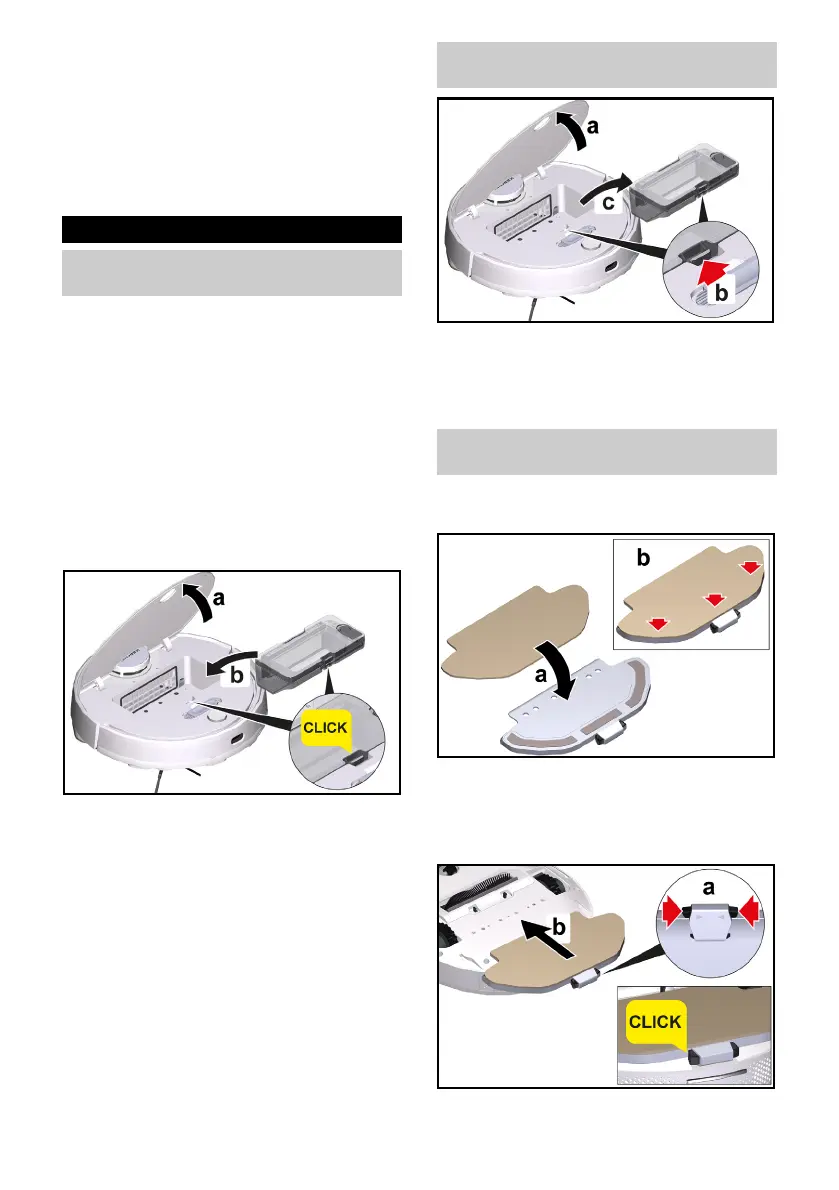
Installing the 2-in-1 dust
container with water reservoir
The 2-in-1 dust container with water
reservoir may contain a small amount
of residual water due to quality control.
This is normal.
Use the 2-in-1 dust container with wa-
ter reservoir when you want to clean
both dry and wet.
Remove the wiper cloth and wiper
cloth holder for dry cleaning, see chap-
ter Removing the wiper cloth holder
with wiper cloth.
1. Open the cover at the top.
2. Press the 2-in-1 dust container with
water reservoir into position until it
audibly clicks into place.
3. Close the cover at the top.
Removing the 2-in-1 dust
container with water reservoir
1. Open the cover at the top.
2. Press the clamp.
3. Remove the 2-in-1 dust container
with water reservoir.
Installing the wiper cloth holder
with wiper cloth
1. Attach the wiper cloth to the wiper
cloth holder.
a Press the wiper cloth onto the wip-
er cloth holder.
b Press on the Velcro tape.
2. Install the wiper cloth holder.
a Press the clamps together.




 To Next Page