English 17
1. Press any key.
The cleaning robot stops.
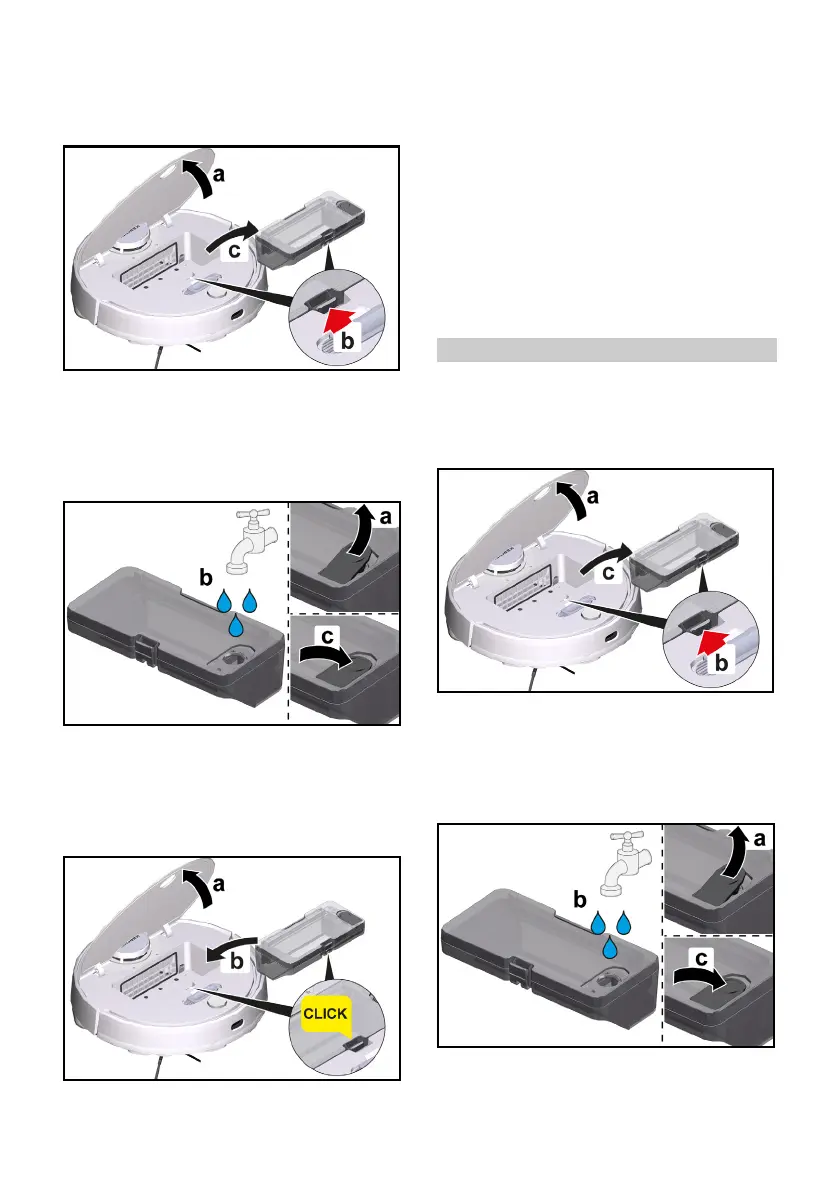
2. Remove the 2-in-1 dust container
with water reservoir.
a Open the cover at the top.
b Press the clamp.
c Remove the 2-in-1 dust container
with water reservoir.
3. Refill water.
a Pull up the rubber tab.
b Fill with water.
c Press the rubber tab down.
4. Install the 2-in-1 dust container with
water reservoir.
a Press the 2-in-1 dust container
with water reservoir into position
until it audibly clicks into place.
b Close the cover at the top.
5. Dampen the wiper cloth under run-
ning water and wring out to remove
excess water.
6. Install the wiper cloth, see chapter
Removing the wiper cloth holder
with wiper cloth.
7. Press the On / Off button.
The cleaning robot starts cleaning.
Refilling water
1. Press any key.
The cleaning robot stops.
2. Remove the 2-in-1 dust container
with water reservoir.
a Open the cover at the top.
b Press the clamp.
c Remove the 2-in-1 dust container
with water reservoir.
3. Refill water.
a Pull up the rubber tab.
b Fill with water.
c Press the rubber tab down.




 To Next Page