EasyManua.ls Logo

Kärcher RCV 5 - User Manual

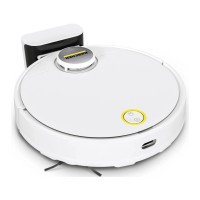
Kärcher RCV 5
84 pages
Print Icon
To Next Page IconTo Next Page
Loading...
RCV 5
97781900
(03/24)
English 2
Français 27
Español 54

Other manuals for Kärcher RCV 5

Questions and Answers

  • B
    Bruce HaleSep 15, 2025
    Why Kärcher RCV 5 cannot connect to WLAN?
    • C
      Charles TranSep 15, 2025
      If your Kärcher Vacuum Cleaner can't connect to WLAN, it might not be connected to the network or within range of the WLAN signal. Ensure that the cleaning robot is connected to the network and within the WLAN signal range. Also, the WLAN signal could be too weak, so ensure the cleaning robot is within range.
  • T
    Tammie LeeNov 17, 2025
    Why my Kärcher RCV 5 does not start?
    • J
      Jeremy StantonNov 17, 2025
      If your Kärcher Vacuum Cleaner isn't starting, there could be several reasons: * The ambient temperature might be too low (below 0 °C) or too high (above 35 °C). Ensure the temperature is within the 0-35 °C range. * The battery charge could be too low. Charge the vacuum cleaner. * The laser distance sensor (LiDAR) may be blocked. Clean the sensor with a dry cloth, remove any obstacles, and try moving the vacuum to a new location. * The collision sensor might be dirty or too close to a virtual wall. Try removing foreign objects by gently tapping the collision sensor, and move the vacuum to a different spot. * The fall sensors could be dirty. Clean them with a dry cloth. * The water reservoir or dust container might not be installed correctly. Ensure they are properly installed ...

Summary

Important Safety Instructions

General Safety Precautions

Basic safety guidelines, intended use, and general warnings.

Specific Hazard Warnings

Detailed warnings about immediate dangers like fire, explosion, and injury.

Customer Service

Product Registration

Instructions for registering your product for support.

Warranty and Contact Information

Details on filing warranty claims and regional contact numbers.

Technical Data

Electrical and Performance Specifications

Details electrical specs, performance data, and dimensions of the robot and station.

Environmental Protection Notes

Guidelines for recycling packaging and disposing of old devices and batteries.

Device Description and Function

Device Components Overview

Identifies and labels all parts of the cleaning robot and accessories.

Functional Description and Status

Explains robot operation, sensors, AI, and LED status indicators.

Initial Setup and Connection

Setting Up the Charging Station

Instructions for placing and connecting the charging station.

WLAN and App Connection

Guide to connect the robot to Wi-Fi and the mobile app.

Robot Operation

Starting and Setting Modes

How to power on, select cleaning modes, and start cleaning.

Robot Control and Recharging

How to pause, stop, manually recharge, and switch off the robot.

Maintenance and Cleaning

Water Reservoir Management

Procedures for refilling and draining the water reservoir.

Cleaning and Replacing Components

Instructions for cleaning dust container, filters, brushes, and replacing parts.

Troubleshooting and Disposal

Troubleshooting Common Issues

Solutions for common errors like charging problems and unusual sounds.

Disposal Guidelines

Procedures for safely disposing of the device and battery.

Kärcher RCV 5 Specifications

General IconGeneral
Product typeAccessory kit
Brand compatibilityKärcher
Suitable for vacuum cleaner typeRobot vacuum
Number of pads1
Number of brushes3
Number of filters2 pc(s)
Quantity per pack6 pc(s)
Package weight400 g
Weight and Dimensions IconWeight and Dimensions
Depth190 mm
Width125 mm
Height82 mm
Weight100 g

Related product manuals