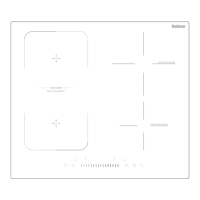
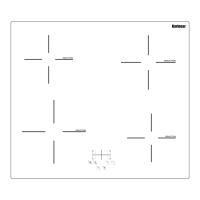
This document describes the Karinear Ceramic Hob, model KNC-D58454, an electric cooktop designed for domestic use. It provides comprehensive instructions for installation, operation, maintenance, and troubleshooting.
Function Description
The Karinear Ceramic Hob is a modern electric cooktop that utilizes microcomputer ceramic cooker hob technology. It offers different kinds of cuisine demands because of resistance wire heating, micro-computerized control, and multi-power selection. The hob is designed to provide optimal choice for modern families, offering a safe and reliable cooking experience with personalized design.
Important Technical Specifications
- Model: KNC-D58454
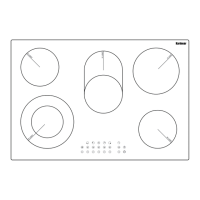
- Cooking Zones: 5 Zones
- Supply Voltage: 220-240V~, 50-60Hz
- Installed Electric Power: 8400W
- Built-in Product Size (LxWxH): 770x520x44 mm
- Freestanding Product Size (mm): 770x520x58 mm
- Building-in Dimensions (AxB): 730x490 mm
The hob features five cooking zones with varying power outputs:
- 1.138/230mm/1000/2200W
- 2.165mm/1200W
- 3.200mm/1800W
- 4.165mm/1200W
- 5.165/270mm/1100W/2000W
The control panel is a slider control type, offering intuitive operation.
Usage Features
The ceramic hob is operated via a touch control panel. Key features and functions include:
- ON/OFF control: To power the hob on or off.
- Child lock control: To prevent unintended use, especially by children.
- Dual/Oval ring control: For activating specific cooking zones with dual or oval heating elements.
- Power/Timer regulating controls: To adjust heating levels and set cooking timers.
- Stop&go control: Allows pausing and resuming cooking without losing settings.
- Timer control: For setting specific cooking durations.
- Heating zone indication: Visual indicators for active heating zones.
Starting to cook:
- After power on, the buzzer beeps once, and all indicators light up for 1 second, then go out, indicating the ceramic hob has entered standby mode.
- Touch the ON/OFF control. All indicators will show "–-".
- Place a suitable pan on the cooking zone you wish to use. Ensure the bottom of the pan and the surface of the cooking zone are clean and dry.
- Touch the heating zone selection control and an indicator next to the key will flash "0".
- To set the power, touch the indicator next to the zone, and it will flash "5", then slide to select the power level.
- To touch the heating zone selection control, then touch the key, dual/oval ring zone will begin to work. You can cancel the dual/oval ring zone by touching the key again.
- A heat setting within 1 minute will automatically switch off if you don't choose one. You need to start again at step 1.
- You can modify the heat setting at any time during cooking.
When you have finished cooking:
- Touch the heating zone selection control that you wish to switch off.
- Turn the cooking zone off by sliding the slider form right to left, making sure the display shows "0".
- Be aware of hot surfaces. The "H" symbol indicates a hot cooking zone. It will disappear when the surface has cooled down to a safe temperature. An energy-saving function allows using residual heat to heat further pans, provided the hotplate is still hot.
- Turn the whole cooktop off by touching the "ON/OFF" control.
Locking the controls:
- You can lock the controls to prevent unintended use (e.g., by children) or accidental changes.
- When the controls are locked, all controls except the ON/OFF and stop&go controls are disabled.
- To lock the controls, touch the keylock control. The timer indicator will show "Lo".
- To unlock, touch and hold the keylock control for a while.
Stop&go Controls:
- Touch the heating zone selection control, then touch the key. The heating zone will stop working, and the LED will show "11". To restart, touch the key again.
Over-Temperature Protection:
- A sensor continuously measures the temperature on the hob surface. If an excessively high temperature is detected, the hob will automatically switch off. When the temperature returns to normal, the hob becomes operational again.
Residual Heat Warning:
- When the hob has been operating for some time, there will be some residual heat. The letter "H" appears to warn you to keep away from it.
Auto Shutdown:
- The hob has an auto shut-down safety feature. This occurs whenever you forget to switch off a cooking zone. The default shutdown times vary based on the power level.
Using the Timer:
- You can set the timer to turn off one cooking zone or more than one after the set time is up.
- You can set the timer for up to 99 minutes. If the setting time exceeds 99 minutes, the timer will automatically return to 0 minutes.
Setting the timer to turn one cooking zone off:
- Touch the heating zone selection control.
- Touch the timer control; the timer indicator will show "30".
- Set the time by sliding.
- Press the timer control first time to decrease or increase by 1 minute intervals.
- Press the timer control second time to decrease or increase by 10 minute intervals.
- Touch the heating zone selection control, and then touch the Timer control. The timer is canceled, and the "--" will show in the minute display.
- When the time is set, it will begin to count down immediately. The display will show the remaining time, and the timer indicator will flash for 5 seconds.
- A buzzer will beep for 30 seconds, and the timer indicator shows "--" when the set time is finished.
Setting the timer to turn more than one cooking zone off:
- If more than one heating zone uses this function, the timer indicator will show the lowest time.
- Example: zone 1# setting time of 3 minutes, zone 2# setting time of 6 minutes, the timer indicator shows "3".
- The red dot next to the power level indicator will flash.
- When cooking timer expires, the corresponding cooking zone will be switch off automatically and show "H".
Cooking Guidelines (for reference only):
- Cooking Tips: Reduce power setting when food comes to a boil. Use a lid to reduce cooking times and save energy. Minimize liquid or fat to reduce cooking times. Start cooking on a high setting and reduce the setting when the food has heated through.
- Simmering, cooking rice: Simmering occurs below boiling point, around 85°C. The key to delicious soups and tender stews is to develop flavor without overcooking. You should also cook egg-based and flour-thickened sauces below boiling point. For cooking rice, use the absorption method, requiring a setting higher than the lowest setting to ensure the food is cooked properly.
- Searing steak: Cook juicy, flavorsome steaks. Stand the meat at room temperature for about 20 minutes before cooking. Heat up a heavy-based frying pan. Brush both sides of the steak with oil. Drizzle a small amount of oil into the hot pan and then lower the meat onto the hot pan. Turn the steak only once during cooking. The exact cooking time will depend on the thickness of the steak and how cooked you want it. Remove the steak to rest on a warm plate for a few minutes to allow it to relax and become tender before serving.
- For stir-frying: Choose a ceramic compatible flat-based wok or a large frying pan. Have all ingredients and equipment ready. Stir-frying should be quick. If cooking large quantities, cook the food in several smaller batches. Preheat the pan briefly and add two tablespoons of oil. Cook any meat first, put it aside and keep warm. Stir-fry the vegetables. When they are hot but still crisp, turn the cooking zone to a lower setting, return the meat to the pan and add your sauce. Stir the ingredients gently to make sure they are heated through. Serve immediately.
Heat Settings:
- 1-2: Delicate warming for small amounts of food, melting chocolate, butter, and foods that burn quickly, gentle simmering, slow warming.
- 3-4: Reheating, rapid simmering, cooking rice.
- 5-6: Pancakes.
- 7-8: Sauteing, cooking pasta.
- 9: Stir-frying, searing, bringing soup to the boil, boiling water.
Maintenance Features
Care and Cleaning:
- Everyday soiling on glass (fingerprints, marks, stains left by food or non-sugary spillovers on the glass):
- Switch the power to the cooktop off.
- Apply a cooktop cleaner while the glass is still warm (but not hot!).
- Rinse and wipe dry with a clean cloth or paper towel.
- Switch the power to the cooktop back on.
- Important: When the cooktop is switched off, there will be no hot surface indication, but the cooking zone may still be hot. Take extreme care. Heavy-duty scourers, some nylon scourers, and harsh/abrasive cleaning agents may scratch the glass. Always read the label to check if your cleaner or scourer is suitable. Never leave cleaning residue on the cooktop; the glass may become stained.
- Boilovers, melts, and hot sugary spills on the glass:
- Remove these immediately with a fish slice, palette knife, or razor blade scraper suitable for ceramic glass cooktops, but beware of hot cooking zone surfaces.
- Switch the power to the cooktop off at the wall.
- Hold the blade or utensil at a 30° angle and scrape the soiling or spill to a cool area of the cooktop.
- Clean the soiling or spill up with a dish cloth or paper towel.
- Follow steps 2 to 4 for "Everyday soiling on glass" above.
- Important: Remove stains left by melts and sugary food or spillovers as soon as possible. If left to cool on the glass, they may be difficult to remove, or even permanently damage the glass surface. Cut hazard: when the safety cover is retracted, the blade in a scraper is razor-sharp. Use with extreme care and always store safely and out of reach of children.
- Spillovers on the touch controls:
- Switch the power to the cooktop off.
- Soak up the spill.
- Wipe the touch control area with a clean damp sponge or cloth.
- Wipe the area completely dry with a paper towel.
- Switch the power to the cooktop back on.
- Important: The cooktop may beep and turn itself off, and the touch controls may not function while there is liquid on them. Make sure you wipe the touch control area dry before turning the cooktop back on.
Troubleshooting:
- E4 (high temperature): Contact supplier karinear_service@163.com.
- F4 (circuit open): Contact supplier karinear_service@163.com.
Hints and Tips:
- The cooktop cannot be turned on: No power. Make sure the cooktop is connected to the power supply and that it is switched on. Check whether there is a power outage in your home or area. If you've checked everything and the problem persists, call a qualified technician.
- The touch controls are unresponsive: The controls are locked. Unlock the controls. See section 'Using your ceramic cooktop' for instructions.
- The touch controls are difficult to operate: There may be a slight film of water over the controls or you may be using the tip of your finger when touching the controls. Make sure the touch control area is dry and use the ball of your finger when touching the controls.
- The glass is being scratched: Rough-edged cookware. Unsuitable, abrasive scourer, or cleaning products being used. Use cookware with flat and smooth bases. See 'Choosing the right cookware'. See 'Care and cleaning'.
- Some pans make crackling or clicking noises: This may be caused by the construction of your cookware (layers of different metals vibrating differently). This is normal for cookware and does not indicate a fault.
Disposal of the packing material: The cardboard box and packing materials protect the appliance during shipping. They have been designed to be biodegradable and recyclable. Ensure that any plastic wrappings, bags, etc., are disposed of safely and kept out of the reach of children.
Disposal of your old appliance: Electrical and electronic appliances contain valuable materials. They also contain certain substances, compounds, and components which were essential for the proper functioning and safe use of the equipment. Handling these materials improperly by disposing of them in your household waste can be harmful to your health and the environment. Therefore, please do not dispose of your old appliance with regular household waste and follow local regulations on proper disposal. Consult with local authorities, dealers, or Miele to dispose of and recycle electrical and electronic appliances. Miele assumes no responsibility for deleting any personal data left on the appliance being disposed. Please ensure that your old appliance is kept away from children until removal. Observe safety requirements for appliances that may tip over or pose an entrapment hazard.

 Need help?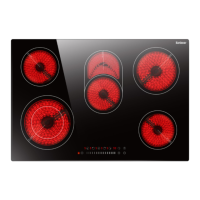

 To Next Page
 General