9
20 Starting Installation
Connection of KAT SENSORS
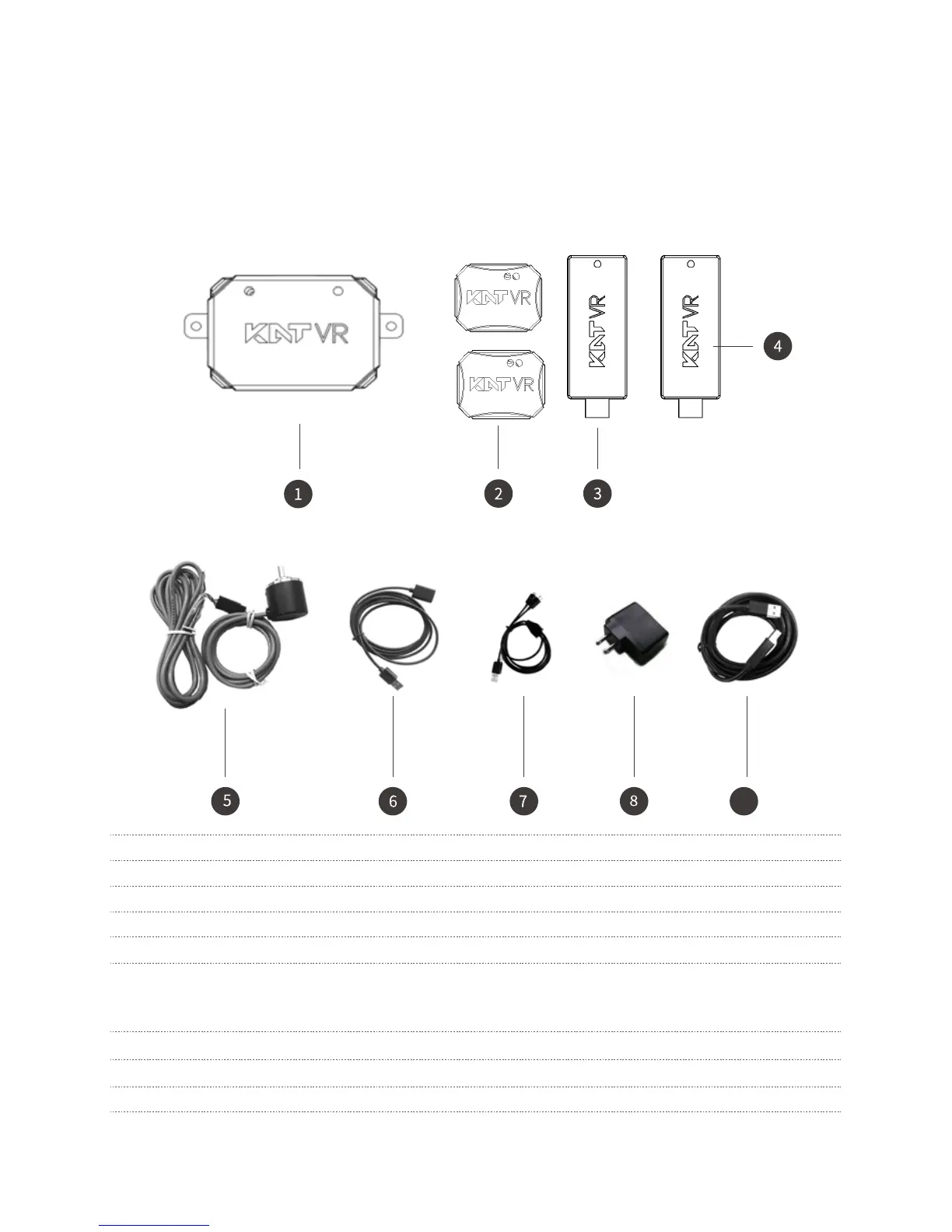
List of Included Sensors
Welcome to use a combination of KAT-SENSORS, and the Sensors you have received consist of the following
components:
1 KATVR-Back Sensor Already installed to the connecting rod
2 KATVR-Foot Sensor
3 KATVR-Central Sensor Port for the KATVR-Top Sensor on the side
4 Wireless receiver No port for the KATVR-Top Sensor on the side
5 KATVR-Top Sensor Already installed to the girder
6 USB-A type extension
cable
7 Charging cable Charging KATVR-Foot Sensor
8 Charger Charging KATVR-Foot Sensor
9 Charging cable Charging Back Sensor
One for connecting the KATVR-Central and sending the KATVR-Back data to PC
The other for connecting the wireless receiver and sending the two KATVR-Foot
Sensor data to PC


 To Next Page