
 Need help?
Do you have a question about the KAWA S6 and is the answer not in the manual?
Describes buttons like Menu, OK, Navigation, Power, and Volume keys.
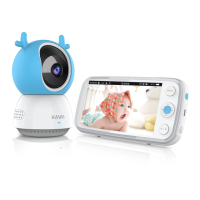
Details the display screen, LED indicator, microphone, speaker, and ports.
Describes the camera's lens, microphone, sensors, and pairing button.
Details the camera's antenna, speaker, and USB power port.
Step-by-step guide for installing the camera using a wall mount.
Details the method for installing the camera using adhesive tape.
Options for manual, automatic, and multi-screen display of camera feeds.
Explains accessing the menu, VOX mode, and alert thresholds.
Details sound, temperature, duration, and volume settings for alerts.
Covers white noise and lullaby playback for parent and baby.
How to set timed reminders for various events.
Managing camera pairing and configuring display modes.
Adjusting night vision, time, brightness, and sleep mode.
Explains icons for signal strength, battery, and volume level.
Further details on icons for charging, connection, modes, and alerts.
Warns about cord safety for children.
Advises on adapter accessibility, battery risks, and hearing protection.
Lists operating frequencies, power, adapter specs, and FCC compliance.
Warns about potential exposure to BPA and its health risks.
Covers operating conditions, product recycling, and warranty details.
Provides manufacturer's contact details for support and inquiries.
 General
| Brand | KAWA |
|---|---|
| Model | S6 |
| Category | Baby Monitor |
| Language | English |

 To Next Page