15
CA99/CA79 MIDI Settings Manual
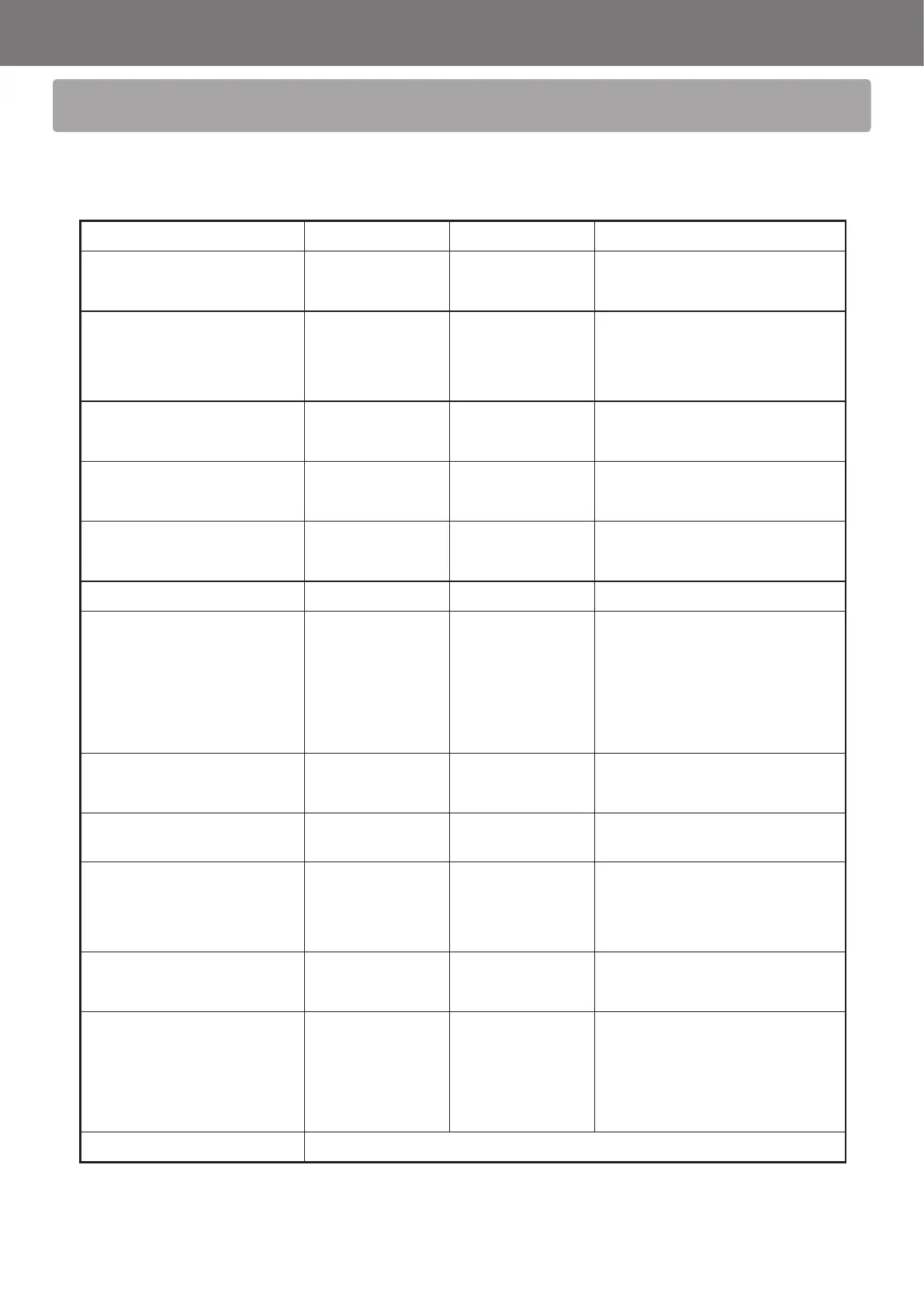
MIDI Implementation Chart
[DIGITAL PIANO]
MIDI Implementation Chart
Date: February 2020
Kawai CA99/CA79 Version: 1.0
Function Transmitted Section Remarks
Basic
Channel
Default 1 - 16 1 - 16
Changed 1 - 16 1 - 16
Mode
Default Mode 3 Mode 1
* The default for the OMNI mode
is ON.
Specifying MIDI channels
automatically turns it OFF.
Messages X Mode 1, 3
Altered *****
Note
Number
21 - 108** 0 - 127
** The value depends on the
Transpose setting.
True Voice ***** 0 - 127
Velocity
Note ON O O
Note OFF O O
After Touch
Key X X
Channel X X
Pitch Bend X X
Control
Change
0, 32
7
10
11
64
66
67
O
X
X
X
O (Right pedal)
O (Middle pedal)
O (Left pedal)
O
O
O
O
O
O
O
Bank Select
Volume
Pan Pot
Expression Pedal
Sustain Pedal
Sostenuto Pedal
Soft Pedal
Program
Change
O 0 - 127 O 0 - 127 ***
*** Refer to the Program Change
Number List on page 7.
True # ***** 0 - 127
System
Exclusive
O O
Common
Song Position X X
Song Select X X
Tune X X
System
Real Time
Clock X X
Commands O X
Others
Local OFF/ON X O
All Note OFF X O (123-127)
Active Sense X O
Reset X X
Notes
O : Yes
X : No
Mode 1 : OMNI ON , POLY Mode 2 : OMNI ON , MONO
Mode 3 : OMNI OFF, POLY Mode 4 : OMNI OFF, MONO
SP00000261 R100



 To Previous Page