MIDI Settings
6
CA99/CA79 MIDI Settings Manual
4
Multi-timbral Mode
The Multi-timbral Mode setting determines whether or not the CA99/CA79 digital piano is able to receive MIDI
information on more than one MIDI channel simultaneously. This allows the instrument to play back multi-track,
multi-timbral performance data sent from an external MIDI device.
Multi-timbral Mode setting
Multi-timbral Mode Selected sound
O (default) The sound shown in the left column is selected*.
On1 The sound shown in the left column is selected*.
On2 The sound shown in the right column is selected*.
Ref.
“Program Change Number List” P. 7.
Changing the Multi-timbral Mode setting
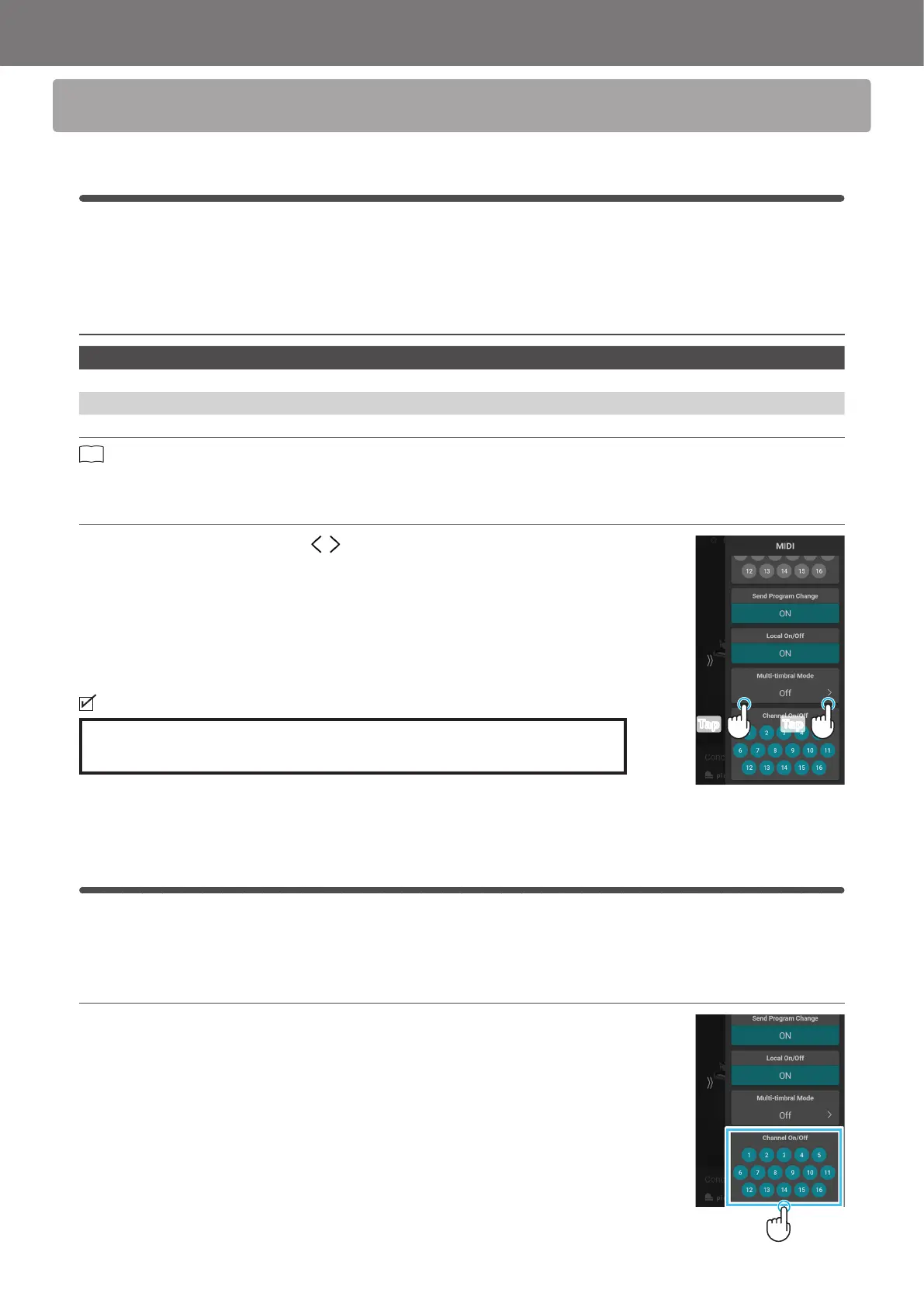
In the Multi Timbral Mode area, tap the buttons to select On1, On2, or O.
Multi Timbral Mode will not be displayed when the “SK-EX Rendering” piano sound variation is
selected.
5
Channel On/O
The Channel On/O setting determines which MIDI channels (1~16) are activated to receive MIDI information when
Multi-timbral mode is enabled.
Changing the Channel On/O setting
In the Channel On/O area, tap the number buttons to turn the MIDI channel on/o.
TapTap
Tap



 To Next Page