LS30 CONTROLLER INSTALLATION AND OPERATING GUIDE
15
4.2 Menu System
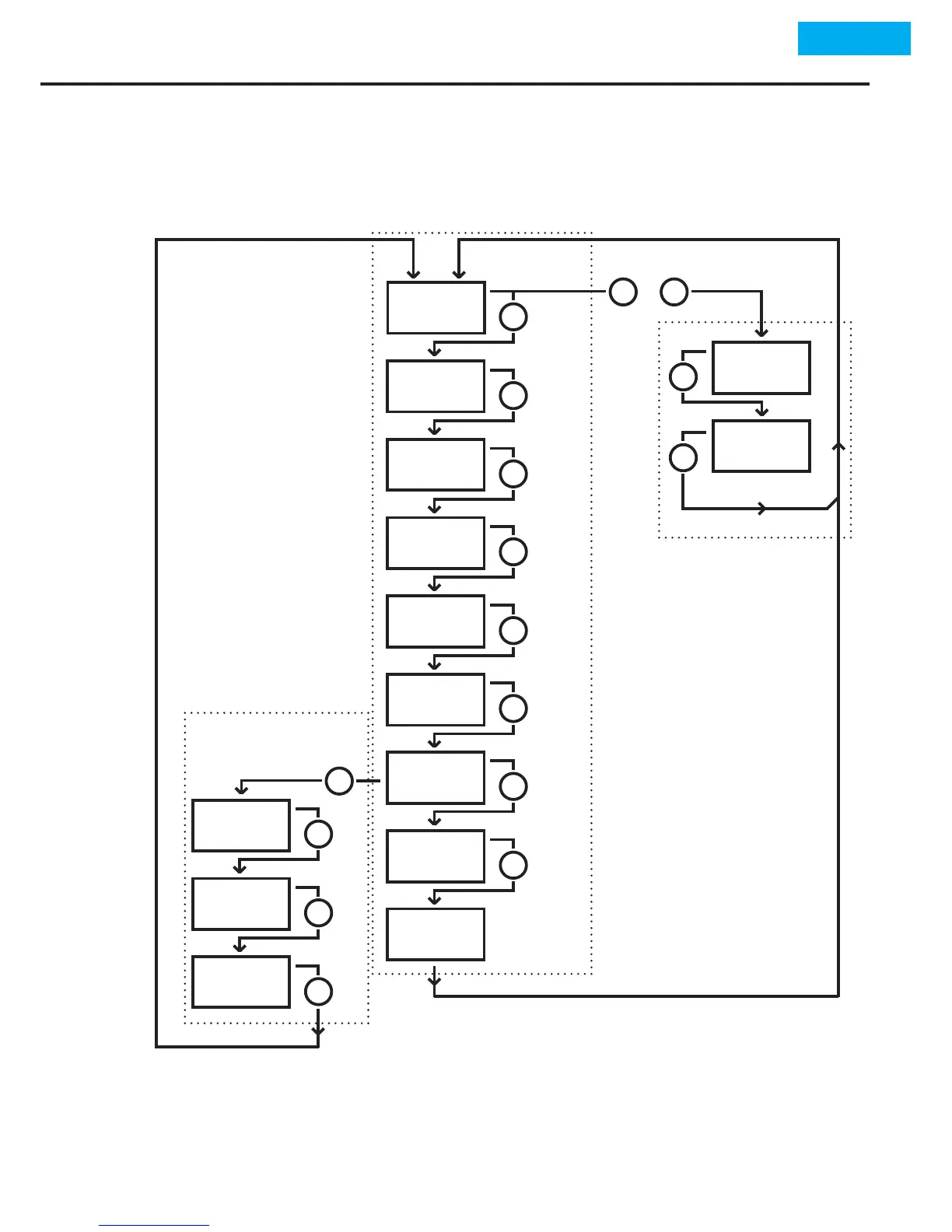
There are 3 dierent menu levels for LS30 Controller program-
ming.
for First Level Menu, 'Set' buon should be pressed 2 seconds at main operang screen.
for Second Level Menu, while at 1st level menu at 'r3.of' parameter 'Set' buon should
be pressed 2 seconds.
for Third Level Menu, at menu operang screen 'Set' and 'Exit' buons should be
pressed together for 2 seconds.
r1.on
r.Lo
r.Hi
r1.oF
r2.oF
Lo
r2.on
r3.on
Hi
out
r3.oF
dot
Addr
xx
xx
xx
xx
xx
xx
xx
xx
xx
xx
xx
xx
xx
SET
>2 sec.
>2 sec.
Second Level Menu
First Level Menu
Third Level Menu
>2 sec.
SET
+
EXIT
SET
SET
SET
SET
SET
SET
SET
SET
SET
SET
SET
SET
SET
Main Op.
Screen


 To Next Page