DLNA DMR
- Digital Media Renderer, can play content received from a digital
media controller (DMC), which will find content from a digital
media server (DMS)
Device Name
- Select to name DLNA DMR.
Scan storage
- Set the scan mode of media library.
Format
- Follow the on-screen information to format your HDD.
BD-Lite Menu
- Here you can open the BDMV navigation menu during BDMV
folder or BD ISO playback. And BD-J is not supported.
Restore Default
- Restore to factory defaults.
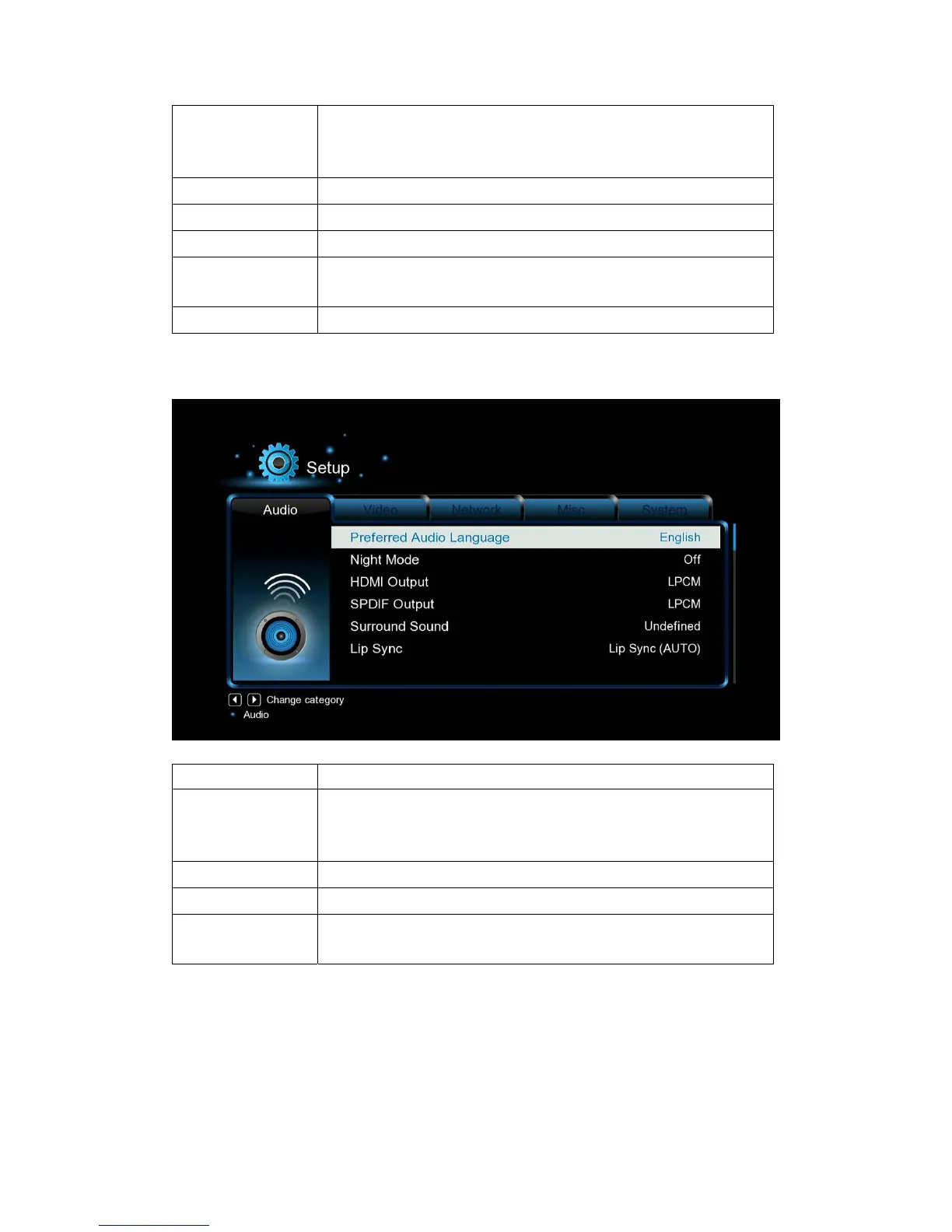
3.1.2 Changing Audio Settings
Option Description
Night Mode
- Choose among Off / On / Comfort. If the option is turned on,
the audio output volume will be decreased to make you more
comfortable.
HDMI Output
- Choose among LPCM, RAW and Auto.
SPDIF Output
- Choose among LPCM, RAW.
Surround Sound
- Please select 5.1CH when your amplifier is a 5.1ch one, and
select HD audio while your amplifier is a 7.1ch one.
Note: In raw mode, Dolby TrueHD, Dolby Digital Plus , Dolby Digital, DTS sound can be by
passed to the HDMI TV or Digital amplifier.
Due to the bandwidth requirement, Dolby TrueHD and Dolby Digital Plus sound only can be by
passed through HDMI cable, also the TV system must up to 720p or above.


 To Next Page