Kelvinator Air Conditioning Features of the remote contol 3
Features of the remote control
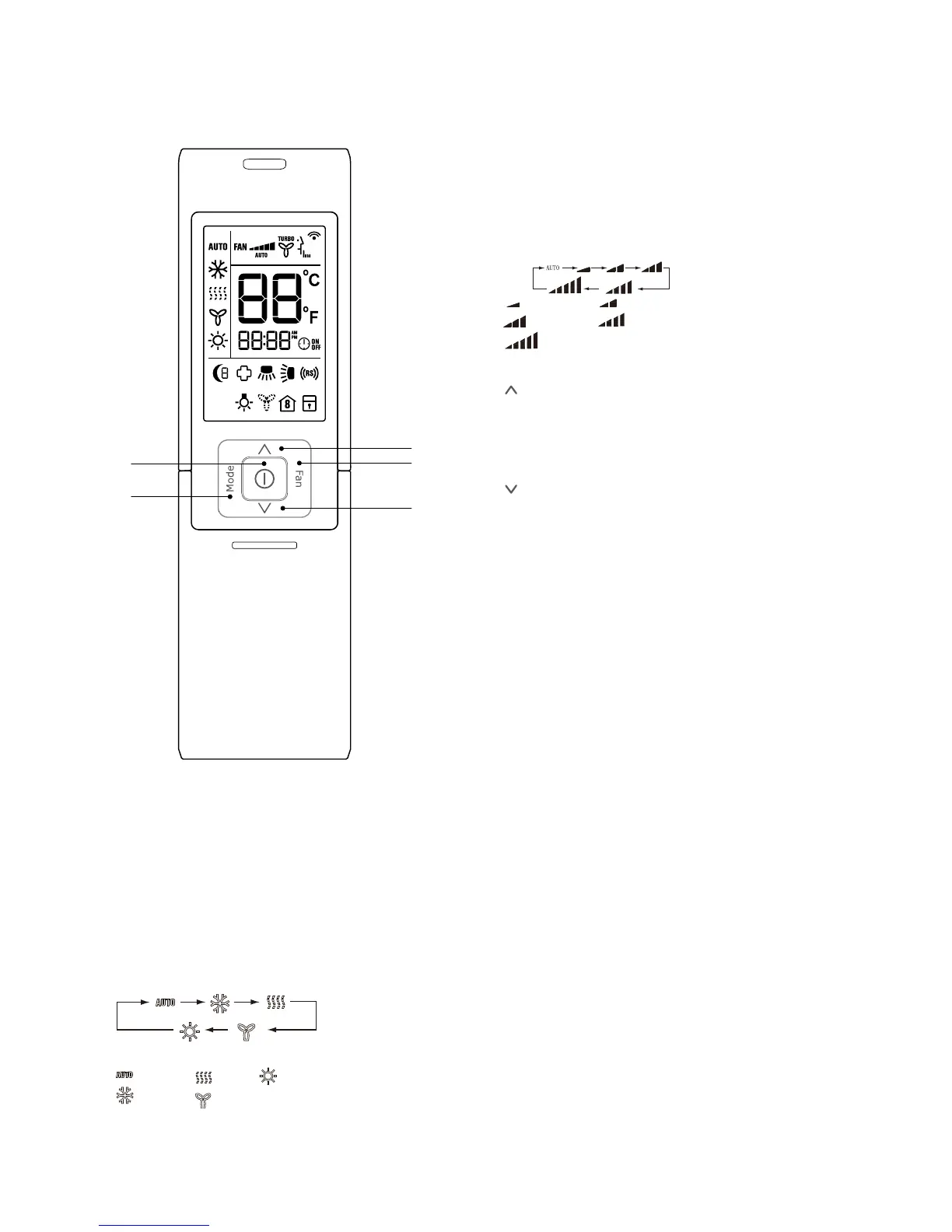
3 FAN Button
By pressing this button, Auto, Low, Medium-low,
Medium, Medium-high, High speed can be progressively
selected.Whentheunitisturnedon,Autofanspeedis
the default. Under DRY mode only, Low fan speed can
be set up.
Medium fan
Low fan
High fan
Medium-low fan
Medium-high fan
4 Button
Pressing this button will increase the temperature
setting, holding this button down for 2 seconds and
morewillincreasethetemperaturesettingmorequickly.
Maximum setting is 30°C.
5
Button
Pressing this button will decrease the temperature
setting, holding the button down for 2 seconds and
more will decrease the temperature setting more.
The minimum setting is 16°C
2
1
3
4
5
1 ON/OFF Button
Press this button, the unit will be turned on, press it once
more, the unit will be turned off. Sleep function will be
cancelled while the unit is switched off.
2 MODE Button
By pressing this button, Auto, Cool,Dry, Fan, Heat mode
can be selected progressively. Auto mode is default
while power on. Under Auto mode,the temperature will
not be displayed; Under Heat mode, the initial value is
28°C; Under other modes, the initial value is 25°C.
AUTO
COOL
DRY
FAN
HEAT
(Reverse cycle model only)



 To Next Page
 Loading...