EasyManua.ls Logo

Kemper MaxiFil Clean - Page 93

Kemper MaxiFil Clean
Print Icon
To Next Page IconTo Next Page
To Previous Page IconTo Previous Page
Loading...
EN
1502030-00 - 93 -
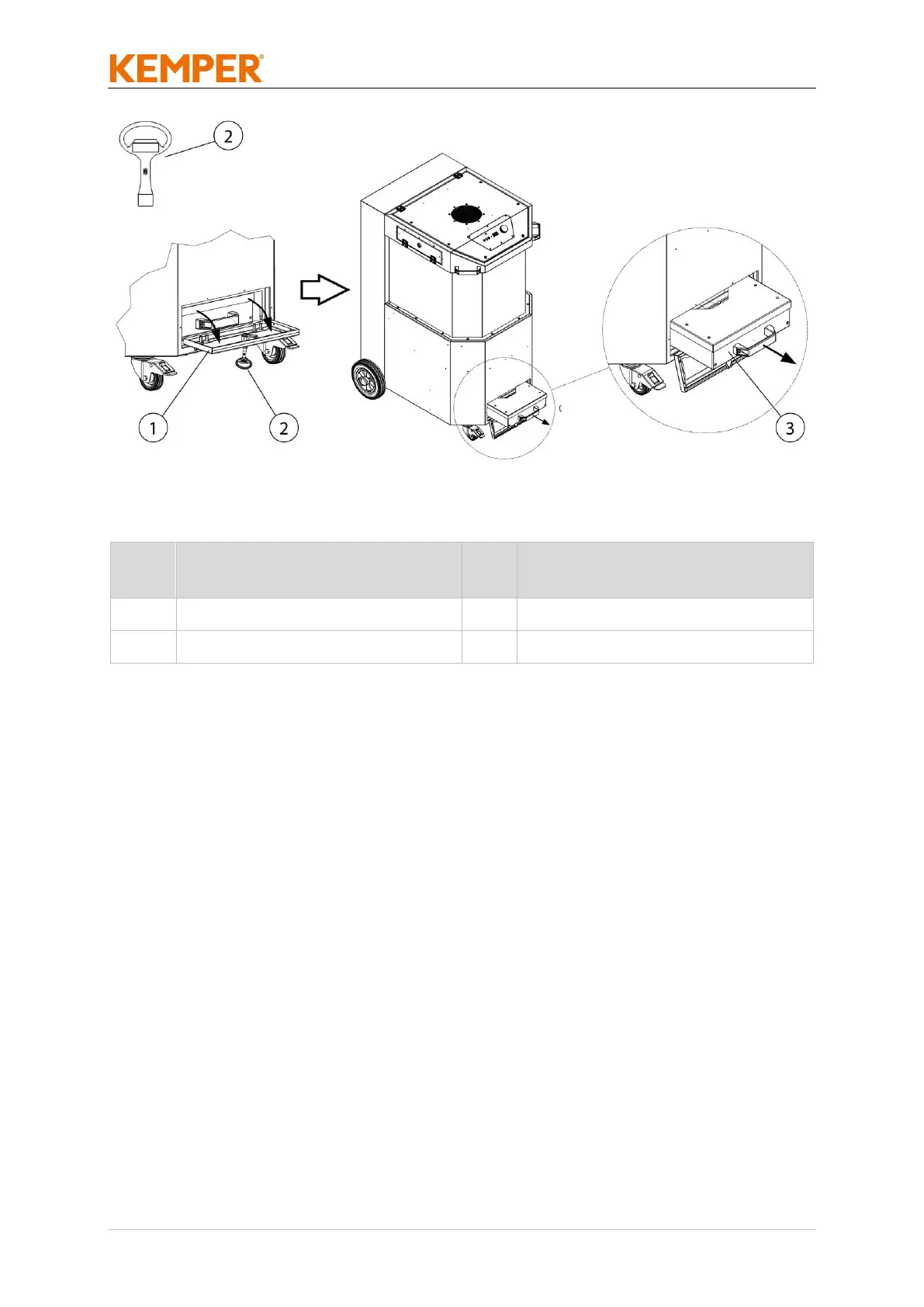
Fig. 30: Maintenance – Access to the dust collection container
Item
Description
Ite
m
Description
1
Maintenance cover
3
Dust collection container
2
Square socket wrench
Tab. 32: Maintenance – Access to the dust collection container
When emptying the dust collection container, please proceed as follows:
1. Switch off the product at the rotary switch.
2. Disconnect the product from the power supply by unplugging.
3. Open the maintenance cover (Pos. 1) with the square socket wrench
(Pos. 2) as shown in the illustration.
4. Carefully pull the dust collection container (Pos. 3) out of the product.

Table of Contents