EasyManua.ls Logo

Kemper WeldFil Compact - User Manual

Default Icon
204 pages
Go to English
Print Icon
To Next Page IconTo Next Page
Loading...
WeldFil Compact
DE Betriebsanleitung (Original)
EN Operating Manual

Table of Contents

Question and Answer IconNeed help?

Do you have a question about the Kemper WeldFil Compact and is the answer not in the manual?

Summary

General Information and Company Notes

Introduction to the Operating Manual

Manual is an essential aid for proper and safe operation of the product.

Copyright and Intellectual Property Rights

Operating Instructions should be kept confidential and protected by copyright.

Notes for the Operating Company

Operating company must ensure personnel are aware of manual and national regulations.

Safety Guidelines and Hazard Awareness

General Safety Information

Product is designed to state-of-the-art technology and safety rules.

Understanding Safety Signs and Symbols

Explains DANGER, WARNING, CAUTION, and NOTE symbols.

Mandatory Markings and Signs

Obligation to post markings and signs on product and surrounding area.

Safety Instructions for Operating Staff

Operator must be instructed and trained; product used as intended.

Maintenance and Troubleshooting Safety

Service and maintenance doors accessible; work when product is switched off.

Special Hazard Warnings

Health hazards from welding fume particles, danger of electric shock.

Product Details and Specifications

Functional Description of the Filter System

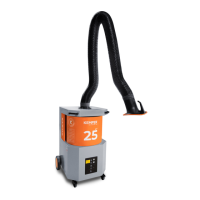
Compact filter system extracts and filters air containing pollutants.

Extraction Capacity Regulation Functionality

System keeps extraction capacity constant, offering efficiency and health benefits.

W3;IFA Certification Distinction

Product manufactured in non-IFA and IFA certified versions for fume separation.

Indoor vs. Outdoor Version Differences

Product available as indoor or optional outdoor version.

Cloud Connectivity Feature

Products with cloud connection allow software updates and real-time parameter querying.

Intended Use of the Product

Product extracts and filters welding fumes from electric welding at source.

Requirements for DIN EN ISO 21904

Requirements for ducting systems, extraction arms, and hoses.

Foreseeable Misuse and Prohibitions

Prohibits operation in non-explosion-proof areas or with incompatible extracted air.

Product Markings and Signage

Markings on product must be replaced if damaged; operating company to post additional signs.

Understanding Residual Risks

Awareness of residual risks like serious injury to lungs and respiratory tract.

Handling: Transport, Storage, and Assembly

Safe Transport Procedures

Life-threatening crushing possible; use suitable pallet truck or forklift.

Storage Recommendations

Store in original packaging at ambient temperature in a dry, clean place.

Storage Period Considerations for Belt Drives

For storage > 6 months, slacken belt drive for fan bearings.

Product Assembly Instructions

Instructions for safe installation, requiring specialists and proper equipment.

Connecting the Product System

Connect compressed air supply, power supply, and ensure correct settings.

Connecting the Outdoor Version

Outdoor version installation requires placing compressed air maintenance unit in a frost-proof space.

Mounting the Suction Power Control Case

Instructions for mounting the suction power control case onto the product.

Wall Mounting for Suction Power Control

Instructions for mounting the suction power control case onto a wall.

Column Mounting for Suction Power Control

Instructions for mounting the suction power control case onto a column.

Understanding Wiring Diagrams

Ensure correct pre-fusing and cable cross-section for mains supply connection.

Product with Plug Connection

Product is ready to plug in and operate immediately.

Product with Connection Terminals

Selection of mains supply connection cable based on rated current.

Product Operation and Control

Operator Qualification and Training

Only commission trained personnel to use the product independently.

Operating Control and Monitoring Technology

Overview of the product's touchscreen interface and operating elements.

Accessing Operating Data

Displays current device data and measured product values.

Accessing Technical Data

Displays product technical data and system information for service requests.

Configuring Technical Settings

Allows display and setting of operating parameters like fan run-on time.

Querying Product Accessories

Information on installed or optionally available accessories.

Querying Spare Parts Information

Query necessary spare parts numbers via the spare parts menu.

Language Selection Menu

Allows selection of the display language using national flags.

Navigating the Maintenance Menu

Displays next maintenance date and date of last maintenance performed.

Setting System Parameters

Allows modification of parameters like fan run-on time and cleaning cycles.

Calibrating the Control Display

Recalibrate touchscreen if operation becomes inaccurate.

Understanding Operating Error Messages

Distinguishes critical errors, warnings, and displays error messages with red background.

Frequency Converter Error Messages

Displays error messages specific to the frequency converter.

System Warnings and Notifications

Notifies system operator of non-critical conditions or pending maintenance.

Setting Extraction Capacity Regulation

Automatically controls fan speed for constant extraction capacity.

Commissioning the Product

Steps for commissioning the product after installation.

Product Maintenance and Troubleshooting

Product Care and Cleaning

Product cleaning and checking filter inserts; do not clean with compressed air.

General Maintenance Procedures

General maintenance guidelines and notes on IFA approval.

Emptying the Dust Collection Container

Instructions for emptying the dust collection container, including safety warnings.

Filter Changing Safety Instructions

Filter life depends on deposited particles; health hazards from welding fumes.

Replacing Extraction Capacity Filter Mats

Check and replace pre-filter mat monthly or as needed.

Replacing Safety Filter for Dust Container

Check and replace safety filter weekly or if soiled.

Replacing Main Filter Cartridges

Steps for replacing main filter cartridges, requiring disconnection and securing.

Draining Compressed Air Vessel Condensate

Condensate must be drained monthly from the compressed air vessel.

Draining Compressed Air Maintenance Unit Condensate

Condensate must be drained weekly from the compressed air maintenance unit.

Fan Belt Drive Replacement and Tensioning

Check belt tension and alignment after 10 fan starts, then every 1600 hours.

Lubricating Fan Bearings

Lubricate fan bearings at regular intervals or if a lubrication nipple is fitted.

Checking Compressed Air Container Safety Valve

Compressed air containers and safety valves must be serviced per national regulations.

Accessing Compressed Air Vessels and Valves

Steps to access compressed air vessels and safety valves by removing cover plates.

Maintenance Schedule Overview

Schedule for activities like emptying dust container and draining condensate.

Maintenance Logbook Requirements

Logbook for recording maintenance activities, required for customer complaints.

Troubleshooting Common Faults

Identifies faults, causes, and suggested solutions.

Switching Off the Signal Horn

How to switch off the signal horn and associated error messages.

Emergency Measures in Case of Fire

Steps to take in case of fire, including disconnecting power and using extinguisher.

Product Disposal and Technical Annexes

Disposal Guidelines for Plastics

Plastics must be sorted and disposed of according to legal requirements.

Disposal Guidelines for Metals

Metals must be separated and disposed of by an authorized company.

Disposal Guidelines for Filter Elements

Filter elements must be disposed of in compliance with legal requirements.

EC Compliance Statement

Declaration of conformity with EC directives and harmonized standards.

UKCA Declaration of Conformity

Declaration of conformity with UKCA directives and designated standards.

Detailed Technical Data

Detailed technical specifications for different product models.

Product Dimension Sheets

Diagrams and tables showing product dimensions for various models.

Spare Parts and Accessories List

List of spare parts and accessories with item numbers and applicable models.

Summary

General Information and Company Notes

Introduction to the Operating Manual

Manual is an essential aid for proper and safe operation of the product.

Copyright and Intellectual Property Rights

Operating Instructions should be kept confidential and protected by copyright.

Notes for the Operating Company

Operating company must ensure personnel are aware of manual and national regulations.

Safety Guidelines and Hazard Awareness

General Safety Information

Product is designed to state-of-the-art technology and safety rules.

Understanding Safety Signs and Symbols

Explains DANGER, WARNING, CAUTION, and NOTE symbols.

Mandatory Markings and Signs

Obligation to post markings and signs on product and surrounding area.

Safety Instructions for Operating Staff

Operator must be instructed and trained; product used as intended.

Maintenance and Troubleshooting Safety

Service and maintenance doors accessible; work when product is switched off.

Special Hazard Warnings

Health hazards from welding fume particles, danger of electric shock.

Product Details and Specifications

Functional Description of the Filter System

Compact filter system extracts and filters air containing pollutants.

Extraction Capacity Regulation Functionality

System keeps extraction capacity constant, offering efficiency and health benefits.

W3;IFA Certification Distinction

Product manufactured in non-IFA and IFA certified versions for fume separation.

Indoor vs. Outdoor Version Differences

Product available as indoor or optional outdoor version.

Cloud Connectivity Feature

Products with cloud connection allow software updates and real-time parameter querying.

Intended Use of the Product

Product extracts and filters welding fumes from electric welding at source.

Requirements for DIN EN ISO 21904

Requirements for ducting systems, extraction arms, and hoses.

Foreseeable Misuse and Prohibitions

Prohibits operation in non-explosion-proof areas or with incompatible extracted air.

Product Markings and Signage

Markings on product must be replaced if damaged; operating company to post additional signs.

Understanding Residual Risks

Awareness of residual risks like serious injury to lungs and respiratory tract.

Handling: Transport, Storage, and Assembly

Safe Transport Procedures

Life-threatening crushing possible; use suitable pallet truck or forklift.

Storage Recommendations

Store in original packaging at ambient temperature in a dry, clean place.

Storage Period Considerations for Belt Drives

For storage > 6 months, slacken belt drive for fan bearings.

Product Assembly Instructions

Instructions for safe installation, requiring specialists and proper equipment.

Connecting the Product System

Connect compressed air supply, power supply, and ensure correct settings.

Connecting the Outdoor Version

Outdoor version installation requires placing compressed air maintenance unit in a frost-proof space.

Mounting the Suction Power Control Case

Instructions for mounting the suction power control case onto the product.

Wall Mounting for Suction Power Control

Instructions for mounting the suction power control case onto a wall.

Column Mounting for Suction Power Control

Instructions for mounting the suction power control case onto a column.

Understanding Wiring Diagrams

Ensure correct pre-fusing and cable cross-section for mains supply connection.

Product with Plug Connection

Product is ready to plug in and operate immediately.

Product with Connection Terminals

Selection of mains supply connection cable based on rated current.

Product Operation and Control

Operator Qualification and Training

Only commission trained personnel to use the product independently.

Operating Control and Monitoring Technology

Overview of the product's touchscreen interface and operating elements.

Accessing Operating Data

Displays current device data and measured product values.

Accessing Technical Data

Displays product technical data and system information for service requests.

Configuring Technical Settings

Allows display and setting of operating parameters like fan run-on time.

Querying Product Accessories

Information on installed or optionally available accessories.

Querying Spare Parts Information

Query necessary spare parts numbers via the spare parts menu.

Language Selection Menu

Allows selection of the display language using national flags.

Navigating the Maintenance Menu

Displays next maintenance date and date of last maintenance performed.

Setting System Parameters

Allows modification of parameters like fan run-on time and cleaning cycles.

Calibrating the Control Display

Recalibrate touchscreen if operation becomes inaccurate.

Understanding Operating Error Messages

Distinguishes critical errors, warnings, and displays error messages with red background.

Frequency Converter Error Messages

Displays error messages specific to the frequency converter.

System Warnings and Notifications

Notifies system operator of non-critical conditions or pending maintenance.

Setting Extraction Capacity Regulation

Automatically controls fan speed for constant extraction capacity.

Commissioning the Product

Steps for commissioning the product after installation.

Product Maintenance and Troubleshooting

Product Care and Cleaning

Product cleaning and checking filter inserts; do not clean with compressed air.

General Maintenance Procedures

General maintenance guidelines and notes on IFA approval.

Emptying the Dust Collection Container

Instructions for emptying the dust collection container, including safety warnings.

Filter Changing Safety Instructions

Filter life depends on deposited particles; health hazards from welding fumes.

Replacing Extraction Capacity Filter Mats

Check and replace pre-filter mat monthly or as needed.

Replacing Safety Filter for Dust Container

Check and replace safety filter weekly or if soiled.

Replacing Main Filter Cartridges

Steps for replacing main filter cartridges, requiring disconnection and securing.

Draining Compressed Air Vessel Condensate

Condensate must be drained monthly from the compressed air vessel.

Draining Compressed Air Maintenance Unit Condensate

Condensate must be drained weekly from the compressed air maintenance unit.

Fan Belt Drive Replacement and Tensioning

Check belt tension and alignment after 10 fan starts, then every 1600 hours.

Lubricating Fan Bearings

Lubricate fan bearings at regular intervals or if a lubrication nipple is fitted.

Checking Compressed Air Container Safety Valve

Compressed air containers and safety valves must be serviced per national regulations.

Accessing Compressed Air Vessels and Valves

Steps to access compressed air vessels and safety valves by removing cover plates.

Maintenance Schedule Overview

Schedule for activities like emptying dust container and draining condensate.

Maintenance Logbook Requirements

Logbook for recording maintenance activities, required for customer complaints.

Troubleshooting Common Faults

Identifies faults, causes, and suggested solutions.

Switching Off the Signal Horn

How to switch off the signal horn and associated error messages.

Emergency Measures in Case of Fire

Steps to take in case of fire, including disconnecting power and using extinguisher.

Product Disposal and Technical Annexes

Disposal Guidelines for Plastics

Plastics must be sorted and disposed of according to legal requirements.

Disposal Guidelines for Metals

Metals must be separated and disposed of by an authorized company.

Disposal Guidelines for Filter Elements

Filter elements must be disposed of in compliance with legal requirements.

EC Compliance Statement

Declaration of conformity with EC directives and harmonized standards.

UKCA Declaration of Conformity

Declaration of conformity with UKCA directives and designated standards.

Detailed Technical Data

Detailed technical specifications for different product models.

Product Dimension Sheets

Diagrams and tables showing product dimensions for various models.

Spare Parts and Accessories List

List of spare parts and accessories with item numbers and applicable models.

Kemper WeldFil Compact Specifications

General IconGeneral
BrandKemper
ModelWeldFil Compact
CategoryWelding Accessories
LanguageEnglish

Related product manuals